
Описание
# WildRTP
- CIRCLE & SQUARE Shapes
- Adjust teleport settings
- Multi Worlds Support
- Cooldown
- MoveTimer
- CustomRTP
- AutoRTP
### Please let me know if you have any issues
## Commands
- /wild - Teleport to a random location
Aliases: [/rtp /randomtp /randomteleport /wildrtp]
- /wild reload - Reloads the config
- /wild info - Display plugin information
- /wild updates - Checks for plugin updates
- /wild help - Display help message
- /customrtp [params...]
- /customrtp
- /customrtp
Note **** are **required arguments**, **[]** are only **optional arguments** and can be omitted.
%player% is a placeholder for the player that executed the command (only in /customrtp).
## Integrations
- WorldGuard
- ProtectionStones
- Towny
- Residence
- GriefDefender
- GriefPrevention (soon)
- Lands (soon)
- Vault (soon)
## Addons
- [WildRTP GUI](https://modrinth.com/plugin/wildrtp-gui)
- WildRTP Fights (coming soon)
## Config
Show config
```
# __ ___ _ _ _____ _______ _____
# \ \ / (_) | | | __ \__ __| __ \
# \ \ /\ / / _| | __| | |__) | | | | |__) |
# \ \/ \/ / | | |/ _` | _ / | | | ___/
# \ /\ / | | | (_| | | \ \ | | | |
# \/ \/ |_|_|\__,_|_| \_\ |_| |_|
#
# by Joni - Thank you for using this plugin
# Language setting
# Available: [en, de, ru]
# You can add/edit languages in the plugin folder (/lang)
lang: "en"
# Global RTP settings
# This section defines the main settings for random teleportation
# Custom settings per world can be defined in the custom section
global:
# Min & max teleportation range
min: 1000
max: 2500
# Shape of the teleportation area [CIRCLE/SQUARE]
shape: CIRCLE
# Teleportation center
center:
player: false # If true, teleportation is centered on the player; x and z will be ignored
x: 0 # X coordinate of center
z: 0 # Z coordinate of center
# Cooldown settings
cooldown:
enabled: true # Enable cooldown between RTP uses
time: 5 # Cooldown time in seconds
# Move timer settings
movetimer:
enabled: true # If true, no movement allowed before teleportation
time: 5 # Time in seconds
sound-canceled: ENTITY_VILLAGER_NO # Set to 'false' to disable.
# Message settings
messages:
start: false # Show message when RTP starts
end: true # Show message when RTP ends
# Title messages displayed when RTP starts/ends
titles:
start:
enabled: false
fadeIn: 0.5
stay: 2
fadeOut: 0.5
end:
enabled: true
fadeIn: 0.5
stay: 2
fadeOut: 0.5
# Sound settings
sound:
start: false # Play a sound when teleport starts. Set to 'false' to disable.
end: ENTITY_PLAYER_LEVELUP # Use any valid Bukkit Sound enum, e.g., ENTITY_PLAYER_LEVELUP.
# Effect settings
effects:
start: # Give an effect when teleport starts.
type: false # Set to 'false' to disable. Use any valid Bukkit PotionEffectType enum, e.g., "BLINDNESS".
time: 1 # Duration in seconds for the effect to last.
end:
type: false
time: 1
# Blocks to avoid when teleporting
# Use LEAVES to disable all teleports in leaves.
blocks:
- LAVA
- WATER
- AIR
# Y-limits for teleporting
# null = no limit
y-min: null
y-max: null
# Biomes to avoid when teleporting
# Example: biomes: [OCEAN, DESERT, PLAINS, FOREST, TAIGA, MUSHROOM_FIELDS, JUNGLE]
# Set to '[]' to disable.
biomes: [ ]
# Teleport to another world
# If set to a valid world name, players will be teleported to that world instead of their current one.
# Set to 'false' to teleport within the same world.
tp-in-other-world: false
# If true, the player's individual spawn point will be set to the new location upon teleporting.
# Set to 'false' to disable.
set-spawnpoint: false
# Custom teleportation command to execute before/after teleporting.
# %player% = player name
# %x%, %y%, %z% = teleportation coordinates
# Example: start: [ "say %player% is teleporting to %x%, %y%, %z%", "give %player% minecraft:ender_pearl 1" ]
custom-command:
start: [ ]
end: [ ]
# RTP generation strategy used to determine how safe locations are found.
# This controls the algorithm used to pick valid teleport positions.
#
# Available strategies:
# AUTO - Automatically chooses the best strategy based on the world environment.
# HIGHEST_BLOCK - Uses the highest non-air block. Extremely fast. Perfect for normal Overworld and The End.
# BOTTOM_UP - Scans from minY upwards for a solid block with space above it. Essential for the Nether or Cave worlds.
# TOP_DOWN - Scans from maxY downward.
#
# Recommended: AUTO (handles most worlds correctly without configuration)
strategy: AUTO
# Auto-RTP settings
# Should the plugin teleport players automatically?
auto-rtp:
onfirstjoin: false # When a player first joins the server
onjoin: false # Every time a player joins the server
ondeath:
enabled: false # After a player dies
prioritize-bed: false # If true, players will be teleported to their bed spawn point if they have one set.
# List mode: use 'blacklist' or 'whitelist'
list: blacklist
# Set to '[]' to disable the blacklist.
# Add blocked worlds here
blacklist: [ ]
# Set to '[]' to disable the whitelist.
# Add allowed worlds here
whitelist: [ ]
# Uncomment and modify to customize settings for specific worlds
# YOU CAN remove any fields you don’t want to customize,
# BUT missing values will be set to the global values
# (e.g. max in global is 2500 and if not set here it will be 2500 as well)
# To enable, remove { } and add your worlds below:
# A short example is shown below:
custom: { }
# my_custom_world:
# min: 500
# max: 1500
# cooldown:
# time: 30
# biomes: [OCEAN, DESERT]
# Maximum attempts to find a safe location before failing
max-tries: 25
# If you want to change the prefix, you can do it here
prefix: "&8[&2WildRTP&8] &6"
# Hook settings for third-party plugins
hooks:
worldguard: false
protectionstones: false
towny: false
residence: false
griefdefender: false
griefprevention: false
lands: false
vault:
enabled: false
settings:
pay-by-distance:
enabled: false
price-per-block: 0.01
pay-by-teleport:
enabled: false
price: 5.0
# Check for updates
check-updates: true
# Notify admins about plugin updates when they join
notify-updates-on-join: true
# If I am allowed to collect anonymous data about your server and this plugin. So I can see how many servers are using this plugin :)
# And you can see the data as well here https://bstats.org/plugin/bukkit/WildRTP/17799
metrics: true
# Advanced settings
force-close-inventories: true
per-world-cooldowns: false
prevent-spam: true # Block multiple searches while one is in progress
# Debug mode
debug: false
# Config version (do not change)
config-version: 18
```
## Permissions
- wildrtp.rtp - Allows you to run /wild - Default
- wildrtp.reload - Allows you to run /wild reload
- wildrtp.updates - Allows you to run /wild updates
- wildrtp.custom - Allows you to run /customrtp
- wildrtp.cooldown.bypass - Bypass the cooldown, if enabled
- wildrtp.movetimer.bypass - Bypass the movetimer, if enabled
- wildrtp.list.bypass - Bypass the list of disallowed worlds
- wildrtp.list.bypass.world_name - Bypass a specific world from the list of disallowed worlds (blacklist or whitelist, whichever is enabled)
- wildrtp.help - Allows you to run /wild help
- wildrtp.admin - Grants all WildRTP permissions
## Placeholders
To view both internal **placeholders** and **external placeholders**, please visit the [wiki](https://github.com/LasaJoniHD/WildRTP/wiki/Placeholders).
## Performance
Using async chunk loading on paper servers should have no impact on the performance besides the time it takes to load or generate a chunk async. You can use [Chunky](https://modrinth.com/plugin/chunky) to pre-generate chunks, which makes the teleporting a bit faster.
## Need help?
If you need any help, I'd be delighted to help you – just join my Discord support server. If you have found a bug or a feature you would like to request, please get in touch – I can't wait to hear from you!
## bStats
[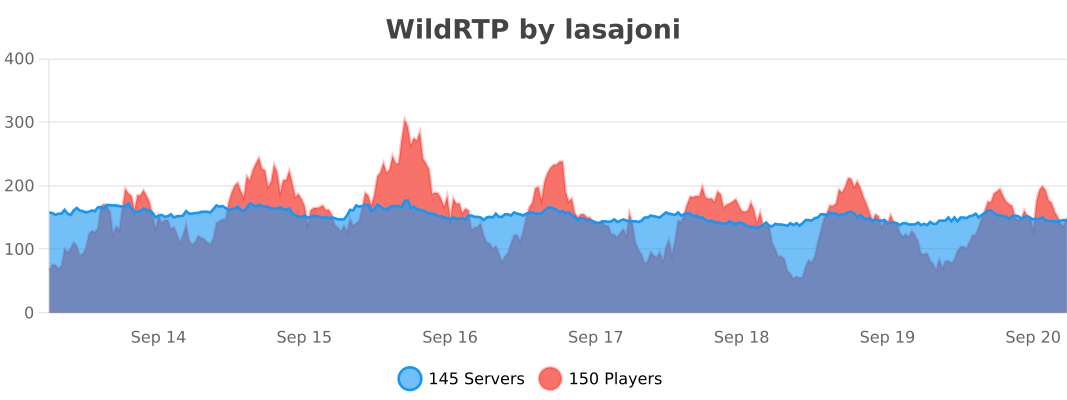](https://bstats.org/plugin/bukkit/WildRTP/17799)