
Описание
# WhatIsInThatShelf (WIITS)
> **Never wonder what's sitting on that shelf again.**
**WhatIsInThatShelf** is a lightweight utility mod that adds a clean, highly houses-configurable HUD tooltip for Shelf blocks. Instead of opening an inventory to check your items, simply look at a shelf to see exactly what is inside.
---
## ✨ Primary Features
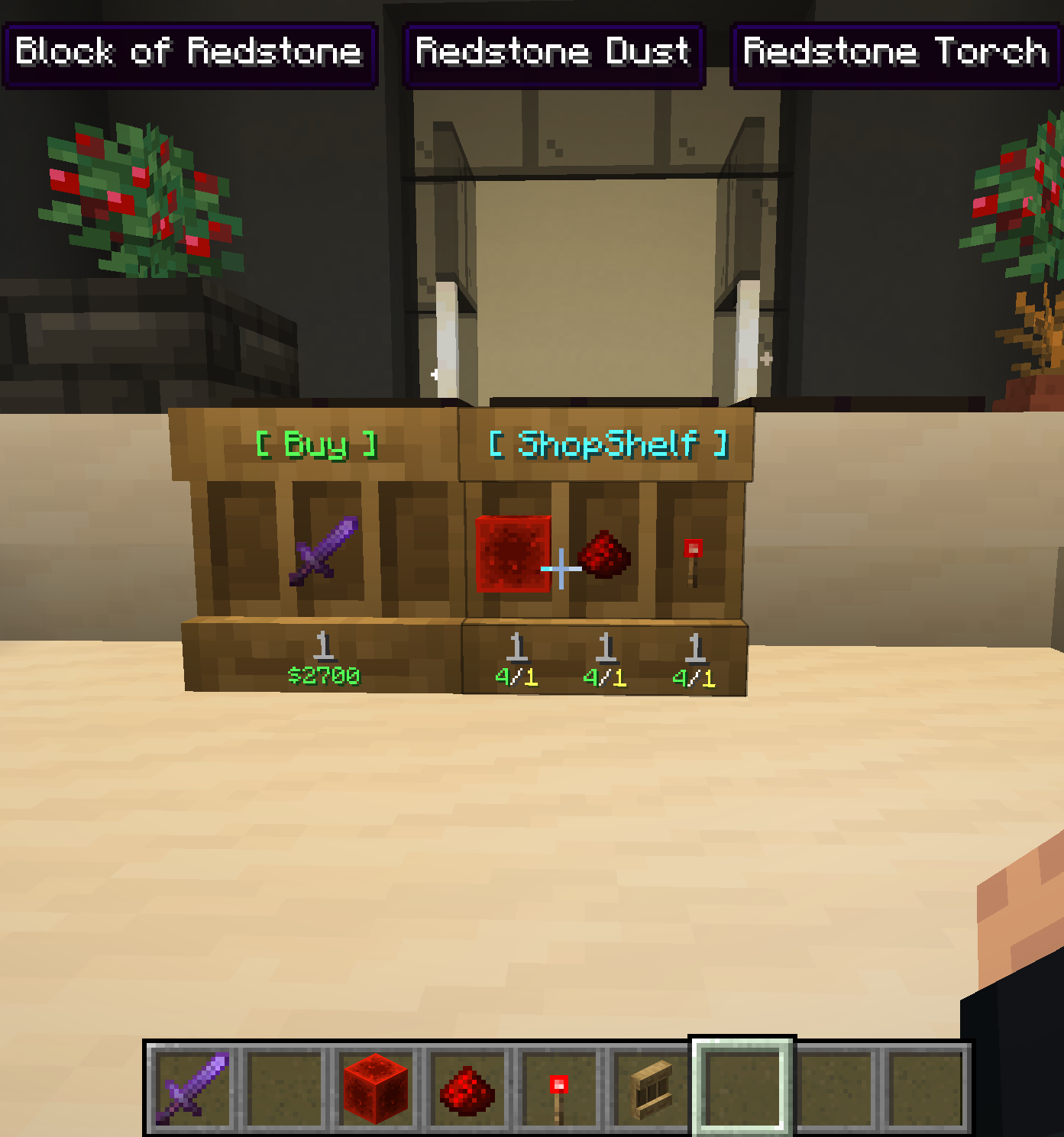
### 📦 Smart Item Detection
When looking at a shelf, the mod identifies the specific slot your crosshair is targeting and displays its contents instantly.
* **Triple Mode:** If you prefer to see everything at once, you can enable Triple Mode in the settings. This displays all three shelf slots simultaneously.
* **Adjustable Spacing:** You can use the "Gap" slider to fine-tune the distance between these three tooltips, whether they are stacked vertically or spread horizontally.
### 🛠️ Live Configuration
Forget about restarting your game to change settings. Pressing **"I"** (the default, rebindable key) opens a specialized settings screen.
* **Visual Feedback:** Because the settings menu can be used while looking at a shelf, you can see HUD changes in real-time as you toggle options or move sliders.
* **Dynamic Scaling:** The "Scale" slider (0.25x to 3.0x) allows you to resize the tooltip based on your preference.
* **Config Folder Access:** A dedicated button in the menu opens your configuration folder instantly, making manual edits easy.
### 📍 Intelligent Positioning
The HUD includes six anchor points: Top Left, Middle, and Right, and Bottom Left, Middle, and Right.
* **Chat Awareness:** If you use a Bottom position, the tooltip will automatically jump to the Top whenever you open the chat bar so it doesn't block your typing.
* **XP Bar Safety:** The Bottom-Middle position is pre-configured with a specific margin to sit safely above your experience bar and hotbar.
---
## 🎨 Content & Style
You have total control over what information is displayed on the HUD:
* **Data Toggles:** Choose to show or hide item attributes, potion effects, mod names, and advanced technical info.
* **Amount Formatting:** Display item counts in seven different positions, such as above the name, after the name, or even relative to the item lore.
* **Color Overrides:** The mod supports custom Hex codes (`&#RRGGBB`), Minecraft color codes (`&6`), and named colors for mod names, attributes, and more.
* **Transparency Mode:** You can toggle the background box on or off to create a floating text effect for a more minimal UI.
---
## ⚙️ Compatibility & Requirements
* **WTHIT Integration:** Built-in compatibility prevents overlapping tooltips. WIITS tells WTHIT to hide its default block tooltip when looking at a shelf so only the item info is visible.
* **Requirements:** Requires **Minecraft 1.21.x**, **Fabric Loader**, and **Fabric API**.