
Описание
# Visbarrier
Toggle barrier block visibility in Minecraft Forge 1.8 - 1.12 with better performance
Uses better rendering methods:
* Seamless rendering
* Connected Textures
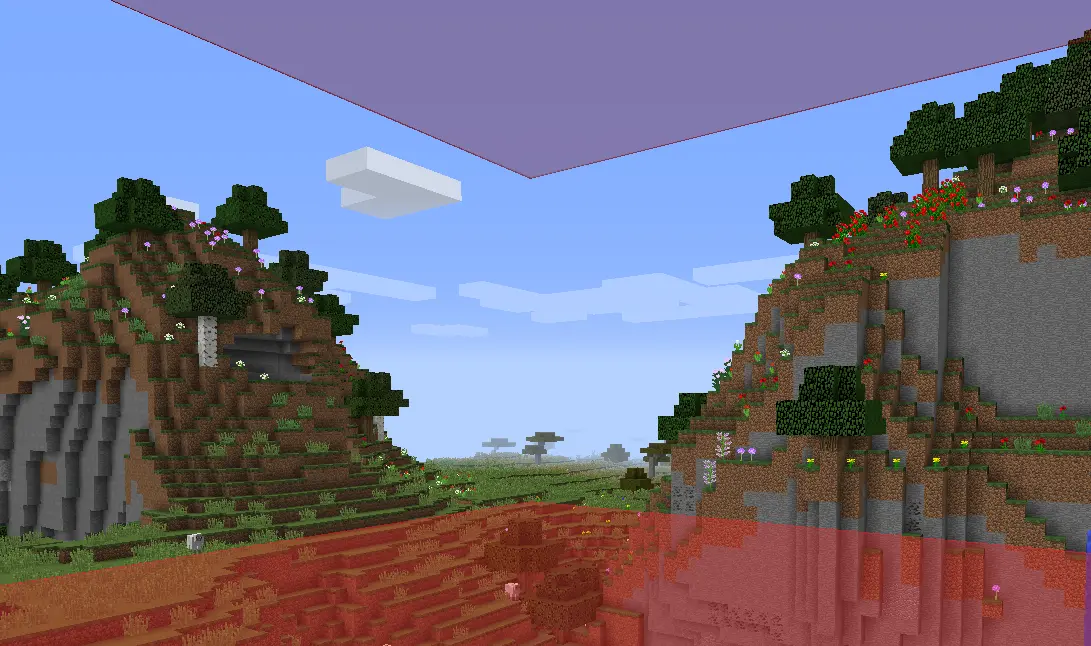
Note: Did not really test for 1.9 - 1.11 so let me know if it works well. I know 1.8.9 works great and 1.12.2 doesn't have connected textures right now
## Features
- Optimized Rendering
- Keybind Toggle
- Connected Textures
- Optional Chat Notifications
- Resource Pack Compatible
## Usage
**Press `B`** to toggle barrier visibility on/off
*(Rebind in Options → Controls → Visbarrier)*
You'll see a chat notification confirming the toggle:
| Barriers ON | Barriers OFF |
|-------------|--------------|
|  |  |
## Commands
Mod settings in `/visbarrier` commands
| Command | Alias | Effect |
|---------|-------|--------|
| `/visbarrier connect` | `/visbarrier ct` | Toggle connected textures on/off |
| `/visbarrier notify` | `/visbarrier n` | Toggle keybind chat notifications on/off |
## Customization
Override the barrier appearance with a resource pack:
- **Texture**: `assets/minecraft/textures/blocks/barrier.png`
- **Model**: `assets/minecraft/models/block/barrier.json`
If a resource pack provides its own barrier texture, Visbarrier's connected textures are automatically bypassed so the resource pack renders as intended.
## TODO
- Maybe fix 1.12.2 connected textures but honestly I don't know who uses it
- Also let me know if other versions broken and maybe I'll fix it maybe I won't :)
---
## Credits
v2 is originally forked from [Diabet/olvend's barrier mod](https://github.com/olvend/VisibleBarriers) (MIT License)