
Описание
[](https://modrinth.com/mod/utools)
[](https://fabricmc.net/)
[](https://creativecommons.org/licenses/by-nc/4.0/)
[](https://github.com/lugosieben/utools/releases/latest)
[](https://github.com/lugosieben/utools/commits/)
_Simple tools for the survival experience. This should act as a replacement to having tons of mods for things like Fullbright, Zoom etc._
# Features
## Short Overview
- Fullbright / Custom Gamma / Night Vision
- Fully configurable Zoom
- Light Overlay
- Client Side Time & Weather
- Unpin all texture packs (Forced Server Resource Pack Bypass)
- Auto-Copy Screenshots
- Hide Pumpkin Overlay
- Lower Fire & Shield (Customizable)
- Show Map in Boat while moving
- Smaller totems
- Hide other players
- Show Barrier blocks
- Turn off different types of Fog individually or all together
- Auto-Attack
- Keep Mining when switching Tools (fixes annoying quartz mining with a mending tool)
## Fullbright / Gamma / Night Vision

Change your Gamma above the normal limits. The intended usage is to get Fullbright, but the Gamma can also be changed to a low value.
If you're using shaders, you should use Night Vision instead of custom gamma.
#### Usage
Use `/fullbright` or the `Toggle Fullbright` keybinding to switch between 1500% (Max) or 100% (Default) gamma.
Use `/fullbright [value]` to change your gamma to any positive value.!
Use the `Toggle Nightvision` keybinding to toggle the clientside night vision effect.
You can toggle the normal / fullbright Gamma values in the settings (Accessible via [ModMenu](https://modrinth.com/mod/modmenu))
## Zoom
Zoom in (and out) with a simple hotkey. You can choose between easings or use an instant zoom for zoom-ins and zoom-outs individually.
#### Usage
Hold the `Zoom` keybinding to switch into zoom mode.
Visit the config to view all settings. (There are many)
## Light Overlay

Display the light levels of nearby blocks in real-time. Useful to spawn-proof with torches.
#### Usage
Use the `Toggle Light Overlay` keybinding to toggle on or off.
You can set the threshold for a green texture in the settings under `Light Overlay Threshold`.
## Client Time & Client Weather
Change your local time to `DAY,NOON,NIGHT,MIDNIGHT` and disable rain. This also works on servers since it is only client side.
#### Usage
You can change the time and weather in the settings (`/utools config` or in ModMenu).
Alternatively you can change the time with `/clienttime set day|noon|night|midnight` and reset with `/clienttime reset`.
## Unpin Texture Packs
This allows you to unpin all texture packs. Doing so, you can move all texture packs independent of their intended order. This is especially useful when a server forces a resource pack which you don't want. To bypass, you can just move the server pack to the bottom, below the default textures since it is no longer pinned.
#### Usage
The setting to unpin all packs is located in the settings (`/utools config` or via ModMenu)
## Copy Screenshots
When taking screenshots, the images will be automatically copied to the clipboard.
#### Usage
Toggleable in the settings
## Several Visual Modifications
- Hide the pumpkin on head overlay
- Lower fire overlay (customizable)
- Lower shield (customizable)
- Show map in boat while moving
- Smaller totem in hand / in pop animation
- Show barrier blocks
#### Usage
Toggle / Customize in the config under the category `Visual Modifications`
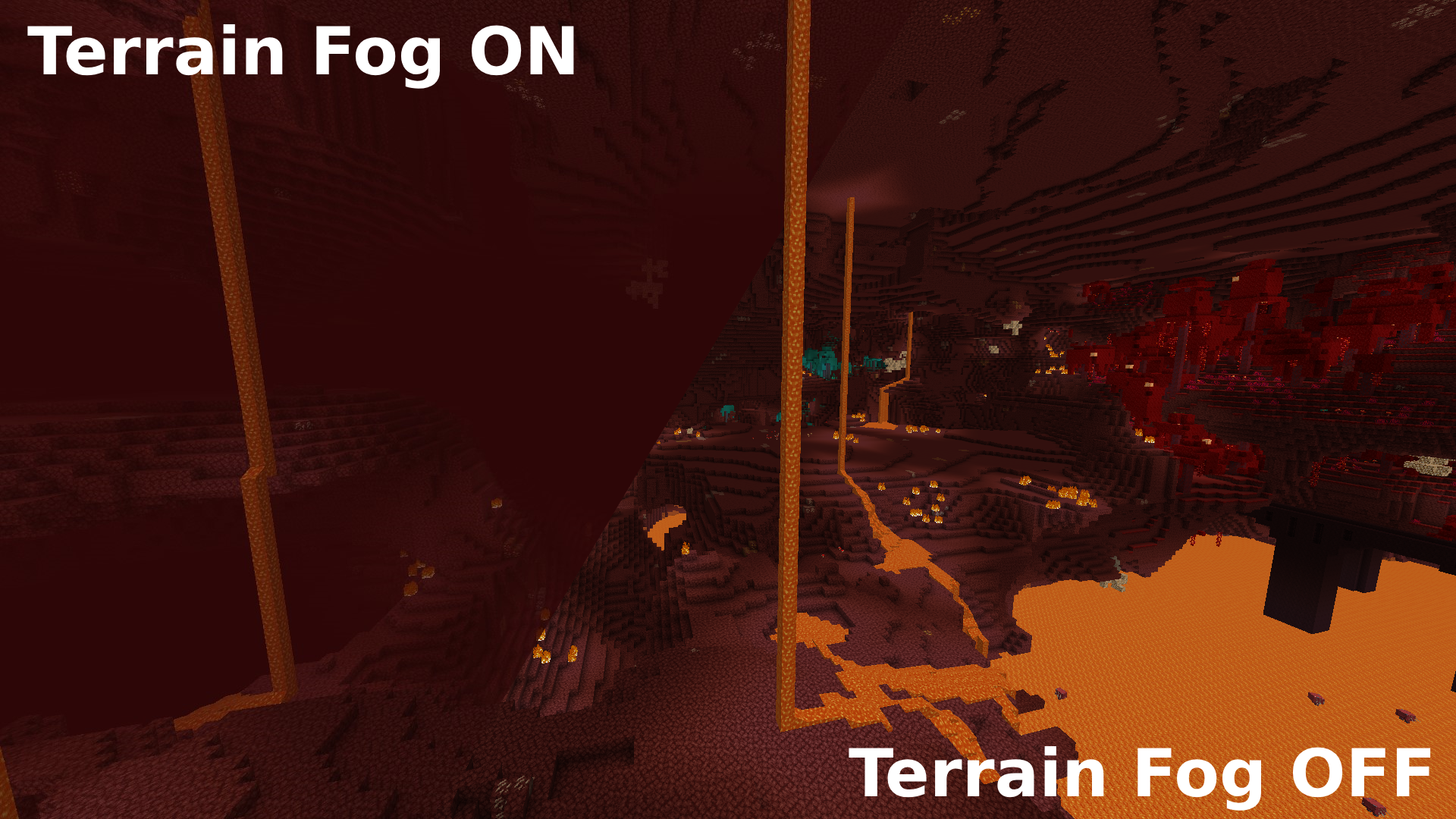
## Custom Fog
Allows you to enable / disable ALL types of fogs. See comparison in the nether for Terrain Fog below
#### Usage
See all fog types in config under `Fog` category. Turn them off to your likings.
**Caution**: Disabling fogs, especially darkness, blindness, lava and water fogs could be considered cheating or an unfair advantage by some players or server administrators.
## Auto-Attack
Automatically clicks the attack button when your hit cooldown has finished.
#### Usage
Press the `Toogle Autoattack` keybinding to toggle on/off.
## Hide other players
Allows you to hide all other players with a keybinding.
#### Usage
Press the `Toggle Hiding other Players` keybinding to toggle.
## Keep Mining when switching tools
Allows you to keep your Mining progress on your block when switching tool / getting mended.
Fixes annoying restart of block breaking everytime you break a quartz ore with mending.
#### Usage
Toggleable in the settings
# Translations
`en_en` English: [@lugosieben](https://github.com/lugosieben) (Must be updated with any new feature!)
`de_de` German: [@Kolpixx](https://github.com/Kolpixx) & [@lugosieben](https://github.com/lugosieben)
`es_es` Spanish: [@lugosieben](https://github.com/lugosieben)
# License
This project is licensed under [Creative Commons Attribution-NonCommercial 4.0 International](https://creativecommons.org/licenses/by-nc/4.0/deed.en).