
Описание
**Underlay** is a Minecraft mod that lets you place carpets (and anything else) under any block with space beneath it (e.g. chests, beds, signs, torches, etc.)!
Just **right click a block face with a block to place it**, (for example, under an upside-down stair), and you're done! Right click again with another item to replace it quickly, or left click it to remove it. Works in **Survival** too!
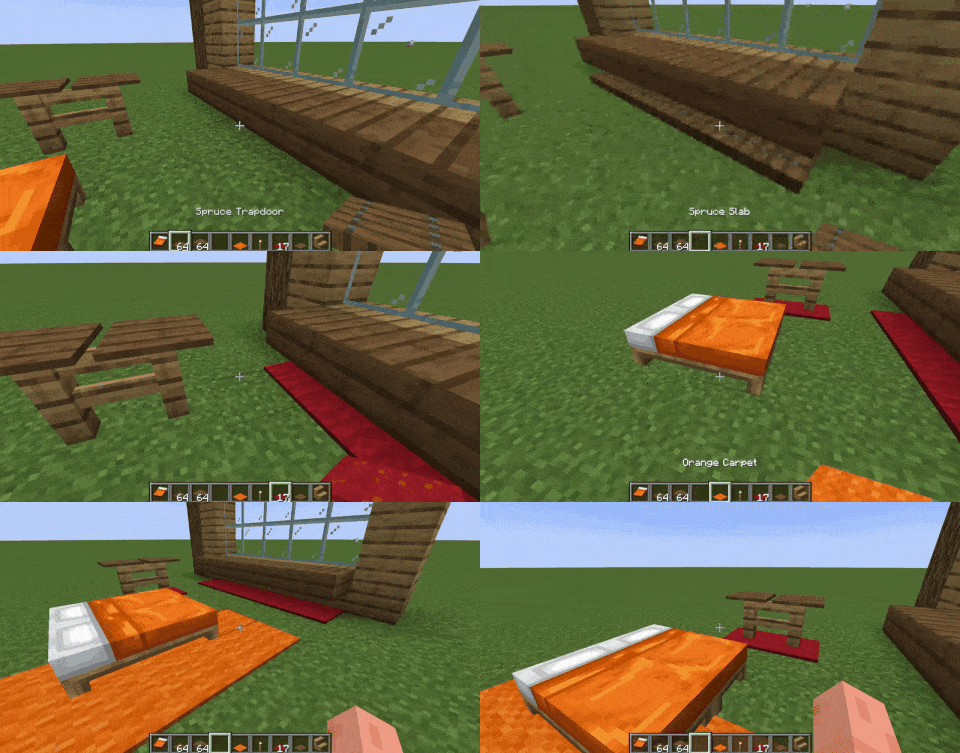
By default, you can place the following blocks as overlays: carpets, trapdoors, buttons, rails, slabs and pressure plates. **To expand this to other blocks**, such as grass, see "How to add support for more blocks (or exclude some)".
#### Join the Discord server for sneak peeks on upcoming updates!
[](https://discord.gg/UPmnyM9YcY)
---
### How does this work?
**They are not block entities!**
Underlay adds these things called "overlays" ~~but they're really more like underlays xd~~, essentially they are fake versions of the item you place - which lets you place two things in the same block space!
### How to add support for more blocks (or exclude some)
In your Minecraft folder you can find `config/Underlay/underlay.json`. Use `overlay_blocks` to add blocks, `exclude_blocks` to exclude them, and to not allow overlays to be placed on certain blocks use `target_exclude_blocks`, like this:
```
{
"overlay_blocks": [
"minecraft:short_grass",
"mymod:shiny_block"
],
"exclude_blocks": [
"minecraft:oak_button",
"minecraft:rail"
],
"target_exclude_blocks": [
"minecraft:oak_door",
"minecraft:spruce_door"
]
}
```
### Mod Integration
Some versions of Underlay include integration with [Create](https://modrinth.com/mod/create), [Jade](https://modrinth.com/mod/jade) and [Flashback](https://modrinth.com/mod/flashback).