
Описание
This **clientside** mod introduces four new rendering modes to enhance your gameplay experience. Other versions and versions for Fabric, will be released in the future.
Also available on [Curseforge](https://www.curseforge.com/minecraft/mc-mods/ui-elements).
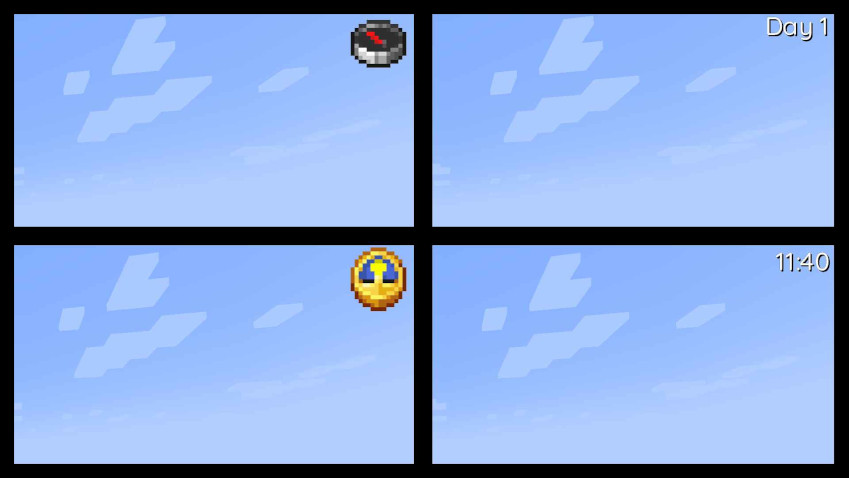
This mod also offers extensive customization options, allowing you to adjust everything from item scale to shadow color and **font type**. It utilizes a TTF-based font system, making it simple to add and customize your own fonts. To do so, just place or replace a TTF file in the following folder within the jar: **assets/daycounter/font**. **Important: The TTF file name must not contain spaces, special characters, or uppercase letters.**
## Config:
Spoiler
["Config for Day Counter Mod"]
#Position of the UI element (LEFT|CENTER|RIGHT)
Position = "RIGHT"
#Size of the font
"Font size" = 24
#Font that will be used (minecraft|epilogue-light...)
Font = "quicksand-medium"
#Color of the text in hexadecimal
Textcolor = "0xFFFFFF"
#Color of the text-shadow in hexadecimal
Shadowcolor = "0x000000"
#Render different UI elements (Clock|Compass|Time|Day)
"UI element type" = "Day"
#Should a drop shadow be rendered
"Text has drop shadow" = true
#Render the UI on top of everything
"Render over everything" = false
#Scales the Item UI element
#Range: 0.5 ~ 5.0
"Item Scale Factor" = 3.0
#Offsets the UI position along the X axis
#Range: -1920.0 ~ 1920.0
OffsetX = 0.0
#Offsets the UI position along the Y axis
#Range: -1920.0 ~ 1920.0
OffsetY = 0.0
#Offsets the Shadow position
#Range: -10.0 ~ 10.0
"Shadow Offset" = 1.0