
Описание
# txt2book
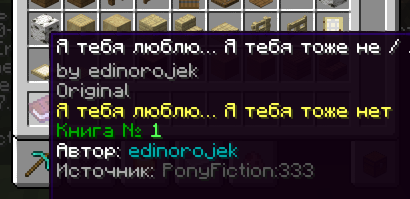
This mod allows you to import books or articles from supported websites and convert them into in-game Minecraft books.
**Supported Websites:**
- Telegraph (good)
- Ponyfiction (good)
- Ficbook (good with small texts)
- .docx documents (WIP)
You can set up a proxy in the config.
---
### Check out my new mod - [PxIgnis](https://modrinth.com/mod/pxignis)!
A server-side mod that enables Lua scripting in Minecraft! Instant hot reload, very simple but powerful API for prototyping game mechanics, custom mob AI, mini games, custom commands & everything that comes into your mind.
```lua
local arena = world:createRegion(vec(-50, 64, -50), vec(50, 80, 50))
arena:on("entity_enter", function(entity)
if entity:isPlayer() then
mc.broadcast(entity.name .. " entered the arena")
coroutine.wrap(function()
local res = mc.fetch("https://api.example.com/arena/log")
if not res.ok then
mc.broadcast("log failed: " .. res.error, true)
end
end)()
end
end)
```
---
## How to Use
To import a book, use the following command:
`/txt2book [signed]`
**Example:**
`/txt2book ponyfiction 333`
This will import the story from `ponyfiction.org/story/333` and give you a Minecraft book.
You can also specify whether the book should be signed (`minecraft:written_book`) or unsigned (`minecraft:writable_book`). By default, the book will be signed.
**Examples:**
- `/txt2book ponyfiction 333 true` – Creates a signed book.
- `/txt2book ponyfiction 333 false` – Creates an unsigned, writable book.
**Finding `workId`:**
- Ficbook: `ficbook.net/readfic/**10936980**` → Work ID is `"10936980"`
- Ponyfiction: `ponyfiction.org/story/**220**` → Work ID is `"220"`
- Telegraph: `telegra.ph/**Pikabu-Puls-August-2024-09-16**` → Work ID is `"Pikabu-Puls-August-2024-09-16"`
### Docx importing (a little guide)
```
/txt2book docx "" [writtenBook]
```
`url` is a link to the `.docx` file.
You can just send the file in Discord and copy the link to it.
#### How Chapters Work
Chapters are split by paragraph styles in the docx file.
`Title` - Sets the book title
`Heading 1...9` - Starts a new chapter
Any other style - text
#### Example Structure
```
[Title] MY SUPER BOOK
[Heading 1] Everything goes good
But main hero dies
[Heading 1] Now everything is bad
And sad
```
Produces:
- Book title: `MY SUPER BOOK`
- Chapter 1: `Everything goes good` — body text
- Chapter 2: `Now everything is bad` — body text
## Admin Commands
- `/txt2book reload` – Reloads the configuration.
- `/txt2book resetCache` – Clears the book cache, allowing faster access to recently imported books.
## Permissions
By default, all commands are restricted to server operators. You can adjust access using the permission system.
- `ru.pyxiion.txt2book` – Permission to use the main command.
- `ru.pyxiion.txt2book.ficbook` – Permission to import books from Ficbook.
- `ru.pyxiion.txt2book.ponyfiction`
- `ru.pyxiion.txt2book.telegraph`
- `ru.pyxiion.txt2book.docx`
- `ru.pyxiion.txt2book.reload` – Permission to reload the mod configuration.
- `ru.pyxiion.txt2book.resetCache` – Permission to reset the book cache.
## Configuration
File: `config/txt2book.toml`
Parameters:
- `config_version` — do not modify this value.
- `lang` — mod language. You can set "ru" or "en", or add your own language.
- `maximum_file_size` — maximum size for imported files.
- `[characters]`, `[characters.category]`, `[characters.width]` — system parameters.
- `[langs.X]` — messages for language X.
## Language Support
The mod supports both English and Russian. You can select or add languages in the configuration file (`txt2book.toml`).
## Some limitations
The mod does not support all possible letters. It filters them out if the mod doesn't know their size.
### About docx importing
The first title in a document is considered the title of the book. All subsequent titles are chapter titles.
## Plans
- Improve .docx importing
- Improve Ficbook importing
---
Let me know if you found a bug or have a suggestion, such as adding a new source.
[](https://modrinth.com/mod/fabric-api)