
Описание
### ⚠️ Resource Pack Required
Grab the Resource Pack from the [original](https://modrinth.com/datapack/tool-trims)
You can already trim armor, but what about weapons and tools?
Well, with this Plugin, you can trim them!
## Features
- All features from the [original](https://modrinth.com/datapack/tool-trims) with a few changes:
- Removed Toolsmithing Table (Use vanilla smithing table to trim tools)
- Simplified commands into one creative command `/function tooltrims:give_templates`
- Tool Trims can be duplicated using a crafting table (instead of the Toolsmithing Table)
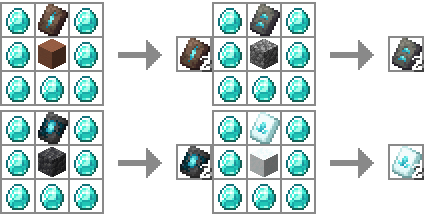
- Auto-install datapack (modified from [original](https://modrinth.com/datapack/tool-trims))
- Can hook into [Geyser](https://geysermc.org/)
Installation
1. Stop the server
2. Delete the original data pack if you have it
3. Download and put in the plugins folder
4. Configure the server to serve the resource pack from the [original creation](https://modrinth.com/datapack/tool-trims)
4. Re(start) server
5. Depending on the version you may need to wait for the server to be up and restart again to load the datapack.
Geyser
1. Do normal install (listed above)
2. If you want bedrock players to be able to craft with these trims, install [this fix](https://modrinth.com/plugin/geyser-recipe-fix)
3. Click the featured version.
4. Download, and unzip "Geyser Hook" (Secondary download, under the versions tab)
5. Put "Tool Trims (plugin) Geyser RP.mcpack" in the packs folder of Geyser
6. Put "Tool Trims (plugin) Geyser mappings.json" in the custom_mappings folder of Geyser
7. Put "en_us.json" in the locales/overrides folder of Geyser
8. Re(start) server
Credits
Thanks to:
- JoeFly: Amazing idea, resource pack, and data pack