Описание
# Simple Timer Datapack:
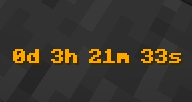
This Datapack introduces a simple, customizable timer and countdown feature in various colors, making it perfect for mini-games, events, or personal projects. It’s easy to set up and use, and works seamlessly within your existing Minecraft worlds.
It adds a timer and countdown system that is customizable in different colors _(soon for the countdown system)_, allowing you to fit it to the theme of your game or event.
# Menu
The Menu can be opened with
```
/trigger timer_trigger set 24
```
# Important
**If you try to add the _Datapack_ in a newer/older version, you may see a message like this:**
```
This Datapack was made for a newer/older Version of Minecraft
```
**It will still work in certain versions that are displayed in the Versions tab [here](https://modrinth.com/datapack/timer-datapack/versions)!!!**
# Why Download This Project?
This Datapack is designed for anyone who wants to enhance their Minecraft world with a fully customizable and visually appealing timer and countdown system. Whether you're hosting complex mini-games, timing in-game events, or simply adding more functionality to your builds, this project offers a range of useful features:
- **Versatile Timer and Countdown System:**
Easily set up a timer or countdown for any scenario. From races to timed challenges, this Datapack allows you to manage in-game time with precision. The countdown can be customized down to the second, and there are no limits on how long you can set it — whether it's a short 10-second sprint or a massive 1000-hour countdown for long-term events.
- **16 Color Options & Color Wave Mode:**
Choose from 16 different colors to match your Minecraft theme, build, or event. Plus a "color wave" mode, adding even more dynamic visual customization to your timers and countdowns.
- **Simple and Intuitive Menu:**
You don’t need to deal with complicated setups or commands. The user-friendly menu makes it easy to start, pause, resume, or reset the timer, and you can even hide it from chat if you want a cleaner interface.
- **Lightweight and Non-Intrusive:**
The Datapack integrates seamlessly into your existing Minecraft world without causing lag or disrupting gameplay. It's designed to enhance the experience without adding unnecessary complexity.
# How does the pack work?
**First: Paste the Datapack in your world and reload. After that you should see this message in chat.**
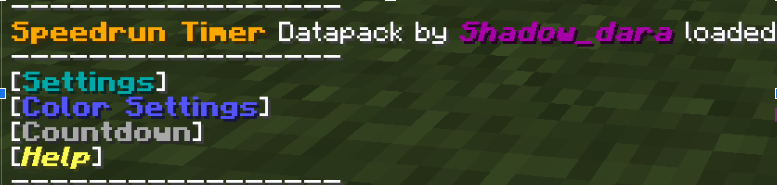
To go trough the menues, you must click on name in the chat.
- **Settings:** In this menu, you can start, pause, or resume the timer. Additionally, you have the option to disable the timer from appearing over your hotbar for a cleaner experience but the timer wont stop!
- **Color Settings:** Opens a submenu where you can choose from 16 different colors to customize the timer's appearance and a dynamic color wave mode. _If you want too, you suggest options for the color wave mode on my discord server_
- **Countdown:** This option allows you to start a countdown using a bossbar. You can easily adjust the time via a submenu with options to add or subtract in increments of 1 second, 10 seconds, 1 minute, 10 minutes, 1 hour, or 10 hours. There's no upper limit on the countdown, so feel free to set it as high as you'd like—even up to 1000 hours!
- **Help:** Contains credits, an uninstall option, and a debug menu. The debug menu displays the timer's scoreboard in the sidebar for easy monitoring.
**If you need help with this pack, check out my discord server [here](https://discord.gg/9Jh8B8pkJa)!**
# Do not use this pack on multiplayer servers, may cause some issues!!!