
Описание
# 💧 Thirst Bar
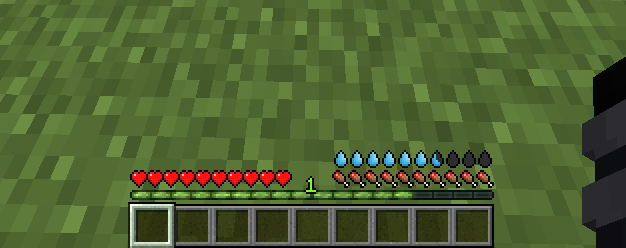
**Thirst Bar** is a Minecraft datapack+resourcepack/mod that adds a thirst bar to the game.
## ✨ Features
- The thirst bar can be refilled by drinking water bottles. 
- Customizable values.
- As soon as you enter the water, it disappears so that the drowning hud is visible.
- Works in singleplayer and multiplayer.
- Supports [Smithed Actionbar Libary](https://smithed.net/packs/actionbar).
## 🛠️ Settings
You can easily customize the thirst depletion rate at any time using the following command (1 second = 20 ticks):
- 🛠️ **Customize thirst depletion rate:**
`/data modify storage thirstbar time set value [timeinticks]` (Default Value:1200)
**Example:** `data modify storage thirstbar time set value 600` (600 = 30 seconds)
You can also easily customize how often damage is dealt when the thirst bar is empty at any time using the following command (1 second = 20 ticks):
- 🛠️ **Customize damage rate:**
`/data modify storage thirstbar damagetime set value [timeinticks]` (Default Value:20)
**Example:** `data modify storage thirstbar damagetime set value 40` (40 = 2 seconds)
## 📦 Optional Library Support – **Actionbar**
This [datapack](https://smithed.net/packs/actionbar) allows the **actionbar to be shared across multiple datapacks** on a server, preventing conflicts and ensuring compatibility.
🔗 **Download:** [Smithed – Actionbar Library](https://api.smithed.dev/v2/download?pack=actionbar&mode=datapack)
- **Enable support with the following command:** ``scoreboard players set .library thirstbar 1``
- **Disable support with the following command:** ``scoreboard players set .library thirstbar 0``
## 📦 Installation
**There are two ways to install:**
### 1️⃣ Mod Version
Download the mod file and add it to your `mods` folder as you would with any other Minecraft mod. You dont need to install the Resource Pack
### 2️⃣ Datapack + Resource Pack
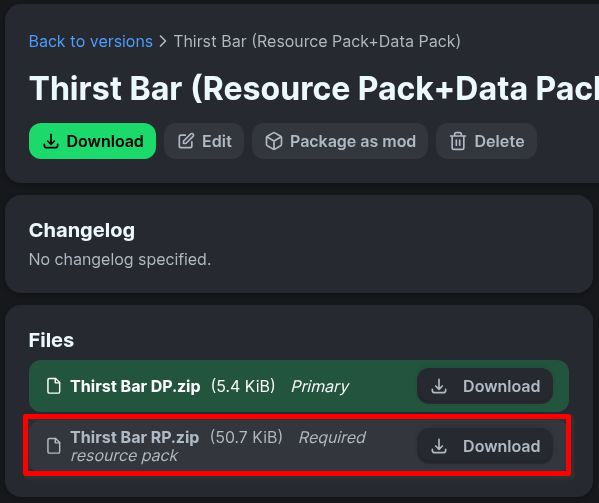
First, download the resource pack and place it in your `resourcepacks` folder.
Then, download the datapack and add it to your world's `datapacks` folder or your server's `datapacks` directory.
**_You can download Resource Pack from the releases page:_**
## 🧱 Compatibility
- Minecraft Java Edition 1.19.3+
- If you choose to use the resource pack, you must also install the datapack
## 🌐 ITITAN Hosting
[](https://ititanhosting.com/game/minecraft)
## 💬 Feedback and Request
**_If you have a request or feedback, please write them in to my discord 3geetr._**