
Описание
# Technical Utilities
Tech Utils is a mod providing client-side tweaks for [Litematica](https://www.curseforge.com/minecraft/mc-mods/litematica), [WorldEdit](https://www.curseforge.com/minecraft/mc-mods/worldedit) and other small utilities.
## Mod config
To access mod config open [Mod Menu](https://modrinth.com/mod/modmenu) and select this mod.
## Dependency version lock
Tech Utils locks to (i.e. requires you to play) a specific version of each of its dependencies (Litematica and WorldEdit) to prevent conflicts from happening when you try to install a newer version of a dependency.
You are on your own if you decide to remove these restrictions using [Dependency Overrides](https://docs.fabricmc.net/players/troubleshooting/dependency-overrides). Do not report problems if you do this.
## Features
- Inventory Verifier addon to Litematica's Schematic Verifier
- Conveniently displays the difference between the expected and found inventory contents side-by-side.
- Has semantic slot highlighting (view feature `inventoryScreenOverlay` further down).
- Turning on `verifyItemComponents` will require item components to match and will also visualize them in the item tooltip for you to compare.
- Enables schematic creators to use [item predicates](https://minecraft.wiki/w/Template:Nbt_inherit/conditions/item/template) - a flexible way to specify what properties items should have. [Here's](https://misode.github.io/predicate/?share=3lvOcqP7xk) an impractical but exhaustive example via Misode's handy generator.
\
Check out the feature's showcase video:
*This feature only works if your server has [Servux](https://modrinth.com/mod/servux) (or [PCA Protocol](https://github.com/Fallen-Breath/pca-protocol/releases) in 1.20.1-4), or you have nbt query permissions (e.g. by being an operator or installing a permissions mod/plugin), or you're in Singleplayer.*
*On Multiplayer, make sure you have enabled `entityDataSync` and `entityDataSyncBackup` in Litematica's settings.*
- Sync WorldEdit selection
Snap WorldEdit region to active Litematica selection - `autoWeSync`.
*Region synchronizes shortly after you modify a selection, showing you a confirmation message above the hotbar.*

- Litematic preview (1.21 and below)
Show 3D render of selected litematic in Load Schematics menu - `renderPreview`.
*This only works for .litematic files.*

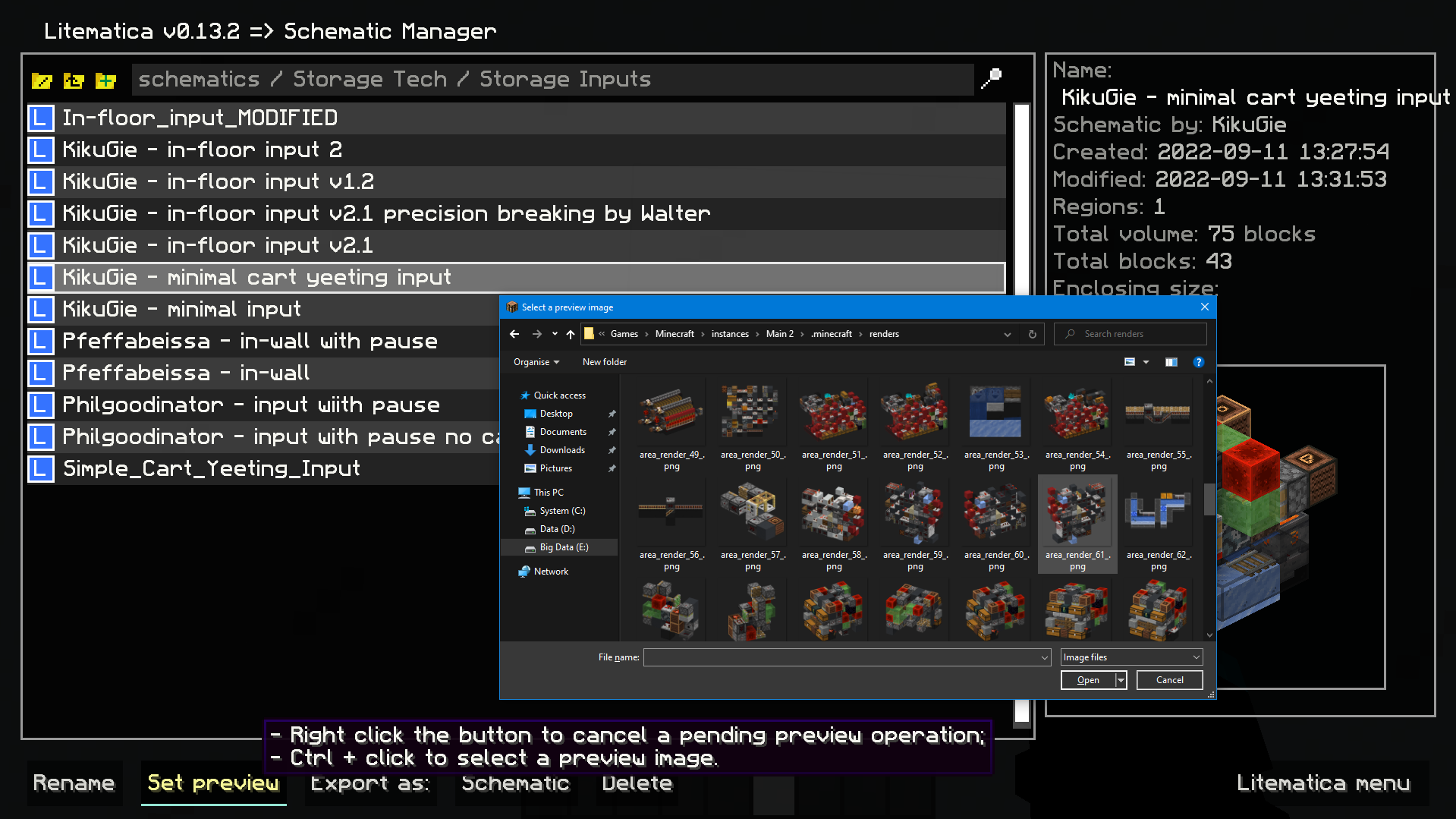
- Image selection dialog for litematica preview:
Set litematic preview image to one you select, which unlike the 3D preview feature will be shown to any player, even without this mod.
*In main Litematica menu go to Schematic Manager, select a litematic and ctrl + click on Set Preview button to open the prompt.*
- Inventory setup preview:
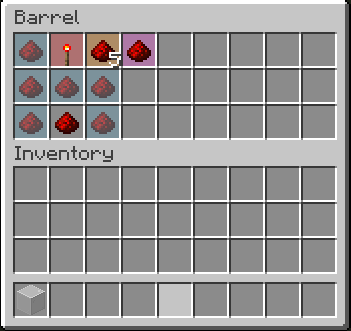
Show items that have to be in a container and highlights wrong or mismatched ones - `inventoryScreenOverlay`.
*Item colors match your placement block colors. By default its:
- Light blue: missing item;
- Orange: mismatched amount or nbt data;
- Magenta: extra item that shouldn't be present;
- Red: wrong item type.*
- Compact scoreboard (ported from my old mod) - `compactScoreboard`.
Using short number format:
- 1000 -> 1k
- 1000000 -> 1M
- 1000000000 -> 1B
- Disable WorldEdit neighbor updates on log-in - `autoDisableUpdates`.
- Hotkeys for litematic placement rotation & mirror - `rotatePlacement` and `mirrorPlacement`.
- `/isorender selection` shortcut for rendering current Litematica selection in [Isometric Renders](https://modrinth.com/mod/isometric-renders).
- A hotkey to give yourself a container full of the item you're holding - `giveFullInv`. Supports boxes, chests, and bundles. Nesting them is possible.
- A hotkey to refresh the material list - `refreshMaterialList`.
- Make easy place act as if all blocks are full blocks. Useful for placing blocks with small hit boxes.
- *And more to come!*
## Dependencies
- [Fabric API](https://modrinth.com/mod/fabric-api)
- [MaliLib](https://www.curseforge.com/minecraft/mc-mods/malilib)
- [Litematica](https://www.curseforge.com/minecraft/mc-mods/litematica)
*Mod logo by Mizeno*