
Описание
# TabTPS 
Minecraft server mod/plugin to show TPS, MSPT, and other information in the tab menu, boss bar, and action bar.
Current supported platforms:
- [Paper](https://papermc.io)
- [Sponge](https://spongepowered.org) 8+
- Fabric (requires [Fabric API](https://modrinth.com/mod/fabric-api))
- NeoForge
## Features
### Live information displays
- Configure what information will be shown using display configs (`/plugins/TabTPS/display-configs/`)
- Each display config has a permission associated, and players with that permission will use that display config.
- The default display config uses the permission `tabtps.defaultdisplay`, and allows for using all three display types.
- Only one display config can be assigned to each player, even if they have permission for multiple. Set priorities for different display configs in the main config (`plugins/TabTPS/main.conf`)
- Configure colors for displays using theme configs (`/plugins/TabTPS/themes/`)
#### Tab menu
* Command: ``/tabtps toggle tab``
* 
#### Action bar
* Command: ``/tabtps toggle actionbar``
* 
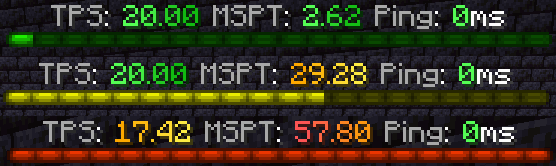
#### Boss bar
* Command: ``/tabtps toggle bossbar``
* 
### Commands
#### Improved TPS command
* Command: ``/tickinfo`` or ``/mspt``
* Permission required: ``tabtps.tps``
* 
#### Memory command
* Command: ``/memory``, `/mem`, or ``/ram``
* View information about the current memory pools of the server jvm.
* Note: the output and usefulness of this command varies depending on the type of garbage collection used, garbage collection settings, and many other factors.
* Permission required: ``tabtps.tps``
* 
#### Ping command
* Commands: ``/ping``, `/ping [username]`, or ``/pingall``
* View the ping of yourself, or another user. ``/pingall`` will show a summary of all connected player's pings.
* Permissions: ``tabtps.ping`` to view your own ping, ``tabtps.ping.others`` to view other users ping and the ping summary.
* 
* 
#### Reload command
* Command: ``/tabtps reload``
* Permission required: ``tabtps.reload``