
Описание
# ⚔️ SwordSight: Server-Authoritative Hit Through the Clutter
SwordSight is a mod designed to enhance combat by preventing blocks like **tall grass, flowers, and other non-solid clutter from blocking your weapon's line of sight**, allowing you to hit enemies behind them seamlessly.
Alongside the original server-authoritative configuration system, SwordSight now ships with a full **in-game configuration menu** — a JEI/REI-style dual-list picker for choosing exactly which blocks are ignored, with dedicated handling for growth-stage crops so you can decide whether a fully-grown plant should still be farmable with your weapon.
---
📧 Contact Me & Support Information
### 💬 Primary Support Channel (Preferred)
**All general questions, feature requests, and non-urgent bug reports should be posted in the appropriate channels on our [Discord Server](https://discord.gg/48sZCbdHzJ).** We actively monitor the server and will respond as soon as possible. This ensures that the whole community can benefit from the discussion and solutions.
### 🆘 Urgent Private Messaging (PM) Policy
While we prefer all issues to be handled via the Discord server first, you are welcome to PM me directly under **specific urgent circumstances**:
* **Allowed Reason:** Your server is **crashing** or experiencing **critical, game-breaking errors** directly related to one of my mods/plugins.
* **Requirement:** You must be the **owner** of the server.
* **Time Zone:** I am operating in the **(CET/CEST) Time Zone**.
* **PM Hours:** Please only send private messages between **10:00 AM and 10:00 PM (Brussels Time)**.
I will endeavor to answer your PM as soon as I can to be helpful and see what I can do to resolve your urgent issue. However, please understand that immediate responses are not guaranteed, and **private messaging is a professional courtesy, not an entitlement.** Thank you for your understanding and cooperation!
## 🎯 Features
### 🖱️ In-Game Configuration Menu (Keybind: M)
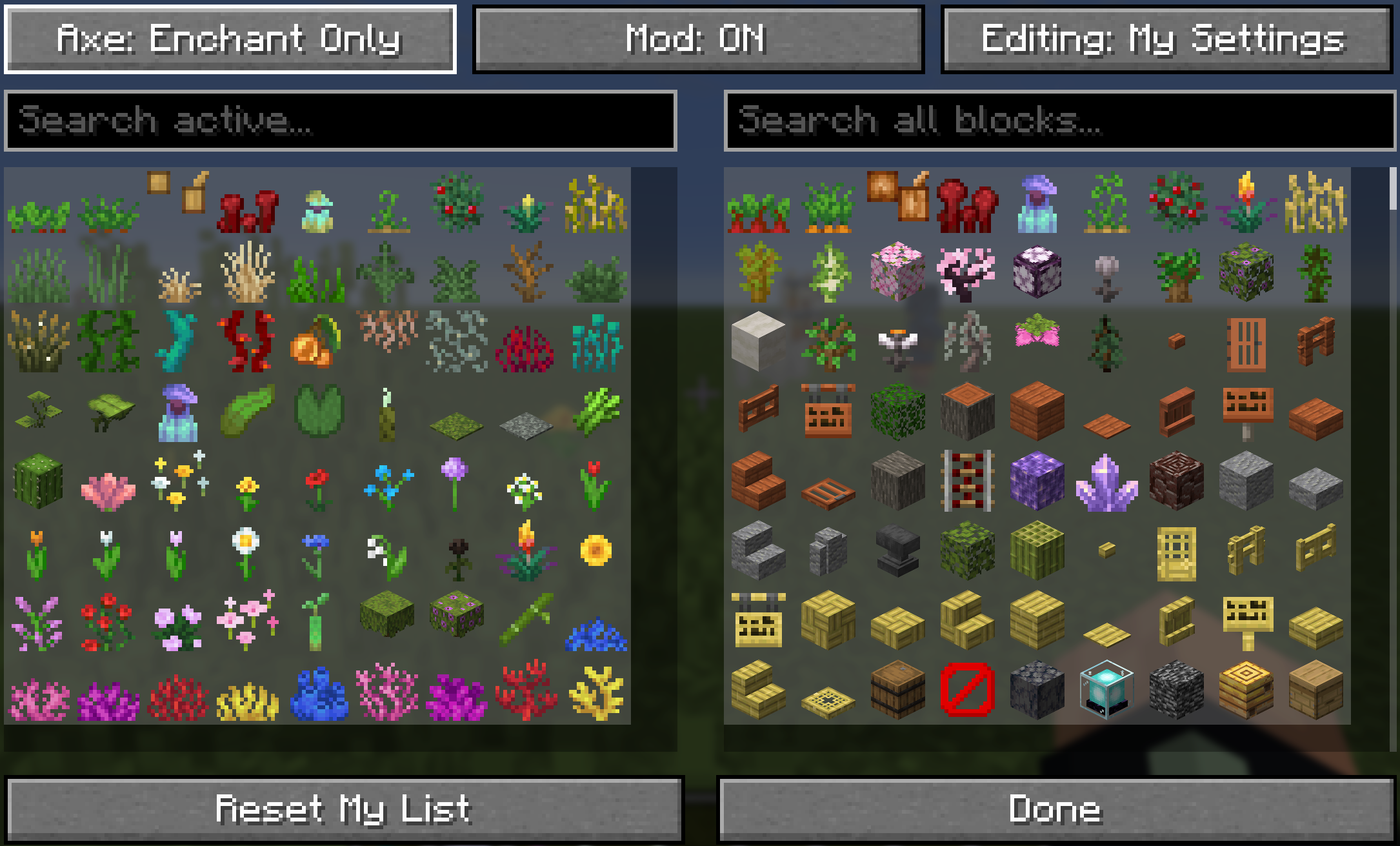
Press **`M`** (default, fully rebindable in *Controls*) or run `/swordsight`/`/swords` to open SwordSight's config menu directly — no more chat commands needed to see what's active.
* **Two-list picker**: an *Active* list on the left (blocks currently ignored) and an *All Blocks* list on the right (everything else you can enable), just like a JEI/REI item browser. Click an entry on either side to move it across.
* **Smart sorting**: the Active list follows a curated, farming-friendly order — grasses (short, tall, dry, sea) → other greens → flowers (short, then tall) → saplings → coral fans → coral → everything else in the same order as the vanilla creative inventory. The All Blocks list surfaces plant matter first (including modded flora), pushing logs and other solid blocks further down.
* **Two editing profiles**: *My Settings* is always yours to edit, personal and independent of any server. *Editing: Server* is available only in single-player, or to players with genuine server-verified permission in multiplayer — the button is always visible, but simply won't switch modes without the right access. Server-editing mode tints the list yellow so you always know which profile you're touching.
* **Growth-stage crops, done properly**: wheat, carrots, potatoes, beetroots, cocoa, nether wart, torchflower, pitcher plant, and sweet berry bush each get two dedicated entries — *second-to-last stage* and *fully grown* — rendered with their real in-game growth textures rather than a generic seed icon. Toggling them controls exactly how each crop behaves:
* **Second-to-last stage active**: your weapon passes through every earlier growth stage, but the fully-grown plant still blocks hits — so it stays farmable.
* **Fully-grown stage also active**: the plant is protected at every stage, including once it's fully grown.
* **Clean icons**: entries with a missing or broken texture are automatically filtered out, non-vanilla/custom skull blocks are excluded, and paired blocks like torch/wall-torch or a mob skull and its wall variant are merged into a single entry so you never see duplicates.
* **Reset My List** restores your personal profile back to the shipped defaults at any time.
### 🌐 Server-Authoritative Configuration
* **Multiplayer Consistency**: when installed on a dedicated server, the server's own block list acts as the source of truth for what's *available* at all — regular players only ever see and use blocks the server currently permits, keeping every player's experience consistent with server intent.
* **Your Settings, Server Permitting**: your own Active/Inactive choices always remain yours — the server doesn't overwrite your personal picks. Instead, it defines the boundary of what's possible: anything outside the server's allowed list simply won't function or appear, no matter your own preferences.
* **Server Operators**: players with server permission can switch to *Editing: Server* in the menu (or use the equivalent chat commands) to change the list every player on the server is bound by.
* **Vanilla Server Fallback**: connecting to a server that doesn't have SwordSight installed automatically falls back to a bundled, curated "safe" block list, so basic hit-through functionality still works immediately without any server-side setup.
* **Single-Player**: acts as a fully local, self-contained mod — your personal settings are all that matter, with no server boundary to worry about.
### 📝 Default Ignored Blocks
The shipped default configuration includes a comprehensive list of non-solid plant and clutter blocks, covering grasses, crops, flowers, vines, corals, and more.
📦 Default Block List
```
// --- GRASSES, FERNS, BUSHES ---
"minecraft:short_grass",
"minecraft:tall_grass",
"minecraft:dead_bush",
"minecraft:fern",
"minecraft:large_fern",
"minecraft:short_dry_grass",
"minecraft:tall_dry_grass",
"minecraft:bush",
"minecraft:firefly_bush",
// --- CROPS & GROWABLES (with dedicated growth-stage handling — see In-Game Configuration Menu) ---
"minecraft:sugar_cane",
"minecraft:wheat",
"minecraft:carrots",
"minecraft:potatoes",
"minecraft:beetroots",
"minecraft:cocoa",
"minecraft:nether_wart",
"minecraft:torchflower_crop",
"minecraft:pitcher_crop",
"minecraft:sweet_berry_bush",
"minecraft:bamboo",
"minecraft:bamboo_sapling",
"minecraft:cactus",
"minecraft:cactus_flower",
// --- FLOWERS (Short & Tall) ---
"minecraft:poppy",
"minecraft:dandelion",
"minecraft:allium",
"minecraft:azure_bluet",
"minecraft:red_tulip",
"minecraft:orange_tulip",
"minecraft:white_tulip",
"minecraft:pink_tulip",
"minecraft:oxeye_daisy",
"minecraft:cornflower",
"minecraft:lily_of_the_valley",
"minecraft:wither_rose",
"minecraft:blue_orchid",
"minecraft:torchflower",
"minecraft:sunflower",
"minecraft:lilac",
"minecraft:rose_bush",
"minecraft:peony",
"minecraft:pink_petals",
"minecraft:wildflowers",
// --- VINES, ROOTS, FOLIAGE ---
"minecraft:vine",
"minecraft:twisting_vines",
"minecraft:twisting_vines_plant",
"minecraft:weeping_vines",
"minecraft:weeping_vines_plant",
"minecraft:cave_vines",
"minecraft:cave_vines_plant",
"minecraft:hanging_roots",
"minecraft:glow_lichen",
"minecraft:mangrove_propagule",
"minecraft:mushroom_stem",
"minecraft:crimson_roots",
"minecraft:warped_roots",
"minecraft:azalea",
"minecraft:flowering_azalea",
"minecraft:small_dripleaf",
"minecraft:big_dripleaf", // its stem segment always follows automatically
"minecraft:pitcher_plant",
// --- WATER PLANTS/CORALS ---
"minecraft:seagrass",
"minecraft:tall_seagrass",
"minecraft:kelp",
"minecraft:kelp_plant",
"minecraft:lily_pad",
"minecraft:tube_coral",
"minecraft:brain_coral",
"minecraft:bubble_coral",
"minecraft:fire_coral",
"minecraft:horn_coral",
"minecraft:tube_coral_fan",
"minecraft:brain_coral_fan",
"minecraft:bubble_coral_fan",
"minecraft:fire_coral_fan",
"minecraft:horn_coral_fan",
"minecraft:sea_pickle",
"minecraft:moss_carpet",
"minecraft:pale_moss_carpet"
```
### Bypass Vision-Obscuring Blocks
* **Raycast Override**: the mod intercepts the game's raycast check and forces non-solid clutter blocks defined in the active config to return an empty hitbox, allowing your weapon's line-of-sight to pass through them.
* **Performance Cache**: an internal cache of ignored blocks as resolved `Block` objects keeps lookups fast during gameplay, with no per-hit performance cost.
### Configurable Weapon Eligibility
The hit-through functionality is strictly controlled by weapon type:
* **Automatic Eligibility**: works automatically with **Swords** (via the `#minecraft:swords` item tag), **Tridents**, and **Maces**.
* **Axe Support (Toggleable)**: cycle axe behavior between *Disabled* → *Enchant Only* → *Always Enabled* from the in-game menu or via `/swordsight axe` and `/swordsight axe enchant`.
* **Enchant Only** requires the axe to carry a combat enchantment (Sharpness, Smite, Bane of Arthropods, or Fire Aspect) before hit-through kicks in.
---
## ⚙️ In-Game Commands
Commands are accessible using either `/swordsight` or the alias `/swords`, and now open the in-game configuration menu directly in addition to their usual chat output.
| Command | Description | Context |
| :--- | :--- | :--- |
| `/swordsight` | Displays the command list and links, and opens the configuration menu. | All contexts |
| `/swordsight reload` | Reloads the config from disk and updates the block cache. | Single-player / Server operators |
| `/swordsight list` | Shows all currently ignored blocks. | All contexts |
| `/swordsight list ` | Toggles an item/block in the ignored list. | Single-player / Server operators |
| `/swordsight axe` | Cycles Axe Hit-Through between Disabled / Enchant Only / Always Enabled. | Single-player / Server operators |
| `/swordsight axe enchant` | Toggles the enchantment requirement for axes. | Single-player / Server operators |
In multiplayer, players without server permission can still view the current configuration and freely manage their own personal profile through the in-game menu — only changes to the **server's** shared list require operator permission.
---
## Modpack Policy
* You **ARE PERMITTED** to include this mod in any modpack.
* Please do not modify the mod's JAR file directly.
* The modpack itself, or access to this mod within the modpack, **must not be sold**.