
Описание
# SoundboardPlus
> 🔀 This is a fork of [Simple Soundboard](https://modrinth.com/mod/simplesoundboard) by kvxd, extended with additional features and improvements.
**SoundboardPlus** is an enhanced soundboard mod for [Simple Voice Chat](https://modrinth.com/plugin/simple-voice-chat). Play audio files directly into your voice stream — perfect for servers, fun moments, or just vibing with friends.
---
## Features
- **Audio File Support** — Play sound files directly into your microphone stream
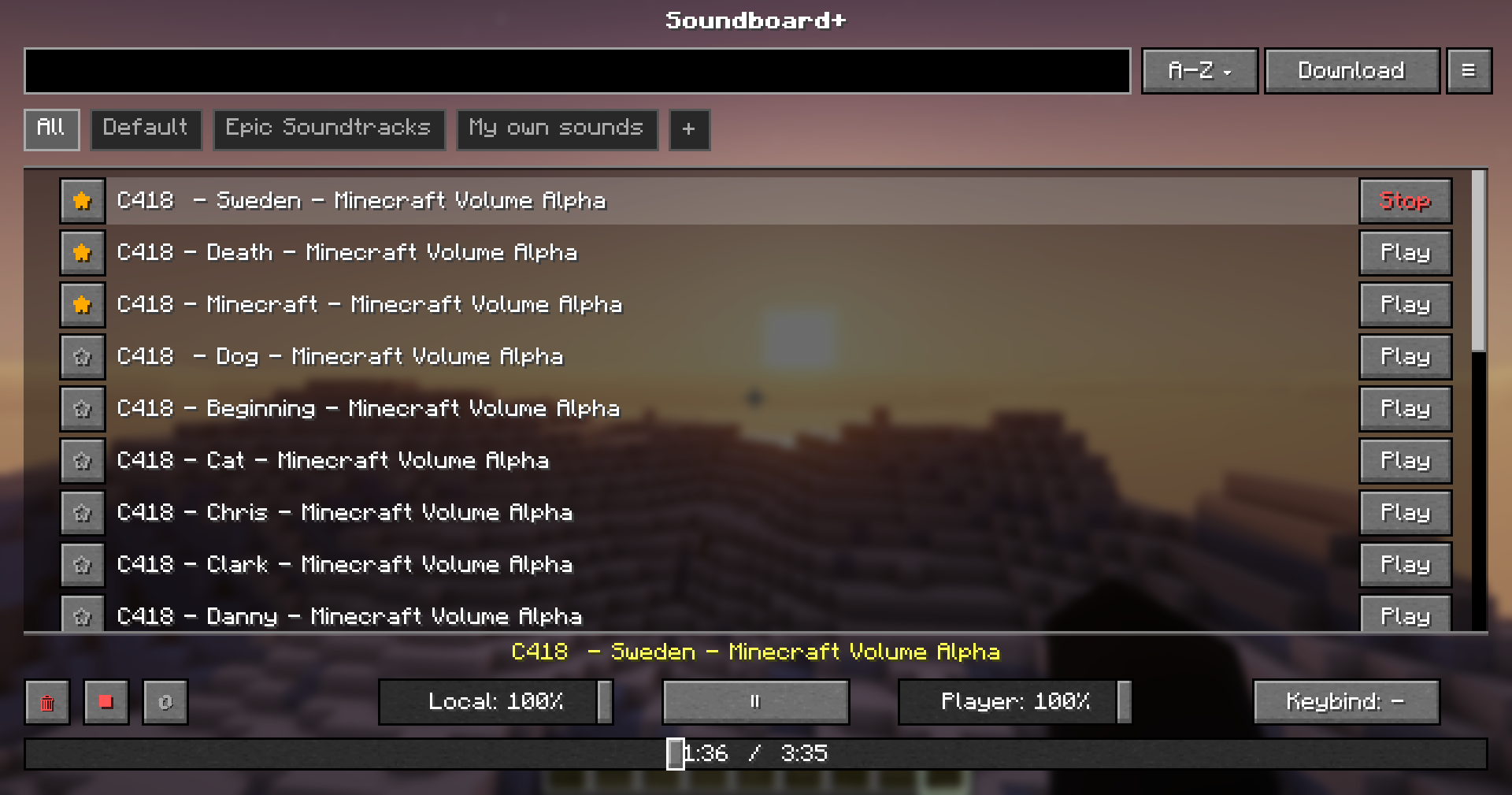
- **Dual Volume Control** — Separate sliders for what *you* hear vs. what *others* hear
- **Sound Management GUI** — Browse, organize, and play your sounds from an in-game interface
- **Categories** — Create and manage categories
- **YouTube Downloading** — Supports downloading from YouTube, TikTok & multiple other sources — uses yt-dlp + ffmpeg
- **Hotkeys** — Create hotkeys for specific sounds
---
## Dependencies
| Dependency | Required |
|---|---|
| [Fabric Loader](https://fabricmc.net/) | ✅ Required |
| [Fabric API](https://modrinth.com/mod/fabric-api) | ✅ Required |
| [Simple Voice Chat](https://modrinth.com/plugin/simple-voice-chat) | ✅ Required |
| [Fabric Language Kotlin](https://modrinth.com/mod/fabric-language-kotlin) | ✅ Required |
> **Note:** This mod downloads yt-dlp and ffmpeg automatically.
---
## Installation
1. Download all required dependencies above
2. Drop `SoundboardPlus.jar` into your `.minecraft/mods/` folder
3. Launch the game — the `soundboard/` folder will be generated automatically
---
## Usage
1. Place your audio files into the `.minecraft/soundboard/` folder or download them via the ingame downloading tab
2. Join a world or server
3. Press the keybind (**default: `J`**) to open the Soundboard GUI
4. Click **Play** on any sound to broadcast it through your voice chat
---
## Changes from the Original
- **Category support** — Organize your sounds into categories for easier navigation
- **Fixed yt-dlp downloading** — Audio downloads via yt-dlp now work reliably
- **Global Volume Slider** — Adjust playback volume globally without per-sound configuration
- **Progress Bar** — Visual playback progress so you always know where a sound is at
- **Play / Pause & Loop** — Full playback controls, including looping sounds on repeat
- **Toast Notifications** — On-screen notifications for downloading events
- **Additional Settings** — More configuration options for a customized experience
- **Refreshed UI** — Cleaner and improved interface compared to the original
---
## Issues & Contributions
Found a bug, want to contribute, or want to suggest changes? Head over to the [GitHub repository](https://github.com/wolmics/SoundboardPlus) and open an issue or pull request!
---
*Licensed under GPL-3.0*