Описание

This client side mod adds a soulslike HUD found in FromSoftware games.
The mod includes:
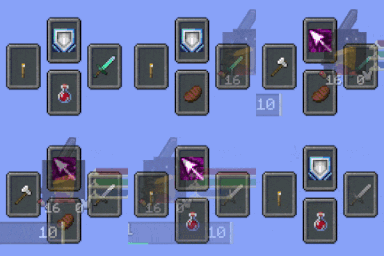
* Equipment slots selector
* Compatability with Iron's Spells n' Spellbooks
* Compatability with MoreOffhandSlots
* Keep hotbar hidden with AutoHUD
* Status Gauges including status of your teammates.
* Alternative skill overlay UI for Epic Fight
* Custom bossbar
* Support for client only and client-server features.
Each feature can be disabled through the config.
Before using the mod I also recommend:
* Configurable mod to update config values without restarting.
* A mod that allows you to shift the chatbox, otherwise change the anchor.
* To disable existing UI of mods, such as Iron's Spells spell bar.
Check out my partner mod, [Souls Message Banners](https://modrinth.com/mod/souls-message-banners).
***
# Equipment Slots
The equipment slots is essentially an extended hotbar selector. They can be cycled through your arrow keys.
**Weapon slot** - Indicates your selected weapon. By pressing your `Right Arrow` key, your main hand will cycle to weapons in your hotbar. If you are not currently holding a weapon, it will jump to the weapon it indicates.
* If Epic Fight is installed, items in Combat Preferred is included.
* Items can be added/removed through the config.
**Offhand slot** - Indicates your offhand slot. By pressing your `Left Arrow` key, you are able to cycle through your offhand items (only with MoreOffhandSlots).
**Spell slot** - Indicates your active spell. By pressing your `Up Arrow` key, you can cycle through your spells.
* This includes preview slots to see which spells you are cycling to.
**Consumable slot** - Indicates your food items. By pressing your `Down Arrow` key, you can cycle through your consumable items.
* This includes preview slots to see which items you are cycling to.
* The mod also adds a "Use Consumable key" (`G` key), which will automatically jump to the item and consume without holding right click.
* Thus cycling wont jump to your consumables unless configured.
* Iron's Spells scrolls are included
# Status Gauges

This replaces certain elements found in the vanilla hotbar.
## Crest
* Displays player hunger and armor level
* Displays player character preview / paper doll
* Face Mode
* Model Mode
* Supports Epic Fight player model
## Status bars
* Displays status of the player
* Stamina
* Epic Fight
* Parcool
* Paragliders
* Mine and Slash
* Mana
* Iron's Spells
* Mine and Slash
* The bar widths dynamically change depending on how much the player's stats have changed from the baseline max values.
* Server owners can set their baseline values and projected max/late game values in the server config
* Clients can do the same or override the server values, but they can also make the bar widths constant.
* Player gauge appearance can be customized in `assets/souls_combat_hud/souls_bars/player_gauge.json`.
## Party Gauges
This displays the status of your teammates. **This feature is only enabled if the mod is installed serverside**.
* Supports vanilla teams and FTB teams.
* Team color will display as a crest outline.
* Sort party screen, open with `O` key
* Certain stat tracking can be restricted via server config.
* Party gauge appearance can be customized in `assets/souls_combat_hud/souls_bars/party_gauge.json`.
# Bossbar

This replaces the vanilla bossbar with a soulslike bossbar.
* You can set a custom bossbar for certain bosses via translation keys (e.g. `entity.minecraft.ender_dragon`) inside `assets//souls_bars/entities`.
* You may need to see the config of your boss mods to disable custom bars if you wish to make it appear.
# Vanilla HUD Changes

* Bossbar and certain parts of the hotbar are automatically hidden by default, configurable.
* A custom experience overlay replaces the experience bar, also includes total xp points.
* A custom oxygen bar replaces the air level meter.
* Item highlight name and record label are shifted closer to the hotbar, configurable.
* By default, the item name shifting when changing from/to creative is disabled.
* Cold Sweat mod repositions this text, make sure to disable `Custom hotbar layout`.
* No Hunger mod makes armor level reappear, make sure to disable `Render armor at hunger`.
***
Notes
* Incase you are encountering "Payload may not be larger than 32767 bytes", install Packet Fixer.