
Описание
# SnapshotXBR
Automatic upscales of the latest textures using [xBRZ](https://sourceforge.net/projects/xbrz/), designed for use under [VanillaXBR](https://modrinth.com/resourcepack/vanillaxbr).
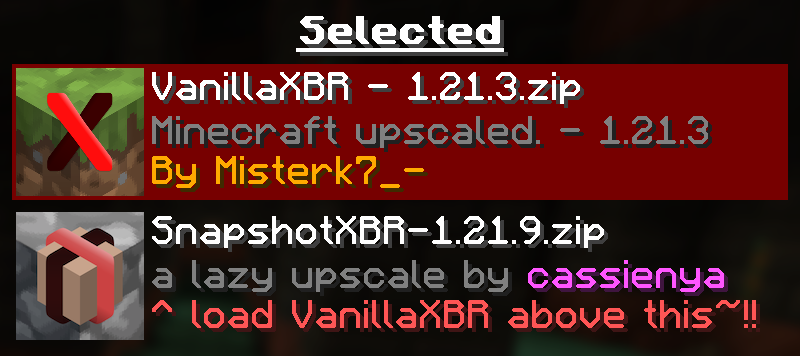
Ensure [VanillaXBR](https://modrinth.com/resourcepack/vanillaxbr) is loaded above SnapshotXBR for the best experience
## Why?
[Misterk7_-](https://modrinth.com/user/misterk7_-) is busy and [VanillaXBR](https://modrinth.com/resourcepack/vanillaxbr) doesnt get updates very quickly, so this is designed to be a sort of bleeding edge build that people can use day 1 as a fallback for textures not yet given [Misterk7_-'s](https://modrinth.com/user/misterk7_-) touch
### You will notice...
- Gaps in-between block models (ex. missing corners of torches)
- Unnatural pixel blending (ex. the eyes of mobs may morph into the rest of the body)
- Clipped textures in the user interface (ex. the dimming is broken in the world menu)
These are issues that come with a 'lazy upscale' of the Minecraft textures, and so will not be fixed as a part of this pack. To fix them, read the recommended usage guidelines below.
### Recommended usage
- Use the latest version of [VanillaXBR](https://modrinth.com/resourcepack/vanillaxbr).
- Enable VanillaXBR above SnapshotXBR in the resource pack menu (as seen above).
- Create and/or improve automatically scaled versions of the textures yourself
## What if I want xBR versions of textures from [insert mod or resource pack]
[PackXBR](https://packxbr.f53.dev/) is the easiest way to make your own textures fit with VanillaXBR.
[](https://packxbr.f53.dev)