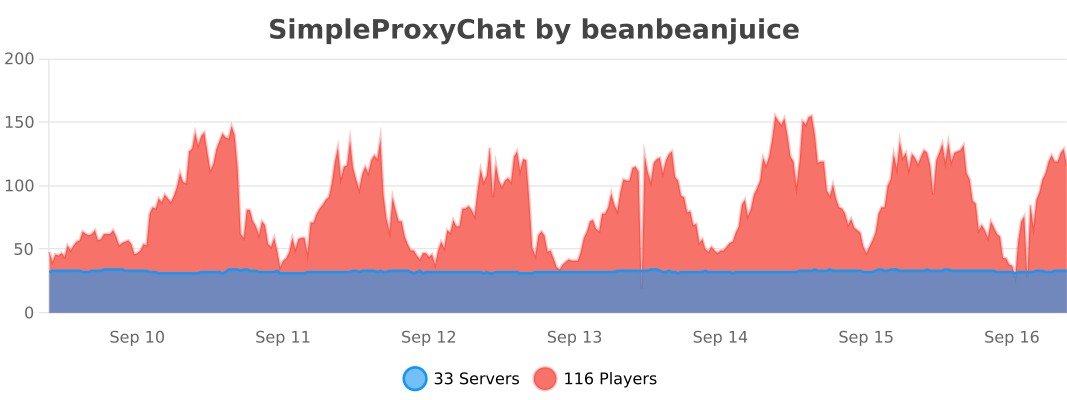
Описание
This is a Bungeecord Chat Sync, Velocity Chat Sync, and Proxy Chat Sync plugin. It is a simple plugin to allow global cross-server communication and messaging with support for PlaceholderAPI, LuckPerms, LiteBans, AdvancedBan, NetworkManager, and Discord.
---
### With PlaceholderAPI
1) You **must** use the *helper plugin* which you can download [here](https://www.spigotmc.org/resources/116966/).
1) Drag the helper plugin to each **Spigot/Paper/Bukkit** server that you want PlaceholderAPI support on.
* You do not need any additional configuration on the Spigot/Paper/Bukkit server as long as you have PlaceholderAPI installed.
1) Set `use-helper` to `true` in the `config.yml` for the proxy configuration. This will be in your **BungeeCord/Velocity** server.
1) Restart or reload the plugin! `/spc-reload`
> For **PlaceholderAPI** support, the helper plugin is required. Additionally, **PlaceholderAPI placeholders** can only be used for **Minecraft chat messages**. It will **not work** for join/leave messages.
### Without Discord
1) Simply place the plugin in your `plugins` folder on **BungeeCord/Waterfall/Velocity** and restart your proxy!
### With Discord
1) Go to discord.com/developers and select **New Application**. You can select *any* name you want.
1) Go to the **OAuth2** section.
1) Go to the **OAuth2 URL Generator** and give it the **bot** scope.
1) Under **bot permissions** select;
- Manage Channels (**REQUIRED**: General Permissions)
- Send Messages (**REQUIRED**: Text Permissions)
- Manage Messages (**REQUIRED**: Text Permissions)
- Read Message History (**REQUIRED**: Text Permissions)
- *+ Any others that you want to add...*
1) Copy the **Generated URL** at the bottom.
1) Paste the generated URL into a web browser.
1) Invite the bot to your server.
1) Go back to discord.com/developers.
1) Select your bot.
1) Click on **bot**.
1) Click **Reset Token** and copy the token somewhere safe.
1) Scroll down to **Privileged Gateway Intents**.
1) Select **SERVER MEMBER INTENT** and **MESSAGE CONTENT INTENT**.
1) Place the plugin in the `plugins` folder on **BungeeCord/Velocity**.
1) Start your server once *fully*, then stop it. There *will* be errors, this is normal.
1) In the generated `ProxyChat/config.yml` file, paste your **Bot Token** and choose the appropriate channel you want messages being sent to.
1) Restart your proxy!
---
* **Global Network Chat**
* **LuckPerms Support**
* **LiteBans Support**
* **AdvancedBan Support**
* **NetworkManager Support**
* **Discord Support**
* **Velocity/Waterfall/BungeeCord Support**
* **Colored Chat**
* **Cross-Server Communication**
* **PlaceholderAPI Support**
* **...and more!**
---
**config.yml**
```YAML
# ==========================================================
# INFORMATION
# HEX Values are Supported
# Example: Some text this is a message!
# Supports Mini-Message/Legacy Color Codes
# ==========================================================
# True if you will be using Discord. The reload command does not work with this.
use-discord: false
# Discord Bot Token (IGNORE IF use_discord = false).
BOT-TOKEN: "TOKEN_HERE"
# Channel to send Discord messages to (IGNORE IF use_discord = false).
CHANNEL-ID: "GLOBAL_CHANNEL_ID"
bot-activity:
# Valid Types: ONLINE, DO_NOT_DISTURB, IDLE, INVISIBLE
status: ONLINE
# Valid Types: PLAYING, STREAMING, LISTENING, WATCHING, COMPETING, CUSTOM_STATUS
type: "CUSTOM_STATUS"
# Valid placeholders are %online% and/or %max-players% (UPDATES EVERY 5 MINUTES)
text: "%online%/%max-players% - SimpleProxyChat by beanbeanjuice"
# The amount of seconds to check if a server is online/offline.
# Smaller numbers can cause errors. Beware.
server-update-interval: 3
# Use this if you want to change the default aliases.
# It MUST be the same name you have in your bungee/velocity config.
# Simply set it to disabled: disabled to disable it.
aliases:
ServerInConfigExample: ServerAliasExample
hub: Hub1
smp: smp1
# Whether to use the permission system.
# Some permissions (denoted with ➕) are always active even if this is false.
# simpleproxychat.read.chat - Read chat messages.
# simpleproxychat.read.join - Read join messages.
# simpleproxychat.read.leave - Read leave messages.
# simpleproxychat.read.fake - Read the fake join/leave messages. Players must also have the REAL join/leave permission.
# simpleproxychat.read.switch - Read switch messages.
# simpleproxychat.read.update - Read update messages. ➕
# simpleproxychat.toggle.chat - Toggle proxy chat for a single server. ➕
# simpleproxychat.toggle.chat.all - Toggle proxy chat for all servers. ➕
# simpleproxychat.reload - Reload the config. ➕
# simpleproxychat.ban - Ban a player from the proxy. ➕
# simpleproxychat.unban - Unban a player from the proxy. ➕
# simpleproxychat.whisper - Whisper to another player on the proxy. ➕
# simpleproxychat.broadcast - Broadcast a message to everyone on the server. ➕
use-permissions: false
# Only messages that start with this character will be sent through the plugin.
# Set to '' to disable.
# Example: If it is set to '$', then when a player sends $hello, it will be sent through the proxy.
proxy-message-prefix: ''
# Whether to send if the statuses of the servers connected to the proxy when the proxy starts up.
# THIS IS FOR DISCORD MESSAGES ONLY.
use-initial-server-status: true
# Whether to send a fake join/leave message when vanishing/unvanishing.
use-fake-messages: true
# Format: https://docs.oracle.com/javase/8/docs/api/java/time/format/DateTimeFormatter.html
# Timezone: https://www.joda.org/joda-time/timezones.html
timestamp:
# If your server is prone to getting off-sync on the time you can use an API.
# WARNING: Using the API will make messages somewhat longer to send.
# Additionally, the maximum accuracy will only be up to 1 minute, rather than seconds.
use-api: false
format: "hh:mm a"
timezone: "America/Los_Angeles"
# True if you will be using the helper plugin.
use-helper: false
update-notifications: true
# It is HIGHLY recommended to use a more robust proxy-wide banning system such as LiteBans or AdvancedBan.
# However, if you would rather a light-weight, simple, banning system. You can enable it here.
# A FULL PROXY RESTART IS REQUIRED TO USE THIS.
use-simple-proxy-chat-banning-system: false
# This will store and re-send the last few chat messages when a player switches servers.
# This is here because sometimes Velocity/Bungee does not keep the previous messages when switching.
# This WILL retain old formatting if you change the formatting prior to reloading.
send-previous-messages-on-switch:
enabled: false
amount: 15
# These require a restart in order to take place.
commands:
reload-aliases:
- "spcreload"
chat-toggle-aliases:
- "chattoggle"
ban-aliases:
- "spcban"
unban-aliases:
- "spcunban"
whisper-aliases:
- "spc-msg"
reply-aliases:
- "spc-r"
broadcast-aliases:
- "spc-bc"
- "broadcast"
# Disable servers from sending/receiving proxy messages.
disabled-servers:
- example1
# DO NOT TOUCH THIS
file-version: 15
```
**messages.yml**
```YAML
# ==========================================================
# INFORMATION
# HEX Values are Supported
# Example: Some text this is a message!
# Supports Mini-Message/Legacy Color Codes
# ==========================================================
# Prefix for the plugin. %plugin-prefix% usable anywhere.
plugin-prefix: "&8[SimpleProxyChat&r&8]"
# Minecraft Stuff
minecraft:
join:
enabled: true
message: "&e%player% &ahas joined the network. (%server%)"
leave:
enabled: true
message: "&e%player% &chas left the network. (%server%)"
chat:
enabled: true
message: "&8[&3%server%&8] &e%player% &9» &7%message%"
vanished: "&cYou cannot send proxy messages while vanished. Your message must end with a '&e/&c' to speak."
switch:
enabled: true
default: "&e%player% &7moved from &c%from% &7to &a%to%&7."
no-from: "&e%player% &7moved &7to &a%to%&7."
whisper:
send: "&8[&dyou&8] &f⇒ &8[&d%receiver%&8] &9» &e%message%"
receive: "&8[&d%sender%&8] &f⇒ &8[&dyou&8] &9» &e%message%"
error: "&c/spc-whisper (user) (message)"
discord:
enabled: true
message: "**%server%** %player% » %message%"
embed:
use: false
title: "[%server%] %player%"
message: "%message%"
color: "#FFC0CB"
use-timestamp: true
command:
no-permission: "%plugin-prefix% &cSorry, you do not have permission to run this command."
unknown: "%plugin-prefix% &cUnknown command."
must-be-player: "%plugin-prefix% &cYou must be a player to run this command."
reload: "%plugin-prefix% &aThe plugin has been successfully reloaded!"
chat-lock:
usage: "%plugin-prefix% &cCorrect usage is &a/spc-chat all lock/unlock &c or &a/spc-chat lock/unlock"
single:
locked: "%plugin-prefix% &6%server% &cwill no longer send proxy chat messages."
unlocked: "%plugin-prefix% &6%server% &awill now send proxy chat messages."
all:
locked: "%plugin-prefix% &cAll servers will no longer send proxy chat messages."
unlocked: "%plugin-prefix% &aAll servers will now send proxy chat messages."
proxy-ban:
usage: "%plugin-prefix% &c/(un)ban (player)"
banned: "%plugin-prefix% &c%player% &7has been banned."
unbanned: "%plugin-prefix% &c%player% &7has been unbanned."
login-message: "&cYou have been banned from the proxy."
broadcast:
usage: "%plugin-prefix% &c/spc-broadcast (message)"
message: "%plugin-prefix% &8[&a&lBROADCAST&r&8] &6%message%"
# Discord Stuff
discord:
join:
enabled: true
message: "%player% has joined the network. (%server%)"
use-timestamp: true
# Incompatible with use-timestamp.
use-embed: true
leave:
enabled: true
message: "%player% has left the network. (%server%)"
use-timestamp: true
# Incompatible with use-timestamp.
use-embed: true
switch:
enabled: true
message: "%player% has switched from %from% to %to%."
use-timestamp: true
# Incompatible with use-timestamp.
use-embed: true
chat:
enabled: true
minecraft-message: "&8[&bDiscord&8] %role% &f%user% &9» &7%message%"
topic:
online: "There are %online% players online."
offline: "The proxy is offline."
proxy-status:
enabled: true
messages:
enabled: "✅ Proxy enabled!"
disabled: "⛔ Proxy disabled."
title: "Server Status"
message: "Status: "
online: "Online ✅"
offline: "Offline ⛔"
use-timestamp: true
# Console Stuff - Uses Minecraft Messages
console:
chat: true
join: true
leave: true
switch: true
discord-chat: true
server-status: true
# The message for any updates that are sent.
# The plugin-prefix is automatically appended to the beginning of this message.
update-message: "&7There is an update! You are on &c%old%. New version is &a%new%&7: &6%link%"
# DO NOT TOUCH THIS
file-version: 10
```
---
* `/spc-reload` - Reloads the config files.
* `/spc-chat` - Lock/unlock the chat.
* `/spc-whipser` - Send a private message to someone.
* `/spc-reply` - Reply to a private message without specifying a user.
* `/spc-ban` - Ban a player from the proxy.
* `/spc-unban` - Unban a player from the proxy.
* `/spc-broadcast` - Broadcast a message to every player on the network.
---
* `simpleproxychat.read.chat` - Read chat messages.
* `simpleproxychat.read.join` - Read join messages.
* `simpleproxychat.read.leave` - Read leave messages.
* `simpleproxychat.read.fake` - Read fake join/leave messages. Must have the real permission too.
* `simpleproxychat.read.switch` - Read switch messages.
* `simpleproxychat.read.update` - Read update notifications.
* `simpleproxychat.toggle.chat` - Toggle proxy chat for a single server.
* `simpleproxychat.toggle.chat.all` - Toggle proxy chat for all servers.
* `simpleproxychat.reload` - Reload the config.
* `simpleproxychat.ban` - Ban someone.
* `simpleproxychat.unban` - Unban someone.
* `simpleproxychat.whisper` - Private messaging permissions.
* `simpleproxychat.broadcast` - Broadcast a message to everyone on the server.
---
* `%plugin-prefix%` - The plugin's designated prefix.
* `%server%` - The current connected server. Uses the alias if one is specified.
* `%original_server%` - Same as `%server%`, but does not use the alias.
* `%to%` - The current connected server. Uses the alias if one is specified.
* `%original_to%` - Same as `%to%`, but does not use the alias.
* `%from%` - The server the player just disconnected from. Uses the alias if one is specified.
* `%original_from%` - Same as `%from%`, but does not use the alias.
* `%player%` - The player's Minecraft username.
* `%escaped_player%` - The escaped player's Minecraft username. (Adds '\\' before the '_' to prevent italics.)
* `%sender%` - The person sending the private message. **Private Messaging Only**
* `%receiver%` - The person receiving the private message. **Private Messaging Only**
* `%user%` - The player's Discord username.
* `%nick%` - The player's Discord nickname.
* `%role%` - The player's Discord role.
* `%prefix%` - The player's prefix. **LuckPerms Only**
* `%suffix%` - The player's suffix. **LuckPerms Only**
* `%message%` - The player's message.
* `%epoch%` - This gets the current time (in milliseconds). Formats can be used like [this](https://gist.github.com/LeviSnoot/d9147767abeef2f770e9ddcd91eb85aa). An example would be ``. **Discord Only**
* `%time%` - Similar to `%epoch%`, but uses a special formatting and timezone found in `config.yml`.
* `%online%` - **Discord Status Only**
* `%max-players%` - **Discord Status Only**
---
1) As of right now, vanish support is only available on *BungeeCord/Waterfall*. The plugin will still function as normal, but if you go into vanish then it won't send a fake join/leave message.
1) In order for prefixes and suffixes to work, you **must** have LuckPerms installed on the proxy. Then, you can use `%prefix%` and `%suffix%`.
1) `%epoch%` and the timestamps only work in certain places on Discord. As an alternative, you can select some of the embeds to have `use-timestamp: true`. This is out of my control sadly... 😔
---
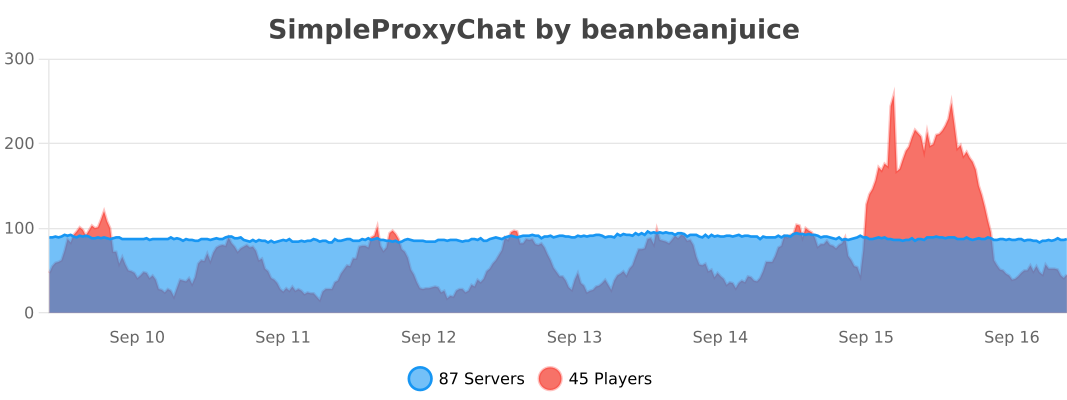
### Velocity Statistics
### BungeeCord/Waterfall Statistics