
Описание
# Simple Shulker Preview



Simple Shulker Preview is a small fabric mod that displays an icon indicating the contents of a shulker. This icon appears on top of the shulker icon in inventory slots.
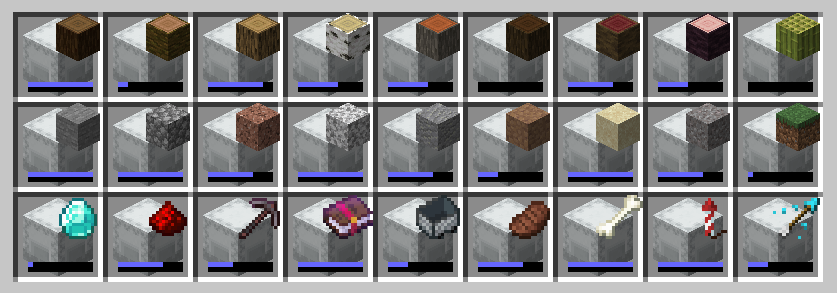
For other download pages, please see [CurseForge](https://www.curseforge.com/minecraft/mc-mods/simple-shulker-preview) or [Modrinth](https://modrinth.com/mod/simple-shulker-preview).
## Dependencies
This mod requires [ModMenu](https://www.curseforge.com/minecraft/mc-mods/modmenu) to adjust the configs. The [Cloth Config API](https://www.curseforge.com/minecraft/mc-mods/cloth-config) mod is embedded - you don't need to download it yourself.
## Configs
I won't go through all the configs, since they've increased over time. A brief overview is as follows:
| **Option** | **Description** |
|---------------------|--------------------------------------------------------------------------------------|
| `Display Item` | Decides which item in the shulker should be displayed based on position or quantity. |
| `Custom Name` | Provides options to display an icon based on custom named shulkers |
| `Icon Positions` | Modify the x and y offsets of the icon, as well as scale. |
| `Capacity Bar` | Display a capacity bar, indicating how full the shulker box is |
| `Bar Position` | Set the position, size, and _direction_ the capacity bar is drawn. |
| `Stack Limits` | Set minimum limits for the number of items required to display an icon |
| `Enable ...` | Option to enable additional features, such as bundles or recursive shulker support |
| `Disable Mod` | Disables the mod so that overlay icons are not displayed. |
When using custom named shulkers, you need to name it using the same conventions required for spawning in items. For example, naming a shulker `minecraft:grass_block` will display a grass block. If an invalid name has been given, it will continue to follow the 'Display Item' configuration (unless 'Custom Name' has been set to 'ALWAYS', of course).
## Contributing
Contributions and suggestions are always welcome! Please limit all issues to only one feature at a time - feel free to open multiple at once if you have many ideas. Similarly, please limit pull requests to a single feature at a time and try to follow the existing code style.
To further discuss or get notifications of new updates, check out my [Discord](https://discord.gg/gyTa5v7kKk). If you like what I do, consider supporting me on Ko-Fi! [](https://ko-fi.com/C0C7DZ3FB)