
Описание
**Shulker & Bundles - Enhanced Inventory Management!**
Tired of inventory overflow? **Shulker & Bundles** supercharges your storage solutions by allowing seamless interaction with Shulker Boxes and Bundles directly from your inventory! Pick up items into your off-hand Shulker or any Bundle, and access their contents using shift right-click while holding on the fly with intuitive GUIs.
📧 Contact Me & Support Information
### 💬 Primary Support Channel (Preferred)
**All general questions, feature requests, and non-urgent bug reports should be posted in the appropriate channels on our [Discord Server](https://discord.gg/48sZCbdHzJ).** We actively monitor the server and will respond as soon as possible. This ensures that the whole community can benefit from the discussion and solutions.
### 🆘 Urgent Private Messaging (PM) Policy
While we prefer all issues to be handled via the Discord server first, you are welcome to PM me directly under **specific urgent circumstances**:
* **Allowed Reason:** Your server is **crashing** or experiencing **critical, game-breaking errors** directly related to one of my mods/plugins.
* **Requirement:** You must be the **owner** of the server.
* **Time Zone:** I am operating in the **(CET/CEST) Time Zone**.
* **PM Hours:** Please only send private messages between **10:00 AM and 10:00 PM (Brussels Time)**.
I will endeavor to answer your PM as soon as I can to be helpful and see what I can do to resolve your urgent issue. However, please understand that immediate responses are not guaranteed, and **private messaging is a professional courtesy, not an entitlement.** Thank you for your understanding and cooperation!
---
## Also works for: [Reinforced Shulker Boxes](https://modrinth.com/mod/reinforced-shulker-boxes)
## Features
### Direct GUI Access
* **Shulker Box GUI:** Shift-right-click a Shulker Box (in main or off-hand) to open its 27-slot GUI **without placing it down!**
* An "Editing Shulker: [Shulker Name]" placeholder appears in your hand while the GUI is open.
* **Permission:** `shulkerbundle.open`
* **Note:** Stacked shulker boxes in hand cannot be opened.
* **Bundle GUI:** Shift-right-click a Bundle (in main or off-hand) to open a dynamic custom GUI.
* The GUI size adjusts to 9, 18, or 27 slots based on the number of unique item types already within the bundle (max 27 unique types for manual interaction).
* An "Editing: [Bundle Name]" placeholder appears in your hand while the GUI is open.
* **Note:** The Bundle GUI cannot be opened if the bundle contains more than 27 unique item types.
* **Permission:** `shulkerbundle.open_bundle_gui`
### Automatic Item Collection
* **Shulker Auto-Pickup (Off-hand):** Items you pick up go directly into your off-hand Shulker Box if space is available.
* **Permission:** `shulkerbundle.hold.shulker`
* **Notifications:** Receive action bar messages showing "Shulker has X empty slots left" when items are picked up, specifically triggered by a new item filling a slot in the third row (slots 18-26).
* **Exclusions:** Will not pick up other Shulker Boxes, Bundles, or placeholder items.
* **Note:** Stacked shulker box items in the off-hand are not supported for auto-pickup.
* **Bundle Auto-Pickup (Inventory & Off-hand):** Items you pick up go directly into any available Bundles in your main inventory or off-hand.
* **Permission:** `shulkerbundle.hold.bundle`
* **Notifications:** Receive action bar messages indicating "Bundle has (X/64) items" if the bundle has 32 or more items but is not full, or "Bundles with space X" otherwise.
* **Conditions:** Auto-pickup into Bundles is skipped if the player is sneaking, the item is on the auto-pickup blacklist (Cake, Pumpkin Pie, or other Bundles), or if adding a new unique item type would exceed 9 unique types already in the bundle.
* **Exclusions:** Items marked with the `CrateBundleNoAutoPickup` NBT tag are ignored.
### Bundle Item Interaction Rules
* **GUI Blacklist:** Prevents `Cake`, `Pumpkin Pie`, `Shulker Box` items, and other `Bundle` items (unless empty) from being manually placed into a Bundle via the custom GUI. Placeholder bundles and shulkers are also blocked.
* **Manual Inventory Interaction Restrictions:** Similar restrictions apply when trying to right-click items from your cursor into a Bundle in your inventory.
* Attempting to add blacklisted items or exceeding unique item limits via right-click will be blocked.
* Any non-empty Bundle cannot be put into another Bundle.
* **Bundle Nesting Prevention (Left-Click):** Prevents putting a Bundle held on the cursor into another Bundle in an inventory slot by left-clicking.
* **Unique Item Limits:** Auto-pickup into Bundles is limited to **9 unique item types**. Manual insertion into the Bundle GUI is limited to **27 unique item types**.
### Commands (Admin & Personal)
* `/shulkerbundle` or `/sb`: Shows the main help page for the mod.
#### Global Commands (Admin-Only)
*Requires the `shulkerbundle.admin` permission (OP Level 2).*
* `/sb global gui [shulker|bundle]`: Toggles the ability to open GUIs for all players.
* `/sb global pickup [shulker|bundle]`: Toggles auto-pickup functionality for all players.
* `/sb global notify [shulker|bundle]`: Toggles action bar notifications for all players.
#### Personal Commands
*These commands allow each player to toggle features for themselves. They are saved per-player on the server.*
* `/sb personal gui [shulker|bundle]`: Toggles your personal preference for opening GUIs.
* `/sb personal pickup [shulker|bundle]`: Toggles your personal preference for auto-pickup.
* `/sb personal notify [shulker|bundle]`: Toggles your personal preference for notifications.
---
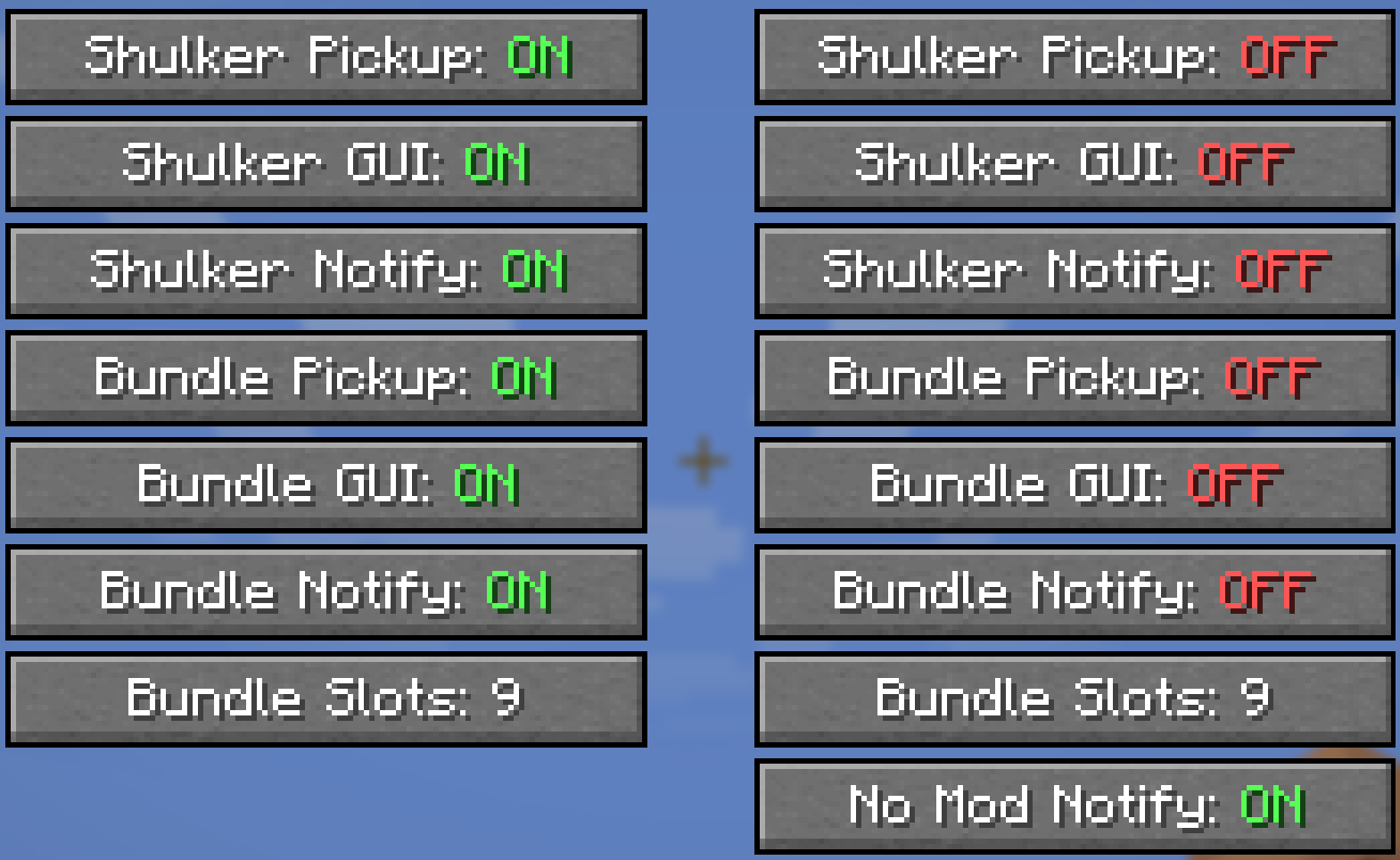
### Client-Side Configuration (via ModMenu)
* If you have ModMenu installed, you can access a detailed config screen.
* Settings are split into **Singleplayer** and **Multiplayer** categories, allowing you to have different preferences for each context.
* These toggles are an alternative to the `/sb personal` commands and give you full control over your experience.
### How Features are Controlled (Permission Hierarchy)
This mod uses a 3-layer system to determine if a feature is active for a player.
1. **Player's Choice (Client-Side):** The player must have the feature enabled in their personal settings (via the ModMenu config or `/sb personal` command). If a player disables a feature, it will **always** be off for them, regardless of server settings.
2. **Server's Global Setting:** If the player has the feature enabled, the server then checks its global settings. If the feature is enabled globally (via `/sb global`), the player can use it.
3. **Server Permissions:** If the feature is disabled globally, the server will then check if the player has the specific permission node for it (e.g., `shulkerbundle.open`).
* **Master Override:** The multiplayer config screen has a **"Deny Server Permissions"** toggle. When enabled, it acts as a "hard opt-out," forcing all of this mod's features to be disabled for you on the server, ignoring any global settings or permissions.
### Server Administration
* **Client Mod Detection:** The server can detect if players have the mod installed. If a player joins without it, they will receive an action bar message with a clickable link to this page. This message only appears twice per player.
* **Server Configuration:** Server owners can disable this notification message by setting `notifyPlayer: false` in the `shulkerbundle.json` config file.
---
Click to view all permission nodes and their descriptions
* `shulkerbundle.open`: Allows opening the Shulker Box GUI with shift-right-click.
* `shulkerbundle.open_bundle_gui`: Allows opening the custom Bundle GUI with shift-right-click.
* `shulkerbundle.hold.shulker`: Allows items to be automatically inserted into the off-hand Shulker Box.
* `shulkerbundle.hold.bundle`: Allows items to be automatically inserted into Bundles in the player's inventory.
* `shulkerbundle.notify.shulker`: Allows players to receive action bar notifications for Shulker Box fill status.
* `shulkerbundle.notify.bundle`: Allows players to receive action bar notifications for Bundle fill status.
* `shulkerbundle.admin`: Grants administrative permissions, including use of the global toggle commands. (Default: OP Level 2)
* `shulkerbundle.command.use`: Allows use of the base `/shulkerbundle` (and `/sb`) command to view help pages. (Default: anyone)
---
## Modpack Policy
* You **ARE PERMITTED** to include this mod in any modpack.
* Please do not modify the mod's JAR file directly.
* The modpack itself, or access to this mod within the modpack, **must not be sold**.