
Описание
# 🔍 Shop Search AddOn for QuickShop
**Stop walking the whole map looking for a sign. Let your players search every shop on the server in one command.**
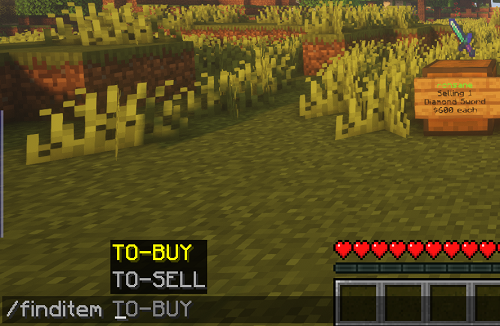
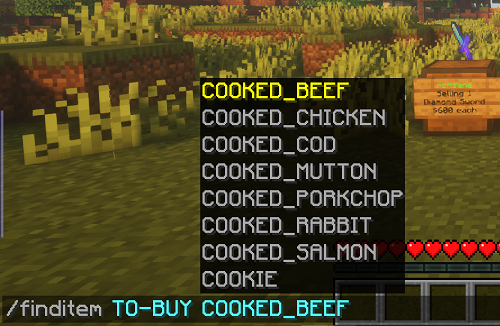
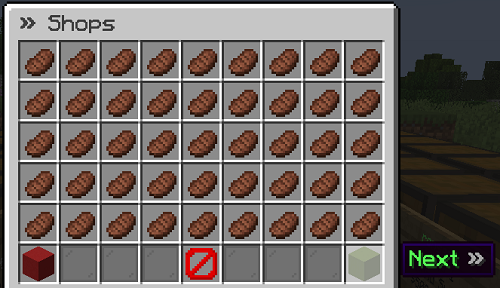
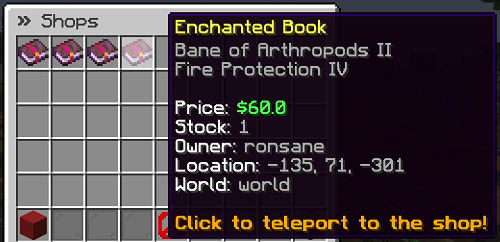
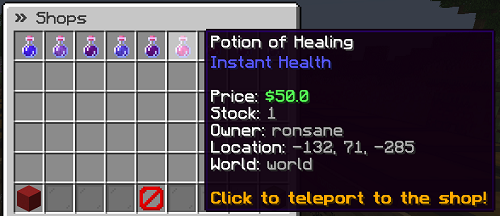
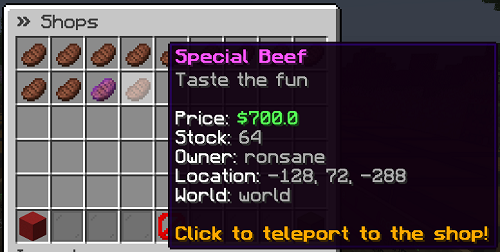
`/finditem` opens an instant, paginated GUI showing every shop buying or selling the item your player wants, complete with price, stock, owner, location, and a one-click teleport button to get there. No walkie-talkie chat spam, no wiki page pinned in Discord, just search and go.

---
## 🚀 Try it in 60 seconds
1. Drop the jar in `plugins/`
2. Restart your server (a `config.yml` is generated for you automatically)
3. Run `/finditem` in game
That's the whole setup. Everything past this point is optional polish.
---
## ✨ Why your players will love it
- **Instant results.** Type an item name, get every matching shop on the server in a clean paginated GUI, sorted by price or stock, your choice.
- **One-click teleport.** Safe, configurable teleportation straight to the shop, with an optional delay and a "don't drop me in lava" landing check, or send them to the nearest warp instead.
- **Nothing gets lost in search.** Enchantments, potion colors and effects, custom item names and lore, and custom model data all show up correctly, not just the base item name.
- **No wasted trips.** Out-of-stock shops are skipped automatically, and you can cap results to a max distance so players aren't sent halfway across the map for one shop.
- **Fully brandable.** Every message supports hex colors, GUI buttons/titles/lore are editable, and large prices auto-shorten (`$10,210,100` → `$10.21M`) to keep things readable.
- **Built for scale.** Shop syncing and searches are optimized to stay fast even on servers running thousands of shops.
## 🖼️ See it in action
| | |
|---|---|
|  |  |
|  |  |
|  |  |
## 📜 Command cheat sheet
| Command | What it does |
|---|---|
| `/finditem TO_SELL ` | Find shops selling this item (so you know where to buy it) |
| `/finditem TO_BUY ` | Find shops buying this item (so you know where to sell it) |
| `/finditem TO_SELL *` / `TO_BUY *` | Browse every shop on the server |
| `/finditem hideshop` | Hide the shop you're looking at from search results |
| `/finditem revealshop` | Make a hidden shop searchable again |
| `/finditemadmin reload` | Reload `config.yml` without a restart |
Aliases `/searchshop`, `/shopsearch`, and `/searchitem` all work out of the box too, and the `TO_SELL`/`TO_BUY` labels can be renamed in config if they read awkwardly for your players.
> Full command list, every permission node, and a fully annotated `config.yml` are on the **[GitHub Wiki](https://github.com/myzticbean/QSFindItemAddOn/wiki)**.
## 🔌 Plays nicely with
Auto-detected on startup, zero extra setup required:
| Plugin | What it adds |
|---|---|
| **PlayerWarps** | Shows the nearest warp to each shop in results |
| **EssentialsX Warps** | Same, using Essentials warps |
| **WorldGuard** | Shows which region a shop sits in |
| **Residence** | Shows which residence (and subzone) a shop sits in |
| **BentoBox** | Keeps shops on locked islands out of search results |
None of these are required. It works great with just QuickShop-Hikari and Vault installed.
## ⚙️ Built for real servers
- Runs on both **Paper and Folia**
- Fine-grained permissions for search, teleport, delay bypass, and safety-check bypass
- Shop owners can hide their own shop from search with a single command
- World and material blacklisting to keep results clean and free of exploit items
- Optional distance limit so search results stay local on huge worlds
## 📋 Requirements
- [QuickShop-Hikari](https://www.spigotmc.org/resources/100125/) v6.3.0.0+
- [Vault](https://www.spigotmc.org/resources/34315/) with a compatible economy plugin
- Paper 1.20+ (Folia supported)
## 📚 Links
- [Wiki & full config reference](https://github.com/myzticbean/QSFindItemAddOn/wiki)
- [Report a bug / request a feature](https://github.com/myzticbean/QSFindItemAddOn/issues)
- [Source code](https://github.com/myzticbean/QSFindItemAddOn)
- [Contributing guide](https://github.com/myzticbean/QSFindItemAddOn/blob/master/CONTRIBUTING.md)
---
*Free and open source, GPLv3 licensed. Anonymous usage stats via bStats help prioritize what to build next, no personal data collected.*