Описание
**If you want to play the full version of the modpack, please download the latest 1.21.11 version!!!**
This Modpack is a collection of Mods and Resourcepacks that you can find on Modrinth that aims to create a semi-realistic, vanilla-style environment, visual and interactive adventure with minimal FPS drops and high customisability. I have gone through many, many Modrinth pages to find the best optimisations and debug mods to squeeze out every last drop of FPS.
**NOTE:** When playing in multiplayer, ensure that you disable the mod "Wet Sand" as the game becomes unplayable as block id's get messed up easily; you might find your deepslate becoming water!
### Q: How often do updates come out?
**Answer**: I try my best to push out updates as quickly as possible, but with school and testing needs for the modpack, it may take a week or two to upload an update.
### Q: How do I install it?
**Answer**: Download the file and double-click it. This should start creating the modpack for you in Modrinth if you have Modrinth installed.
### Q: Can you make the modpack for older versions?
**Answer**: Unfortunately, outside of 1.21.11, the main mods that bring the life together are not compatible with 1.21.10 and earlier. 1.21.10 is the earliest version I will update for, as 1.21.9 has little to no features regarding this mopack; there aren't even replacement mods I could find.
### Q: Can you update the modpack for a newer version?
**Answer**: Currently, no. Most of the mods still need to be upgraded.
### Common Errors and Fixes:
Java Version Incompatibility Error:
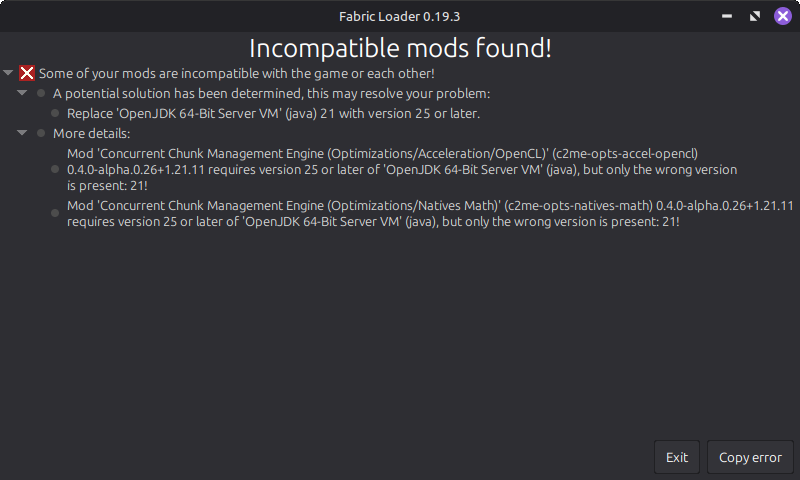
For this error, **you must install said version of Java** on your computer and then go to Shades 'n' Shine> Instance Settings> Java and memory> Java version. Here you need to tick the box that says: "Custom Java Installation" and then choose "Detect" and then choose the correct version of Java.
JDK Error:
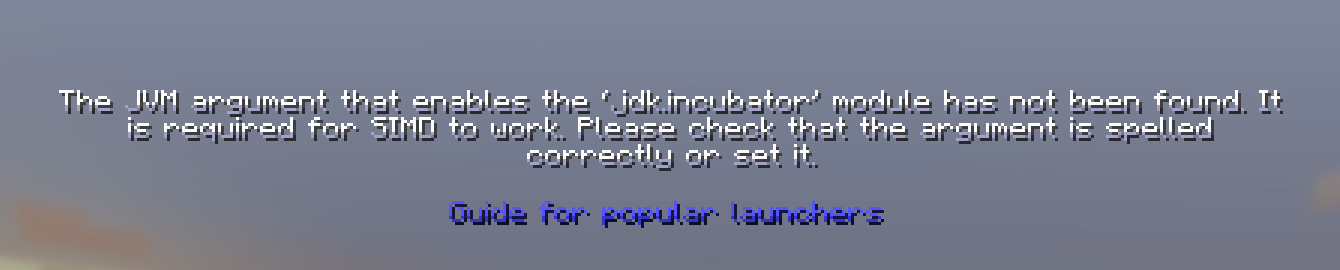
For this error, **click on "Guide for popular launchers"**, and it should be smooth sailing from their - It'll have an easy step-by-step on their site.
### Future Additions:
- My custom music
- Custom quests and advancements
- More simple QoL improvements
- Enhanced Structures (without adding much)
- Missing blocks (stairs, slabs, etc)
- Better balanced loot tables and chests
- Better Crafting Recipes
- Woodcutter
- Stonecutter Crafting Recipes
Minecraft Title created using the "Minecraft Title" plugin, which can be found on Blockbench: https://blockbench.net
My Music: https://musescore.com/s/user/62305303/sets/14941418 (to be added in the update 2.0)
Vanilla Tweaks: https://vanillatweaks.net/
Note: For an even better visual experience for skin customisation and emotes, I would recommend Essentials (mod), but remember to disable the Fresh Animations Player extension and HMI and HMI X Fresh Player Patch to avoid armour and player animations from being broken.