
Описание
# Server Notify
**Server Notify** is a Minecraft mod that lets you display notifications to players joining your Minecraft server. Easily set up notifications using commands, with options for texture, text, or URL-based notifications.
**Required on Client and Server!**
## Notification Types
1. **Texture Notifications**: Display textures from any loaded resource pack.
2. **Text-only Notifications**: Display simple messages.
3. **Image from URL**: Display images from a specified URL.
## Getting Started
1. **Command-based**: All features are accessed via commands in-game.
2. **Commands**: Type `/server-notify` to view available options.
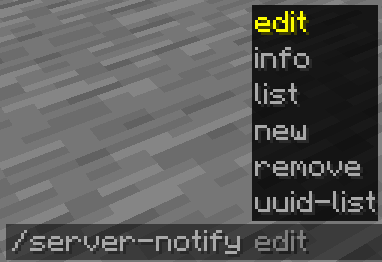
### Command Options:
- **Edit**: Modify a notification's properties.
- **Info**: View details of a specific notification.
- **List**: Display all notifications.
- **New**: Create a new notification.
- **Remove**: Delete a notification.
- **UUID-List**: Show all notifications with their UUIDs.
## Creating Notifications
Use the command `/server-notify new type "Notification Name"` to create a notification, replacing `"Notification Name"` with your preferred name and `type` with **texture**, **text**, or **url**.
### Notification Types and Commands
Text-only Notification
A text notification lets you display any message as a notification.
An example command would be:
```
/server-notify new text "Notification Name"
```
**"Notification Name"** can be anything, however it must be in quotation marks. It is for you to identify the notification later on.
**** is the namespace of the sound you'd like to play when the notification is shown.
**** is the path of the sound you'd like to play when the notification is shown.
**** is your message in quotation marks.
**** displays a "Dismiss" button on the screen.
**** displays a "Press ESC to dismiss" text at the bottom of the screen.
**** shows the notification to a player when they join even if they have already seen it.
**Another Text Notification example would be:**
```
/server-notify new text "Notification Test" minecraft "ambient.cave" "hey, testing" false true true
```
Image from URL Notification
An image notification lets you display any image from a URL.
An example command would be:
```
/server-notify new url "Notification Name"
```
**"Notification Name"** can be anything, however it must be in quotation marks. It is for you to identify the notification later on.
**** is the namespace of the sound you'd like to play when the notification is shown.
**** is the path of the sound you'd like to play when the notification is shown.
**** is your image URL in quotation marks.
**** is the width of your image (you might have to use a scaled down resolution to accomodate for Minecraft's GUI scale, for example for an image that's 1920x1080, scaled down while also keeping the aspect ratio would be 480 by 270).
**** is the height of your image (you might have to use a scaled down resolution to accomodate for Minecraft's GUI scale, for example for an image that's 1920x1080, scaled down while also keeping the aspect ratio would be 480 by 270).
**** displays a "Press ESC to dismiss" text at the bottom of the screen.
**** shows the notification to a player when they join even if they have already seen it.
**Another Image Notification example would be:**
```
/server-notify new url "Image Test" minecraft "ambient.cave" "https://some_direct_image_url" 480 270 true true
```