Описание
# QuickAdditions StationAPI for Minecraft Beta 1.7.3
A StationAPI mod for Minecraft Beta 1.7.3 that adds in features that were requested, but didn't have enough time to make more real solutions.
- Requires [Zastavka API](https://modrinth.com/mod/zastavkaapi) (used to make music biome/dimension specific and to get current BGM)
# Quick Additions
Mod now works on Multiplayer with GlassConfigAPI version 3.0+ used to sync configs!
### Entity Spawning Mechanics
* Adds ability to control which vanilla entities can spawn from biome spawn mechanics.
* Adds ability to disable living entity despawning.
* Adds ability to disable saddled pig despawning.
* Also adds the ability to skip saddled pigs in the passive spawn count.
* Allowing passive spawn capacity to be filled with normal despawning passive mobs and not just the new saddled pigs.
* Adds ability to change max mob spawn capacity for different creature types.
* Monster, passive (animals), and squid max spawn capacity can be changed.
* Adds ability to change mob spawn group size.
* Disabled when [PumpkinMoon](https://modrinth.com/mod/pumpkinmoon) is installed, as PumpkinMoon will take over setting spawn group size.
* Adds ability to change max light level at which monsters can spawn.
### Sleep
* Adds ability to exit beds by clicking or swinging the hand.
* Adds ability to speed up night rather than skip it.
* Configurable speed up tick rate
* Default tick rate takes about 30 seconds to sleep the entire night away
* Ability to tick world entities and chunks during speed up
* For instance makes furnaces smelt faster, entities move faster, and entities make more noise as a side effect
* Adds ability to configure percentage of sleeping players needed to skip nighttime.
* 0% will be treated as one player fully asleep required to skip the night.
### Weather
* Adds ability to set a Y level above which it will always snow.
* Adds ability to disable rain in savanna biomes.
* Adds ability to cancel weather reset when sleeping and the weather is clear.
* This makes rain and snow more common.
* Adds ability to configure rain/thunder time until and duration.
* Also adds the ability to disable rain/thunder entirely.
### Music
* Adds ability to lower ambient nether portal, rain, ghast, and cave sounds.
* Adds ability to change background music countdown timer min and max interval values.
* Also adds the ability to disable random background music entirely.
* Adds ability to add custom background music to the game.
* On first run of the mod a folder named `custom-music` will be created.
* Add `.ogg`, `.mus`, or `.wav` files to this folder, and they will have a random chance to play in-game.
* No other file types are supported by default in Minecraft or by this mod.
* You can make the added songs only play in certain dimensions or biomes by adding specific tags to the song name.
* Firstly the song must end with `-specific.XXX` where `XXX` is one of the three acceptable file types `ogg`, `mus`, or `wav`.
* Then simply specify which dimension using `-overworld-`, `-nether-`, or `-levelX-` in the song name.
* Where `X` in `-levelX-` is the numerical value of the level ID.
* (nether = `-1`, overworld = `0`, skylands = `1`, modded-dimension = some number greater than 1 probably)
* You can also make songs biome specific by specifying the biome with a biome tag such as `-tundra-` or `-savanna-`.
* See full list of vanilla b1.7.3 biomes below
* All tag names MUST be lowercase to work and have the `-` symbol on either side of the tag.
* Example song name: `HappyDisco-nether-rainforest-specific.ogg`
* This song would play in the nether or in the rainforest biome.
* Adds ability to disable default Minecraft background music.
* Adds ability to view currently playing music in the debug overlay (F3).
* Compatible with [Better F3](https://modrinth.com/mod/betterf3-stationapi) using their module system.
* Adds ability to add main menu songs.
* On first run of the mod a folder named `main-menu-theme` will be created.
* Add `.ogg`, `.mus`, or `.wav` files to this folder, these songs will play on the title screen.
* A single song is chosen randomly upon entering the title screen and plays.
* Song names cannot be the same as vanilla b1.7.3 streaming resource files, if they are the song will not play when chosen.
* No other file types are supported by default in Minecraft or by this mod.
* Adds ability to have main menu song override background music.
* (Vanilla b1.7.3 has Minecraft background music continue to play on main menu if started in-game)
### Misc.
* Adds ability to give the player missing achievements that they may have already achieved.
* Load into a world and access mod config from pause menu using [ModMenu](https://modrinth.com/mod/modmenu-beta).
* Adding back missing achievements will not work from the main menu or when game is not running.
* Adds ability to force display active even when tabbing away from the screen.
* Adds ability to configure server spawn protection radius.
* Overridden by UniTweaks.
* Set the value for spawn protection radius in the server.properties file instead when UniTweaks is loaded.
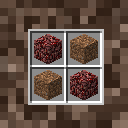
* Adds ability to add a crafting recipe for soul sand.
* See gallery images for recipe.
## List of b1.7.3 Biomes
* Rainforest -> biome tag = `-rainforest-`
* Swampland -> biome tag = `-swampland-`
* Seasonal Forest -> biome tag = `-seasonal forest-`
* Forest -> biome tag = `-forest-`
* Savanna -> biome tag = `-savanna-`
* Shrubland -> biome tag = `-shrubland-`
* Taiga -> biome tag = `-taiga-`
* Desert -> biome tag = `-desert-`
* Plains -> biome tag = `-plains-`
* Ice Desert -> biome tag = `-ice desert-`
* Tundra -> biome tag = `-tundra-`
* Hell -> biome tag = `-hell-` this is the biome that the nether uses
* Sky -> biome tag = `-sky-` this is the biome that the skylands uses
* ModdedBiome -> biome tag = `-moddedbiome-` modded biomes are supported just make the biome name lowercase as a tag!
## Installation using Prism Launcher
1. Download an instance of Babric for Prism Launcher: https://github.com/Glass-Series/babric-prism-instance
2. Install Java 17 and set the instance to use it: https://adoptium.net/temurin/releases/
3. Add GlassConfigAPI 3.0.2+ to the mod folder for the instance: https://modrinth.com/mod/glass-config-api
4. Add Glass Networking to the mod folder for the instance: https://modrinth.com/mod/glass-networking
5. Add StationAPI to the mod folder for the instance: https://modrinth.com/mod/stationapi
6. Add ZastavkaAPI to the mod folder for the instance: https://modrinth.com/mod/zastavkaapi
7. (Optional) Add Mod Menu to the mod folder for the instance: https://modrinth.com/mod/modmenu-beta
8. Add this mod to the mod folder for the instance: https://github.com/telvarost/QuickAdditions-StationAPI/releases
9. Run and enjoy! 👍
## Feedback
Got any suggestions on what should be added next? Feel free to share it by [creating an issue](https://github.com/telvarost/QuickAdditions-StationAPI/issues/new). Know how to code and want to do it yourself? Then look below on how to get started.
## Contributing
Thanks for considering contributing! To get started fork this repository, make your changes, and create a PR.
If you are new to StationAPI consider watching the following videos on Babric/StationAPI Minecraft modding: https://www.youtube.com/watch?v=9-sVGjnGJ5s&list=PLa2JWzyvH63wGcj5-i0P12VkJG7PDyo9T