
Описание
## Craft the exact amount you want — new in 1.3.1
You decide how much QuickCraft makes:
- **Click a recipe** in the recipe book to load enough for **one** craft. Click again for **two**,
again for **three** — each click adds one more, so you can stage the exact batch you want
without counting items by hand.
- **Shift-click a recipe** to load everything available at once (up to a full stack).
- **Shift-click the crafted result** to make the whole batch in one go. It uses **only what's in
the grid** — it won't keep draining your chests or inventory.
- **Normal-click the result** to craft one at a time, topping up from your chests as you go.
Works at the crafting table and your inventory's 2×2 grid.
---
Available options:
- **Search Distance** (slider): choose how far QuickCraft searches for containers (up to 64 blocks).
- **Chain Mode** (toggle): if enabled, QuickCraft follows touching/connected chests from any chest already in range.
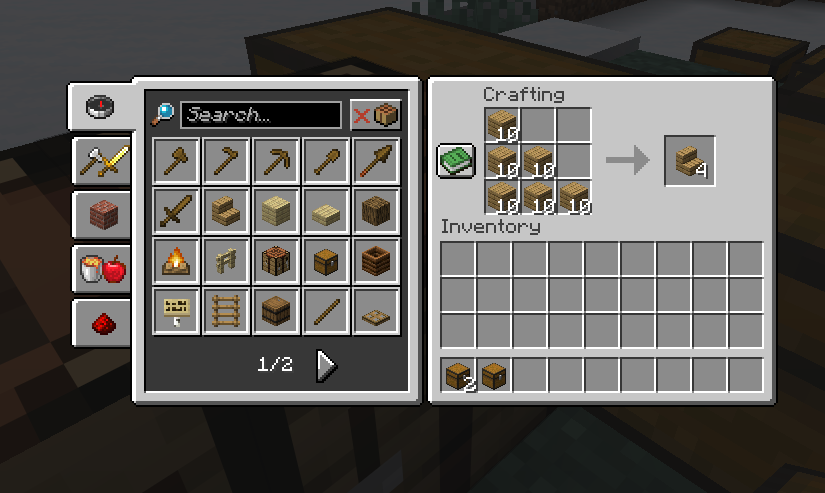
- This example here one of the marked chests contains 64 birch planks and the other 64 oak planks
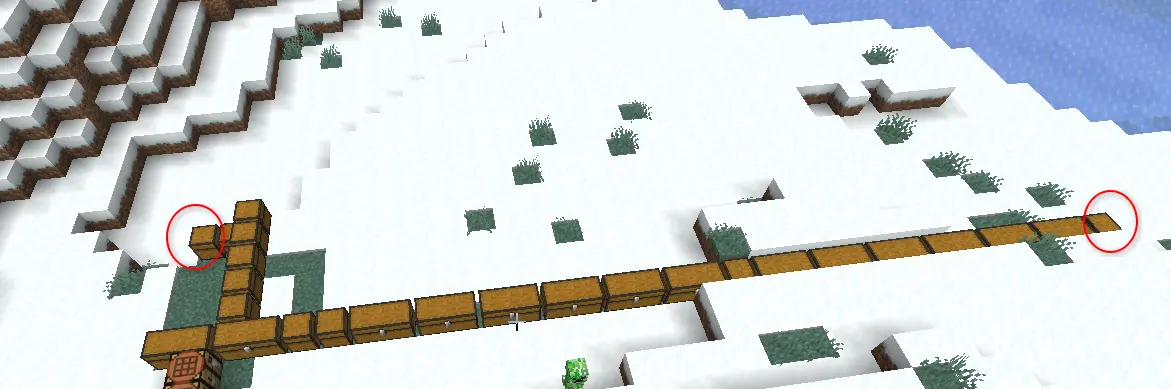!
- Resulting in the ability to create oak stairs (or birch) from those linked chests
-
---
## What's new
- **The recipe book now uses your chests.** Recipes you can make with items in nearby
storage light up as craftable — not just the stuff in your backpack. Works at the
crafting table, your inventory grid, and furnaces.
- **Recipes show up automatically.** If the materials are nearby, the recipe appears in
your book — even for things you've never personally held. So if you've got oak planks
in a chest, oak stairs are right there ready to make.
- **Furnaces, smokers, and blast furnaces.** Click a recipe in the furnace's recipe book
and QuickCraft loads the item to smelt from your chests and adds fuel for you — using
**coal and charcoal first** so it won't burn your wood unless it has to.
- **Tell QuickCraft to leave a chest alone.** Rename a chest to include **`[ignore]`** and
it'll be skipped (great for decoration or off-limits storage). See below.
- **Locked chests stay locked.** Containers sealed with a lock are left untouched unless
you're holding the key.
- **Smarter material matching.** Interchangeable materials (like any kind of planks) are
treated as equal when filling a recipe.
- **Optional ender chest support**, if you want your ender chest counted too.
## Fixes
- **The big one: no more freezing.** Opening the recipe book, crafting table, or even your
inventory could drop the game to a near-frozen crawl for several seconds. That's gone.
- **No more furnace lock-up.** Using the furnace recipe book could hang the game so badly
you couldn't even close it. Fixed.
- **No more recipe-book crash.** Opening the recipe book could crash the game in certain
cases. Fixed.
- **No more false "can't craft" recipes.** Items in your chests were sometimes shown in
red as if you couldn't use them. Now they're correctly shown as available.
- **"Show All" shows all again** — including recipes you can't currently craft.
- **Smoother with big bases.** Large connected storage rooms no longer cause lag spikes.
---
## Leaving a chest out
By default QuickCraft uses every chest in range. To skip one, rename the chest in an
anvil so its name includes **`[ignore]`** (for example `Decorations [ignore]`) before you
place it. Want it back in? Just rename it without the tag.
## Works with most storage mods
Modded chests and barrels work as long as they act like normal storage. Big network-style
systems (like Applied Energistics 2 or Refined Storage) aren't supported automatically yet
— that's on the to-do list.
---
Most of these options can be adjusted in QuickCraft's config file if you want to fine-tune
things. Found a bug or have an idea? Let me know your loader and Minecraft version.
Thanks for using QuickCraft 💛