Описание

# The ultimate solution to inventory problems

[](https://github.com/RafalBerezin/Pocket_Dimension/issues)
[](https://github.com/RafalBerezin/Pocket_Dimension/issues)
[](https://github.com/RafalBerezin/Pocket_Dimension)
[](https://ko-fi.com/rafalberezin)
## Important
Before you install, make sure to read the [uninstallation section](#uninstallation), as it isn't exactly straightforward.
When using data pack version make sure to also install the required resource pack.
About backport to **Minecraft 1.20.1**:
- New features will not be actively developed for this version.
- Only critical bugs will be addressed.
- Due to technical constraints, this version only supports **vanilla Minecraft dimensions**.
## Overview
### This data pack adds a multiplayer-friendly Pocket Dimension
### Accessing Your Pocket Dimension
To access your **Pocket Dimension** you need an ancient artifact known as the **Dimensional Tesseract**. You can craft it using one of the following recipes:
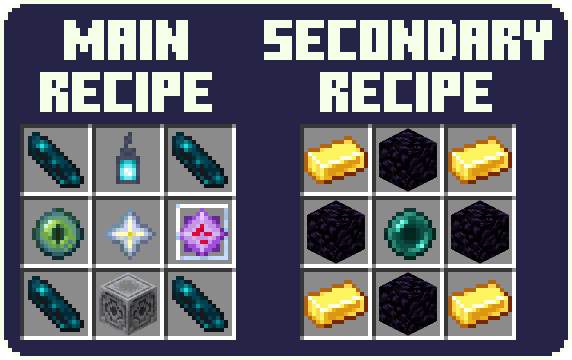
> The secondary recipe can be disabled in the config
### Activating the portal
To open the portal, hold the **Dimensional Tesseract** in hand and **right-click**. The portal remains open for **20 seconds**. After this time, you can use the Dimensional Tesseract again.
By default, the portal will display the name of its owner. You can change it in config.
### Entering the Dimension
Stand in the portal while **sneaking** for **1 second** and you'll be teleported to your Pocket Dimension. Make sure to watch your step, as initially it only contains a **3x3 bedrock platform** floating over the void and an **exit portal** that leads back to the last point of entry of this specific Pocket Dimension.
After teleportation, there's a **1 second** cooldown before you're able to teleport again.
Note that by default, **any player** can use the portal you created to enter your Pocket Dimension. You can change that in config with the `/trigger PDConfig` command.
### Building Freedom
Inside the Pocket Dimension, you have complete freedom to build whatever you want. Your creations persist across visits.
However, using a **Bed** or a **Respawn Anchor** inside triggers an explosion.
### Advancements
Explore a range of **custom advancements** within the Pocket Dimension, offering challenges and **rewards**.
## Configuration
To open the **configuration menu** use the `/trigger PDConfig` command.
Current configuration options:
- Pocket Dimension Privacy:
Whether to allow other players to enter your pocket dimension.
Default: **PUBLIC**
- Portal Stabilization:
The portal will close immediately after a set number of uses.
Default: **INFINITE**
- Portal Name Display:
- Show Name:
Display the name of the portal's owner.
Default: **SHOW**
- **[GLOBAL ONLY]** Display Position:
Where to display the name.
Default: **IN FRONT**
- Crafting:
Allows you to disable the secondary crafting recipe.
Default: **ENABLED**
## Additional Information
- Shaders may affect the sky in Pocket Dimension in unexpected ways.
- The entrance portal keeps the chunk it's located in loaded.
## Installation
Place the downloaded data pack (.zip) file into `.minecraft/saves//datapacks`.
(`` is the world to which you want to add the datapack)
Apply the required resource pack like you normally would.
The world needs to be restarted after the instalation.
## Uninstallation
### First of all,
You can safely disable the data pack by using the `/function pocket_dimension:commands/disable` command. Make sure to keep the data pack itself enabled!
Later, you can enable the data pack by using the `/function pocket_dimension:commands/enable` command.
### As to full uninstallation
Simply removing the data pack file or using the `/datapack disable...` command, will result in the world not being able to be loaded. Minecraft most likely will say that the world has been corrupted. This is because `level.dat` references a custom dimension that cannot be generated without this data pack, thus preventing the loading of the world. You can easily resolved this issue by following the uninstallation steps listed below:
1. Use the `/function pocket_dimension:commands/uninstall` command to disable the datapack.
2. Close the world
3. Find the save file called `level.dat` located in the world folder and, just to be safe, make a backup of it.
4. Remove the data pack from `/datapacks/`
5. Open the save file to edit it. I suggest using .
6. In the file, navigate to `Data/WorldGenSettings/dimensions` and delete `pocket_dimension:pocket_dimension`.
7. Save the edited file and put it back into the world folder.
8. Check whether everything is working properly, and you're good to go.
One more thing: players that were inside the Pocket Dimension when the datapack was removed, will appear in **The Overworld** but will **retain the coordinates** from the Pocket Dimension.
## Technical details for those interested
- This data pack only creates a single dimension, but every player is placed in a different location inside of it.
- The location of each player's 'pocket' is determined on their UUID.
## Credits
- *Dimensional Tesseract* and *Portal* textures made by [**Geastre**](https://geastre.artstation.com/)