Описание
# PingTag
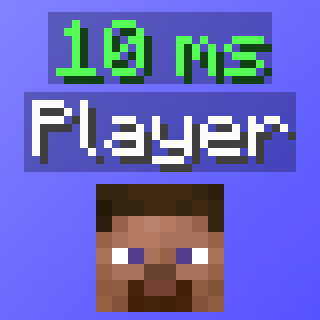
A lightweight Fabric mod adding a second nametag label above usernames, displaying the ping value.

## Features:
- **`Ping Display`** - Shows each player's ping in ms as a second nametag above their name.
- **`Dynamic Ping Colors`** - Ping is automatically colored based on ping value/range.
- **`Toggle Keybind (Default: "P")`** - Press a configurable keybind to toggle the mod, with an action bar notification.
- **`NPC/Fake Player Filtering`** - NPC's, bots, or fake players will not have a ping nametag rendered.
## Config/Settings (ModMenu/YACL):
- **`Enable`** - Toggles the ping nametag display.
- **`Hide When Sneaking`** - Hides the ping nametag when the player is sneaking (still retains vanilla functionality when sneaking).
- **`Hide If Zero`** - Hides the ping nametag when the value is 0.
- **`Prefix Text`** - Text to display before the ping value.
- **`Suffix Text`** - Text to display after the ping value.
- **`Y Offset`** - Vertical distance between the nametag and the ping nametag.
- **`Override Prefix Color`** - Use a custom color for the prefix instead of the ping color.
- **`Prefix Color`** - Color of the prefix text.
- **`Override Suffix Color`** - Use a custom color for the suffix instead of the ping color.
- **`Suffix Color`** - Color of the suffix text.
- **`Ping Range Colors`** - Customize the color for each of the five ping ranges.
- **`0 – 50ms`** - Green
- **`51 – 100ms`** - Yellow
- **`101 – 150ms`** - Gold
- **`151 – 200ms`** - Red
- **`200ms+`** - Dark Red
PingTag uses a YACL configuration, and is saved in your `.minecraft\config` folder as `pingtag_config.json`.