Описание
# PingNameTags
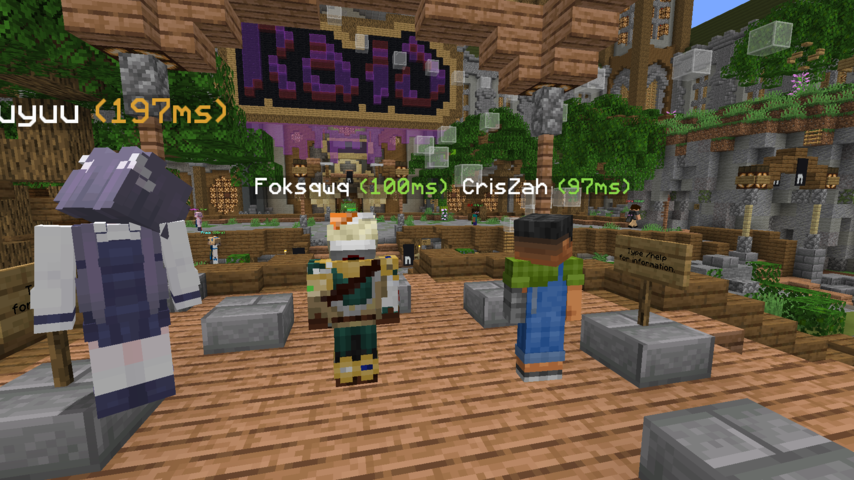
Displays the ping next to player name tags ingame.
Numbers change colour based on ping
**Configurable through [Mod Menu](https://modrinth.com/mod/modmenu)**
## Requirements/Installation
1. **Install the Fabric Loader**:
- Download the Fabric Loader from the [Fabric website](https://fabricmc.net/use/).
- Run the Fabric Loader installer and follow the on-screen instructions to install it for your Minecraft version.
2. **Install the Fabric API and Cloth Config API**:
- Download the [Fabric API](https://modrinth.com/mod/fabric-api) and [Cloth Config API](https://modrinth.com/mod/cloth-config/versions?l=fabric)
- Place the downloaded JAR file into your Minecraft `mods` folder (located in the `.minecraft` directory).
## Configuration
The configuration can be edited in-game if [Mod Menu](https://modrinth.com/mod/modmenu) is installed.
| Option | Type | Default Value | Description |
|----------------------- |-----------------|---------------|--------------------------------------------------------------------------------------------------------------------|
| `enabled` | `boolean` | `true` | Whether ping nametags are enabled or not. |
| `togglepingnametags` | `Key` | `G` | The key that toggles ping nametags on and off. |
| `pingTextPosition` | `Left \| Right` | `Right` | The position of the ping text placed next to the name. |
| `pingTextFormatString` | `String` | `"(%dms)"` | The format string for ping text. Must include a `%d`, which will be replaced dynamically by the actual ping value. |
## Demo