
Описание
# PingDisplay
**See every player's exact ping directly in the Tab list — no more guessing from signal bars.**
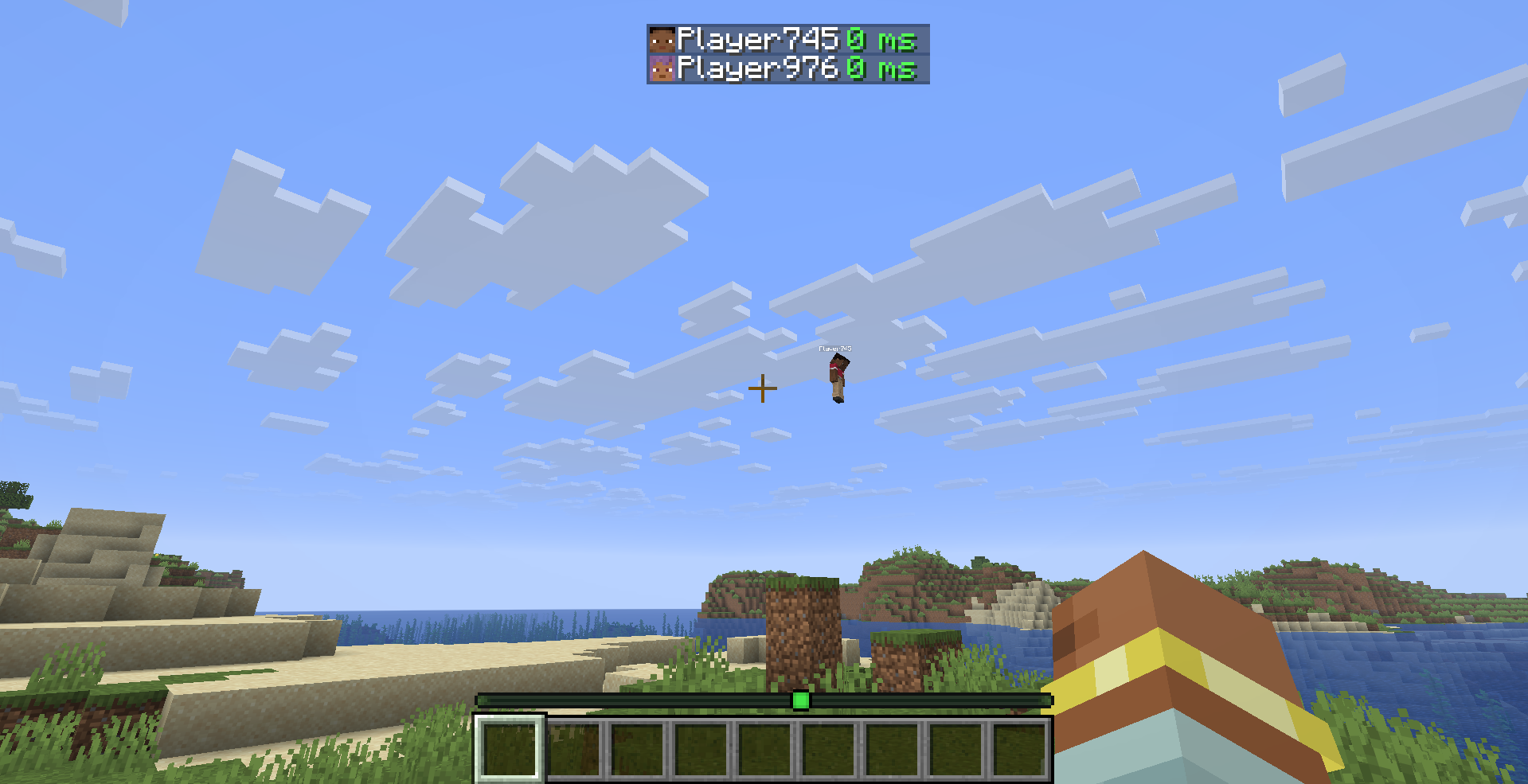
## What it does
PingDisplay makes Minecraft's Tab player list much more useful by showing each player's real latency as a numerical value.
Choose exactly how you want ping to appear:
- 🔢 **Number Only** — replaces the vanilla signal bars with values like `42 ms`
- 📶 **Bars + Number** — keeps the vanilla connection bars and adds the exact ping
- 🎮 **Vanilla Mode** — restores the normal Minecraft ping display instantly
## Features
- ⚡ **Exact numerical ping** — see the real latency of every player
- 🎨 **5 color-coded ping levels** — Excellent, Good, Medium, Bad and Terrible
- 🛠️ **Custom thresholds** — decide exactly when each ping quality level applies
- 🌈 **Custom colors** — every ping level can have its own color
- 🔁 **3 display modes** — Number Only, Bars + Number and Vanilla
- 👁️ **Toggle the `ms` suffix**
- ⏻ **Enable or disable PingDisplay instantly**
- ⚙️ **Built-in configuration screen**
- 🇬🇧 **English localization**
- 🇹🇷 **Turkish localization**
- 🔄 **Automatic migration from PingDisplay 1.0.0 configs**
- 🪶 **Lightweight and client-side only**
- 🖥️ **No server installation required**
## Default Ping Levels
| Quality | Ping |
|--------|------:|
| 🟢 Excellent | Below 50 ms |
| 🟩 Good | Below 100 ms |
| 🟡 Medium | Below 150 ms |
| 🟠 Bad | Below 250 ms |
| 🔴 Terrible | 250 ms and above |
All thresholds and colors can be changed from the in-game configuration screen.
## Configuration
PingDisplay stores its settings in:
`.minecraft/config/pingdisplay.json`
When **Mod Menu** is installed, simply open:
**Mods → PingDisplay → Configure**
Mod Menu is optional. PingDisplay works perfectly without it.
## Supported Versions
- Minecraft **26.1.2 — Fabric**
- Minecraft **26.2 — Fabric**
## Requirements
- [Fabric Loader](https://fabricmc.net/)
- [Fabric API](https://modrinth.com/mod/fabric-api)
## Optional
- [Mod Menu](https://modrinth.com/mod/modmenu) — quick access to the PingDisplay configuration screen
**Cloth Config is no longer required.**
## Client-Side Only
PingDisplay only needs to be installed on your client.
You can use it on multiplayer servers without requiring the server or other players to install the mod.
## Upgrading from 1.0.0
Already using PingDisplay 1.0.0?
Your existing configuration is automatically migrated to the new 1.1.0 system. You don't need to delete your old config.
## License
MIT — see [LICENSE](https://github.com/Cukkoo12/pingdisplay/blob/master/LICENSE)