
Описание
# Aura Ores
### Simple Glowing Ores
[](https://modrinth.com/resourcepack/oresaura) [](https://modrinth.com/resourcepack/oresaura/versions)
***
## What is this?
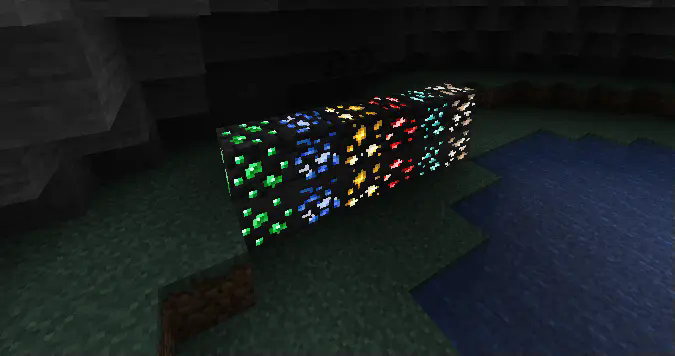
**Aura Ores** is a resource pack that adds an emissive glow to ores. It keeps the standard Vanilla textures but makes them visible in the dark, making mining easier without needing to place torches everywhere.
***
## Requirements
**Important:** For the ores to glow, you must install a mod that supports connected/emissive textures. Without these, the pack will look like default Minecraft.
| Mod Loader | Requirement |
| :--- | :--- |
| **Fabric** | **Continuity** (Recommended) or OptiFabric |
| **Forge / Neo** | **OptiFine** |
> **Note:** If using **Continuity**, make sure "Emissive Textures" is enabled in the resource pack settings.
***
## Features
| Feature | Description |
| :--- | :--- |
| **High Visibility** | Spot Diamonds, Gold, and Iron easily in the dark. |
| **Vanilla Style** | Retains the original ore textures; only the colored parts glow. |
| **Lightweight** | Simple texture changes with minimal performance impact. |
***
## Check Out My Other Mods
If you find **Aura Ores** useful, check out my utility mods:
| Mod Name | Description |
| :--- | :--- |
| **[FPS Overlay](https://modrinth.com/mod/fps-overlay)** | A lightweight, customizable FPS counter. |
| **[Elytra End](https://modrinth.com/mod/elytra-end)** | End style elytra |
| **[Right Click Harvest](https://modrinth.com/mod/the-right-click-harvest)** | Harvest crops instantly just by right-clicking. |
| **[Tools Durability](https://modrinth.com/mod/tools-durability-warning)** | Warns you before your tools break. |
| **[Biome Notifier](https://modrinth.com/mod/biome-notifier)** | Shows the biome name when you enter a new area. |
**[View my full profile](https://modrinth.com/user/Hicham)**
***
## Installation
How to Install (Click to Expand)
1. Download the **Aura Ores** `.zip` file.
2. Do **not** unzip it.
3. Place the file into your `.minecraft/resourcepacks` folder.
4. Launch the game and go to **Options > Resource Packs**.
5. Move Aura Ores to the **Selected** column (Right side).
6. **Important:** Ensure it is placed *above* any other texture packs.
***