Описание
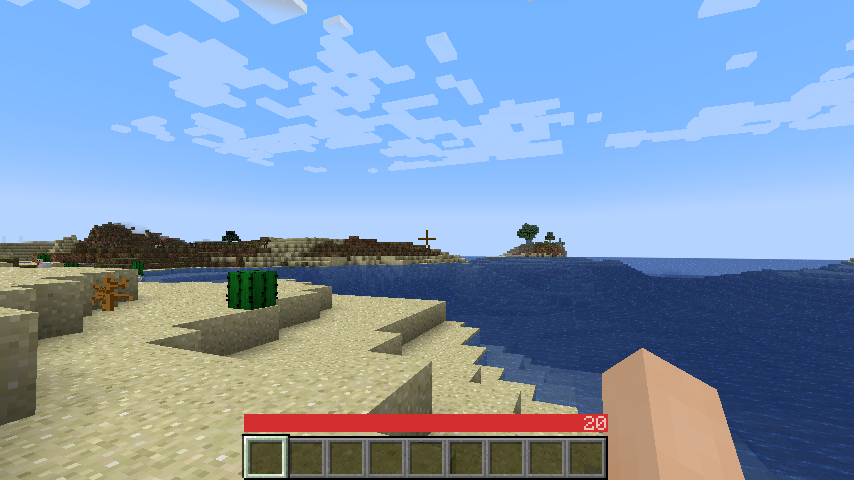
A sleek HUD mod for Minecraft: Java Edition using Fabric mod loader.
Reviews by Niche Duck: [main mod](https://www.youtube.com/watch?v=-Exd6HXWSpc) (v1.2.2), [config](https://www.youtube.com/watch?v=fJbe21IGc7U) (v1.2.2). [Mob arena gameplay with customized OneBar](https://www.youtube.com/watch?v=2wvhI5AhvE0) (v2.3.1) by agata_m
## How it works
[**See the gallery for a tutorial image!**](https://modrinth.com/mod/onebar/gallery)
Tips:
* Every value and bar is displayed only when you need it.
* The positive effects, including health itself, are displayed left-to-right; negative effects are displayed right-to-left.
* If you get hungry, the hunger overlay is displayed over the health by its value.
* If you eat, you'll lose the overlay and the value, because you no longer need it.
* If you are also underwater, the water bar is displayed on top of health _and_ hunger because it is the most important value in this case.
* Health is _always_ the first number and hunger is _almost always_ the last number (except when you have the hunger effect).
* Everything in between is an estimate, additional health or damage source (can be disabled).
* You can also enable "Show additional symbols" in options to get icons for those
* Remember [old Minecraft without hunger and experience](https://minecraft.wiki/w/File:Beta_1.7.png)? This mod gives you a visually similar experience without losing modern functionality.
The mod only uses client-side data, so it is never needed on a server. There are also a lot of settings for configuring the colors and visibility of various elements.
### [Meanings of the colors and icons](https://github.com/Madis0/OneBar#bars-and-values)
## Installation
1. Install Minecraft 1.16 or later
2. Install [Fabric Loader](https://fabricmc.net/use/)
3. Download OneBar, [Fabric API](https://modrinth.com/mod/fabric-api), [Mod Menu](https://modrinth.com/mod/modmenu), [Cloth Config API](https://modrinth.com/mod/cloth-config)
4. Place the JARs you downloaded to your Minecraft's mods folder
5. Run the game!
Currently also works on [Quilt](https://quiltmc.org), though no effort has yet been made to explicitly support it. See [#21](https://github.com/Madis0/OneBar/issues/21).
## Mod compatibility
- [Mod Menu](https://modrinth.com/mod/modmenu) - mod info, config GUI shortcut
- [Catalogue](https://www.curseforge.com/minecraft/mc-mods/catalogue) - mod info, config GUI shortcut
- [Sodium](https://modrinth.com/mod/sodium) - mod version, config GUI shortcut
## FAQ
**Q: Why do I have to download [Cloth Config API](https://www.curseforge.com/minecraft/mc-mods/cloth-config) separately?**
A: Because it's big, gets updated a lot and you probably have a mod or two that requires it anyway. If one of your mods already bundles it, you don't have to download it at all :)
**Q: How do I edit the colors?**
A: Click Esc -> Mods -> OneBar -> config button. Colors are formatted as opacity + RGB in HEX, so choose an opacity from [this list](https://gist.github.com/lopspower/03fb1cc0ac9f32ef38f4#all-hex-value-from-100-to-0-alpha) and use [any HEX color picker](https://rgbacolorpicker.com/hex-color-picker) for choosing a color. For example if I want 80% opacity (`CC`) on blue (`0000FF`), I will enter `#CC0000FF`.
**Q: Forge support?**
A: No. Feel free to fork according to the license or [check out my resource pack that inspired this](https://modrinth.com/resourcepack/material-design-hud).
**Q: Backports?**
A: No, latest is greatest.
**Q: Snapshots?**
A: Sometimes. If not published here, check GitHub Actions.