
Описание
# Old Enchantment Glint
Bring back the iconic shine! **Old Enchantment Glint** restores the vibrant, prominent enchantment glow from Minecraft version 1.19.3 and earlier.
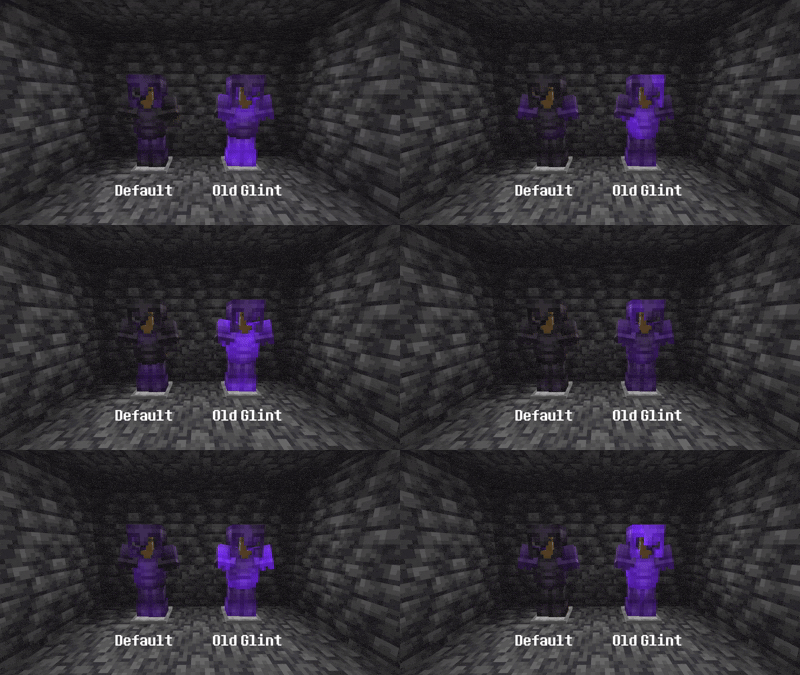
Starting in update 1.19.4, Mojang significantly subdued the enchantment glint, making it softer, slower, and harder to notice during gameplay. If you miss having your enchanted netherite gear, weapons, and tools stand out with that classic, intense purple shimmer, this pack is for you.
---
### Features
* **Original Texture:** Restores the exact pre-1.19.4 enchantment glint texture pattern.
* **Higher Visibility:** Weapons, armor, and enchanted books pop on your hotbar and in your hands.
* **Vanilla Compatible:** Fully compatible with vanilla Minecraft—no OptiFine or Fabric/Forge mods required.
---
### Recommended Settings
To match the exact visual feel of 1.19.3, you need to adjust two settings introduced in the modern accessibility menu:
1. Open the pause menu and go to **Options** -> **Accessibility Settings...**
2. Locate the **Glint Speed** slider and increase it (Recommended: **75% – 100%**).
3. Locate the **Glint Strength** slider and increase it (Recommended: **100%**).
---
### Installation Guide
1. Download the `Old Enchantment Glint.zip` file.
2. Launch Minecraft.
3. From the main menu (or in-game pause menu), navigate to **Options** -> **Resource Packs**.
4. Click **Open Pack Folder** at the bottom left of your screen.
5. Drag and drop the downloaded `.zip` file into the folder that opens.
6. Return to Minecraft, find **Old Enchantment Glint** in the "Available" list on the left, and click the arrow to move it to the "Selected" column on the right.
7. Click **Done** and enjoy your classic gear shine!