
Описание
# No Spyglass Overlay
**No Spyglass Overlay removes only the dirt and dust textures from the center of your view when zooming in.The dark square border that surrounds the zoom screen is not changed or removed.**
**This resource pack gives you a clear, unobstructed view while keeping the standard vanilla look.**
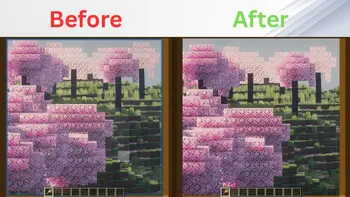
---
## 🛠️ Installation
### For Java Edition:
1. Download the `.zip` file for your Minecraft version.
2. Open Minecraft and navigate to `Options` > `Resource Packs` > `Open Pack Folder`.
3. Drop the downloaded `.zip` file into the folder.
4. Activate the pack in-game and move it to the top of your active pack list.
---
## 📥 Availability
* **Java Edition:** Download right here on Modrinth!