
Описание
## **MusicDisplay**
### Version 2.5 is now available, supporting Minecraft version 26.1.x! Check the changelog [here](https://modrinth.com/mod/musicdisplay/version/84KkKXHm).
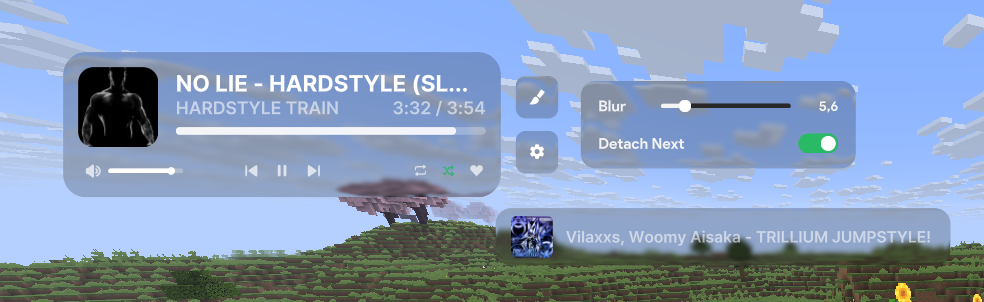
Take full control of your music without ever leaving the game! This mod seamlessly integrates Spotify into your Minecraft client, offering a sleek overlay and easy access to playback controls.
### **Features**
* **Full Playback Control**: Pause, resume, skip, or rewind tracks directly from the game.
* **Live Overlay**: Displays the current song title, artist, album art, and a real-time progress bar.
* **Search Spotify**: You can search for your song or playlist directly from the GUI!
* **Volume Management**: Adjust Spotify volume instantly without Alt-Tabbing.
* **Interactive Controls:**
* Play/Pause
* Previous / Next Track
* Shuffle Toggle
* Loop Toggle
* Like/Save Songs
* **State Synchronization**: Automatically syncs with changes made on other devices (e.g., your phone).
* **Custom API Keys**: Use your own Spotify Client ID and Secret for full privacy and control.
### **How to Use**
**1. Initial Setup**
To connect the mod to your Spotify account:
1. Open the client GUI in the game (default key: **Right Shift**).
2. Click the **Setup Spotify** button at the bottom of the panel. This will launch a local setup server and automatically open the setup page in your web browser (`http://127.0.0.1:8888/setup`).
3. Follow the instructions on the web page:
- Log in to the [Spotify Developer Dashboard](https://developer.spotify.com/dashboard).
- Create a new application.
- Edit the app settings and add `http://127.0.0.1:8888/callback` as a **Redirect URI**.
- Copy your **Client ID** and **Client Secret**.
4. Enter your Client ID and Client Secret in the web form and click **Connect Spotify Account**.
5. Approve the authorization in your browser. Once completed, you can close the browser tab and return to the game!
**2. State & Control**
Enable the Spotify module in your client's GUI. Your music will start syncing instantly!
### **Configuration**
Configuration files are stored locally at: `.minecraft/config/spotify-config.json`
### **Keybinds**
* **Right Shift** - Opens the Client GUI
### **Requirements**
* Spotify Account (Premium is required).
* Minecraft Java Edition (Fabric).
* **Java 25** or higher.
### **Preview**

### **Showcase**