
Описание
_To access the texture pack, click on versions and click on the newest one. There should be a list of all relevant files._
# Using Upgrades
If an upgrade is used (right-click), it will check for a spawner 2 blocks in front of the players looking direction. If there is a spawner, it will try to apply the upgrade. An upgrade can be applied if the spawner was not completely upgraded by the upgrade. Some upgrades can be applied multiple times. If the spawner check failed, the player nearest to the location, which was checked, will get the upgrade item back.
This mod is best paired with other mods that make spawn eggs obtainable or make spawners minable. This mod definitely works with the spawners keeping the upgrades: [https://modrinth.com/datapack/mineable-spawner](https://modrinth.com/datapack/mineable-spawner)
# Upgrade List
## Nearby Entities Upgrade
_(From 6 Base to 10 to 16)_

## Player Range Upgrade
_(From 16 Base to 48)_
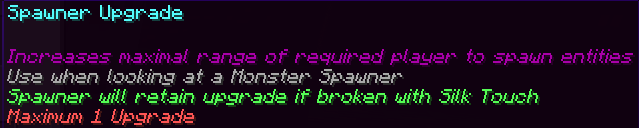
## Maximal Possible Entity Spawns Upgrade
_(From 4 Base to 5 to 6 to 8)_

## Maximal Spawning Range Upgrade
If a Maximal Spawning Range Downgrade is applied, it will be set to the base. The upgrade can then be applied again. _(From 4 Base to 7)_

## Maximal Spawning Range Downgrade
If a Maximal Spawning Range Upgrade is applied, it will be set to the base. The upgrade can then be applied again. _(From 4 Base to 2)_

## Maximal Spawning Time Upgrade
The Spawner randomizes spawning time from Minimal Spawning Time to Maximal Spawning Time _(From 800 Base to 750 to 700 to 650 to 600)_

## Minimal Spawning Time Upgrade
The Spawner randomizes spawning time from Minimal Spawning Time to Maximal Spawning Time _(From 200 Base to 100)_

## Remove Sky Light Condition Upgrade
_I didn't find a good way to check if the upgrade was applied already, so it can be use infinitely but won't have an effect._
_Overwrites the custom spawn rules for the light-level of the sky with a minimum of 0 and a maximum of 15._
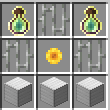
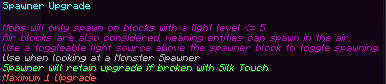
## Controllable Spawner Upgrade
_Overwrites the custom spawn rules for the block light level with a minimum of 0 and a maximum of 5. Air blocks are also blocks._
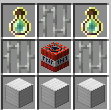
## Experience Value Upgrade
_Adds a small experience orb as a passenger to spawned entities_

## Spawner Reset
_Breaks target spawner dropping xp and placing a blank spawner at the location_
# Bedrock Compatability
If you want to use this datapack on Geyser servers, extract the texture pack zip file and put the "SPWR_mappings.json" inside of Geyser's custom mappings folder and the "SPWR Bedrock.mcpack" inside of Geyser's pack folder. Both of the folders can take multiple files; no merging is needed.
Currently there is a bug on GeyserMC preventing players from using any items when looking at a Spawner ([https://github.com/GeyserMC/Geyser/issues/5225](https://github.com/GeyserMC/Geyser/issues/5225)).
I found a workaround to this by clicking on the bottom of a block above the spawner. Look at the gallery for a GIF showing it.