Описание
# Animated Blocks
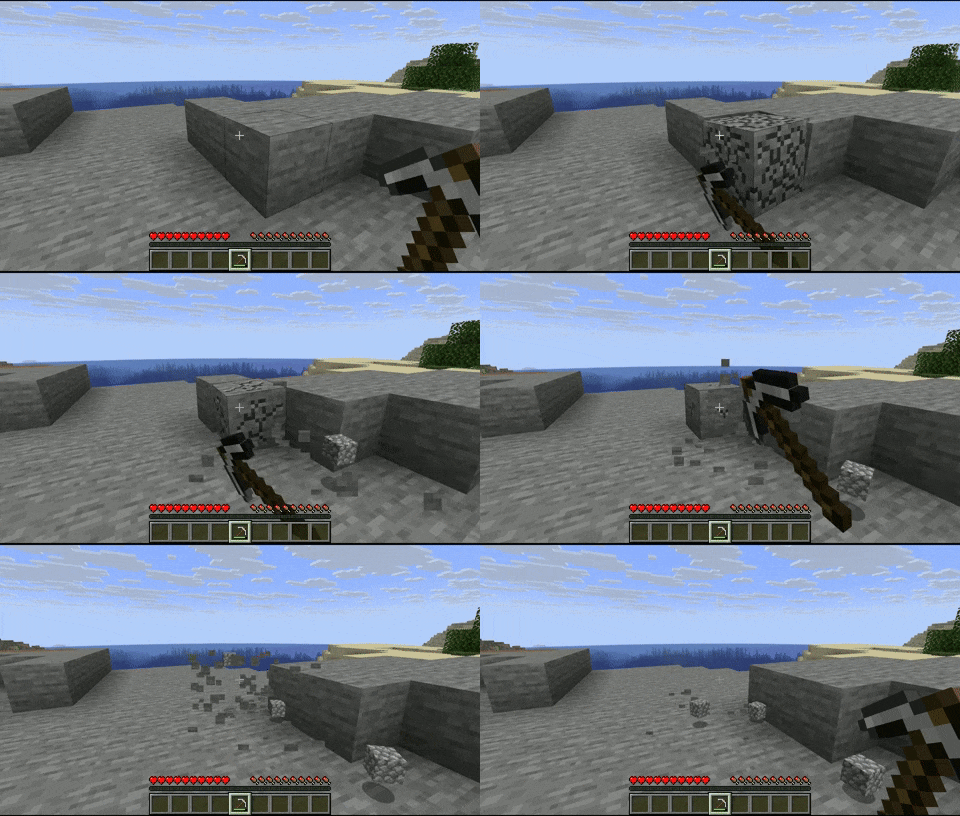
Blocks will now have an animation when mined and placed!
| Mining Animation | Placing Animation (only in 2.0.0+) |
|---|---|
|  |  |
## Customization
The animations are fully customizable via resource packs.
example

**animations_config.json**:
```json
{
"global": { // all the blocks will have these animations by default
"mining_animation": "mining_and_placing_animations:animations/global_mining_animation",
"placing_animation": "mining_and_placing_animations:animations/global_placing_animation"
},
"specific": [ // you can set a specific animation for certain block(s)
{
"blocks": [
"minecraft:dirt",
"minecraft:stone",
"#minecraft:slabs" // you can use tags
],
"mining_animation": "mining_and_placing_animations:animations/dirt_mining_animation",
"placing_animation": "mining_and_placing_animations:animations/dirt_placing_animation"
},
{
"blocks": [
"minecraft:cobblestone"
],
"mining_animation": "mining_and_placing_animations:animations/cobblestone" // if you don't put a 'placing_animation', it will take the global placing animation, same for the mining animation
}
],
"mining_blacklist": [
"#minecraft:beds", // you can use tags
"#minecraft:doors",
"minecraft:oak_planks",
],
"placing_blacklist": [
"#minecraft:pressure_plates",
"minecraft:rail",
"minecraft:snow_block"
]
}
```
The animation files have to be under the directory 'animations'.
**dirt_mining_animation.json** (example of a possible mining animation, same for the placing animation):
```json
{
"duration": 0.15, // length of the animation in seconds
"pivot_point": [0.5, 1.0, 0.5],
"keyframes": [
{
"time": 0.0,
"translation": [0.0, 0.0, 0.0],
"rotation": [-22.5, 0.0, 45.0],
"scale": [0.5, 0.5, 0.5]
},
{
"time": 0.05,
"translation": [20.0, 0.0, -20.0],
"rotation": [0.0, 0.0, 0.0],
"scale": [1.0, 1.0, 1.0]
},
{
"time": 0.10,
"translation": [0.0, -15.0, 0.0],
"rotation": [0.0, -90.0, 0.0],
"scale": [1.5, 1.5, 1.5]
},
{
"time": 0.15,
"translation": [0.0, 0.0, 0.0],
"rotation": [0.0, 0.0, 0.0],
"scale": [1.0, 1.0, 1.0]
}
]
}
```
You can have as many animations as you want!