
Описание
**Transforms your survival Minecraft experience into a recreation of the hit game 'Raft'**
This datapack comes with an overhauled experience, with new mechanics, new blocks, structures, and even new mobs!
**Since this is a Datapack and Resource pack, both can be installed once server side and will apply to all players that join, voiding the need for each player to install the pack!**
> ### Building
> - *Decorate to your hearts content!*
> > - You can place various large structures such as foundations, smelteries, collection nets and more with a grid-like building style!
> > - You can tear down structures with your builders hammer!
> ### Flotsam
> - *Scoop up various types of junk to craft with!*
> > - Flotsam spawns around the raft and can be fished up with a fishing rod
> ### Steve the Shark
> - *Chomp Chomp*
> > - Steve is a friendly lil' fellow!
> > - He circles your raft and occasionly scoots in to take a snack off it
#### Q. How do I download the pack?
> #### A. Install the datapack in the vanilla world creation menu! ¹
#### Q. I cant find the resource pack!
> #### A. Go to the Versions tab, find the **datapack** version you want and click the name, then scroll to the bottom and install the resource pack. ²
#### Q. When is * feature going to be added / When is it going to be updated to * version??
> #### A. Join the Discord for update discussion :D
#### Q. I experienced a bug, what do I do?
> #### A. Join the Discord and file a bug report, or make an issue on the github! :D
¹ How To Download!
Data Pack:
1. Click the latest Datapack version.
2. Scroll down and Download the Primary file.
3. If you want to create a World, go to Singleplayer > Create New World > Data Packs > Open Pack Folder.
(It is not recommended to put it in an already existing world!)
4. Copy/Cut and Paste the downloaded file there.
5. Open/Create your world.
6. Note: You need to also install the Required Resource Pack.
Required Resource Pack:
1. Click the Datapack featured version.
2. Scroll down and Download the Required Resource Pack.
3. Open Minecraft and go to Options > Resource Packs > Open Pack Folder.
4. Copy/Cut and Paste the downloaded file there.
5. Activate the Resource Pack.
(you can reload the resources with f3+t ingame)
## See image below for reference
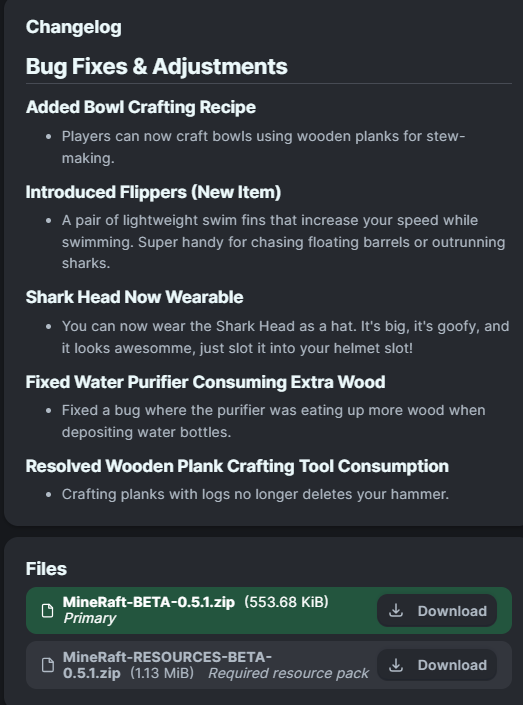
² How to get Resource Pack!

* Release Dates
#### There is no SET date for update releases, though we can confirm that the 1.0.0 update is in the works, you can join the discord for more info!