
Описание
## Full Description
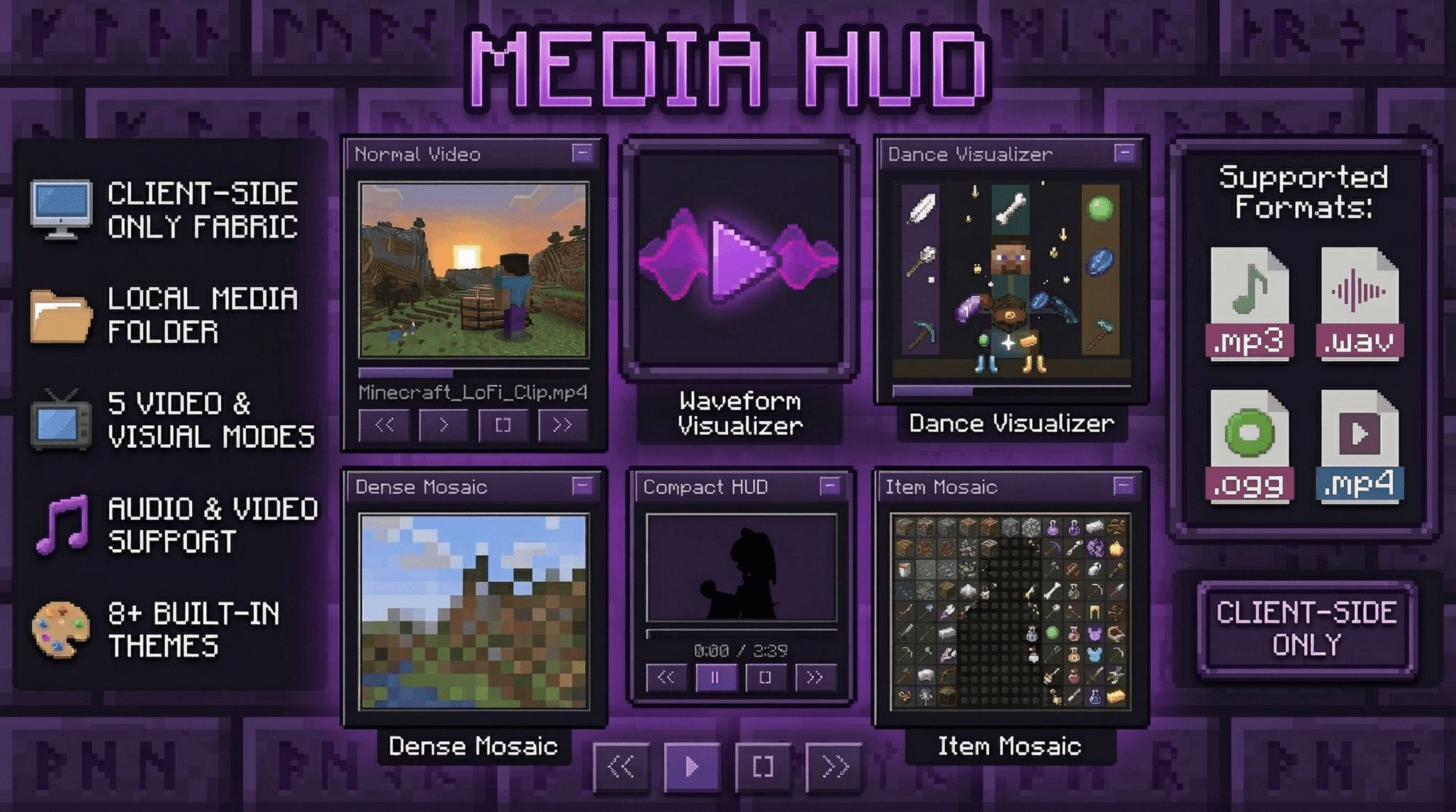
### Media HUD adds a local media player directly to the Minecraft HUD.
It is built for players who want music, videos, and visualizers inside Minecraft without constantly alt-tabbing. You can scan a local media folder, load files directly, drag the player anywhere on the screen, switch between full and compact layouts, and choose between several visual modes ranging from standard video playback to Minecraft-style mosaic rendering.
This mod is client-side only and local-files only. It does not require server installation, it does not use streaming services, and it does not rely on online playback.
## Features
- Client-side only Fabric mod
- Local file playback only
- Draggable HUD with saved position
- Full and compact HUD layouts
- Expandable library panel for folders and files
- Scrollable library panel with current-track follow behavior
- Audio playback for `mp3`, `wav`, and `ogg`
- Video playback for `mp4`
- Progress bar with click-to-seek
- Play, pause, stop, next, previous, loop, shuffle, and volume controls
- Filter modes for audio, video, or both
- Saved HUD scale and transparency settings
- Built-in HUD color themes
- Custom HUD theme colors with hex input
- Normal video mode with aspect-aware layout
- Waveform visualizer mode
- Dance visualizer mode
- Dense mosaic video mode
- Item mosaic video mode built around Minecraft item icon visuals
- `/media` and `/m` command aliases
## Supported Formats
- Audio: `mp3`, `wav`, `ogg`
- Video: `mp4`
Recommended video format for the smoothest results:
- `H.264` video
- `AAC` audio
- `.mp4` container
## Supported Minecraft Versions
Media HUD currently has working builds for:
- `1.20.5`
- `1.20.6`
- `1.21`
- `1.21.1`
- `1.21.2`
- `1.21.3`
- `1.21.4`
- `1.21.5`
- `1.21.6`
- `1.21.7`
- `1.21.8`
- `1.21.9`
- `1.21.10`
- `1.21.11`
## Fabric API Version Guide
Use the Media HUD jar built for your exact Minecraft version, and match it with the Fabric API version line below:
- Minecraft `1.20.5` -> Fabric API `0.97.8+1.20.5`
- Minecraft `1.20.6` -> Fabric API `0.100.8+1.20.6`
- Minecraft `1.21` -> Fabric API `0.102.0+1.21`
- Minecraft `1.21.1` -> Fabric API `0.116.9+1.21.1`
- Minecraft `1.21.2` -> Fabric API `0.106.1+1.21.2`
- Minecraft `1.21.3` -> Fabric API `0.114.1+1.21.3`
- Minecraft `1.21.4` -> Fabric API `0.119.4+1.21.4`
- Minecraft `1.21.5` -> Fabric API `0.128.2+1.21.5`
- Minecraft `1.21.6` -> Fabric API `0.128.2+1.21.6`
- Minecraft `1.21.7` -> Fabric API `0.129.0+1.21.7`
- Minecraft `1.21.8` -> Fabric API `0.136.1+1.21.8`
- Minecraft `1.21.9` -> Fabric API `0.134.1+1.21.9`
- Minecraft `1.21.10` -> Fabric API `0.138.4+1.21.10`
- Minecraft `1.21.11` -> Fabric API `0.141.3+1.21.11`
Recommended:
- Fabric Loader `0.18.4` or newer
- Java `21`
## Installation
1. Install Minecraft Java Edition for one of the supported versions above
2. Install Fabric Loader `0.18.4` or newer
3. Install the matching Fabric API version for your Minecraft version
4. Use Java `21`
5. Put the correct versioned `mediahud` jar in your `mods` folder
6. Launch the game and use `/m ui` to open the interaction overlay
Media HUD is client-side only. A multiplayer server does not need to install it.
This public build is packaged for Windows `x86_64`.
No extra FFmpeg or JavaCV download is required for this release file.
This release package includes third-party notice material for bundled runtime components.
## Command Guide
You can use either `/m` or `/media`.
They are identical aliases.
### Basic HUD Commands
- `/m show`
Shows the HUD.
- `/m hide`
Hides the HUD.
- `/m toggle`
Toggles the HUD on or off.
- `/m ui`
Opens the drag-and-move interaction overlay.
- `/m pos reset`
Resets the HUD position back to its default location.
### Playback Commands
- `/m play`
Starts playback of the currently selected media.
- `/m pause`
Pauses playback.
- `/m stop`
Stops playback.
- `/m next`
Selects the next track or video.
- `/m prev`
Selects the previous track or video.
- `/m seek `
Seeks to a specific time in seconds.
Example: `/m seek 90`
- `/m volume `
Sets volume from `0` to `200`.
Example: `/m volume 75`
### Library and File Commands
- `/m folder `
Sets the root media folder and scans it.
Example: `/m folder C:\Users\Name\Music`
- `/m refresh`
Rescans the current media folder.
- `/m load `
Loads a specific local file directly.
Example: `/m load C:\Users\Name\Videos\clip.mp4`
- `/m probe `
Probes a local file through the media backend.
Useful when checking whether a file is detected correctly.
### Playback Option Commands
- `/m loop`
Toggles looping on or off.
- `/m loop on`
Enables looping.
- `/m loop off`
Disables looping.
- `/m shuffle`
Toggles shuffle on or off.
- `/m shuffle on`
Enables shuffle.
- `/m shuffle off`
Disables shuffle.
- `/m shuffle toggle`
Toggles shuffle explicitly.
### Filter Commands
- `/m filter audio`
Shows only audio files in the library.
- `/m filter video`
Shows only video files in the library.
- `/m filter both`
Shows both audio and video files.
### Render Mode Commands
- `/m mode normal`
Standard video preview mode.
- `/m mode waveform`
Audio waveform visualizer mode.
- `/m mode dance`
Dance visualizer mode.
- `/m mode mosaic`
Dense mosaic video mode.
- `/m mode itemmosaic`
Item-based mosaic video mode.
### Resolution Commands
- `/m wave resolution `
Sets waveform resolution.
- `/m video resolution `
Sets video preview resolution in pixels.
- `/m mosaic resolution `
Sets dense mosaic resolution.
- `/m itemmosaic resolution `
Sets item mosaic resolution.
Higher values can look better, but they may also cost more performance.
### HUD Layout Commands
- `/m hud mode full`
Uses the full HUD layout.
- `/m hud mode compact`
Uses the compact HUD layout.
- `/m hud scale `
Sets HUD scale as a percentage.
Example: `/m hud scale 125`
- `/m hud transparency `
Sets HUD transparency as a percentage.
Example: `/m hud transparency 25`
### Built-In Theme Commands
You can use either `/m theme ...` or `/m hud theme ...`.
- `/m theme`
Shows the current HUD theme.
- `/m theme classic`
Uses the Classic theme.
- `/m theme midnightpurple`
Uses the Midnight Purple theme.
- `/m theme bluemoon`
Uses the Blue Moon theme.
- `/m theme hacker`
Uses the Hacker theme.
- `/m theme sunset`
Uses the Sunset theme.
- `/m theme obsidian`
Uses the Obsidian theme.
- `/m theme rosegold`
Uses the Rose Gold theme.
- `/m theme frost`
Uses the Frost theme.
- `/m theme custom`
Switches back to your saved custom theme colors.
### Custom Theme Color Commands
You can type hex colors without `#`.
Examples:
- `FFAABB`
- `/m theme color`
Shows your current custom theme colors.
- `/m theme color gradientprimary `
Sets the first gradient color.
- `/m theme color gradientsecondary `
Sets the second gradient color.
- `/m theme color main `
Sets the main accent color.
- `/m theme color border `
Sets the border color.
- `/m theme color button `
Sets the button color.
- `/m theme color text `
Sets the text color.
Notes:
- Setting a custom color automatically switches the HUD to the custom theme.
- `gradientprimary` and `gradient_primary` both work.
- `gradientsecondary` and `gradient_secondary` both work.
## Why Use It
- Keep music or video playback inside Minecraft without switching windows
- Use a Minecraft-themed HUD instead of an external desktop player
- Turn videos into stylized dense mosaics or item-based mosaics
- Run a compact layout during normal gameplay or use the full panel while browsing media
- Tune HUD scale, transparency, render resolution, and theme colors to match your setup
- Change the HUD vibe with built-in themes or your own custom palette
- Leave a world or server without worrying about media continuing to play in the background
## Notes and Limitations
- Local files only. No YouTube, no streaming URLs, and no online media sources.
- This release is designed around local playback inside the game HUD, not as a full desktop media suite.
- High video, mosaic, and item-mosaic resolutions can still cost performance depending on the clip.
- Use the jar built for your exact Minecraft version.
- The best results come from using clean local files and a dedicated media folder.
- This packaged release bundles the Windows `x86_64` FFmpeg runtime. Linux and macOS builds are not included in this file.
## License and Third-Party Components
- Media HUD source code is licensed under `MIT`.
- This release bundles third-party runtime components, including JavaCV, JavaCPP, and the Windows `x86_64` FFmpeg runtime via ByteDeco.
- Third-party notices and source/compliance links are included in `THIRD_PARTY_NOTICES.md`.
- The FFmpeg runtime in this release comes from the standard ByteDeco preset artifacts, not the separate `-gpl` artifacts.
- Public notice text to keep in the project page:
- This software uses libraries from the FFmpeg project under the LGPL.
- FFmpeg legal/compliance page: https://ffmpeg.org/legal.html
- Corresponding FFmpeg 7.1.1 source: https://ffmpeg.org/releases/ffmpeg-7.1.1.tar.xz
- ByteDeco preset source/build scripts: https://github.com/bytedeco/javacpp-presets/tree/1.5.12/ffmpeg