
Описание
## Sudo
This module adds some commonly used Linux commands to the game, including `sudo`, `echo`, `cat`, and `export`.
Some Linux mechanisms have also been added, such as the `home` folder and the `.bashrc` file.
## Instructions
### Parameters
Some commands support parameters, you can use `_` plus parameters.
### Variables
Some commands also support the use of variables. You can use variables in the form of `${variable name}`. For how to set variables, please see [export](#export).
#### Dynamic variables
Dynamic variables are recalculated on every execution, here are all dynamic variables:
- `home`: the current user’s home folder
- `uuid`: uuid of the current user
- `player`: the username of the current user
- `exp`: the current user’s experience value
- `level`: the level of the current user
- `health`: current user’s health
- `max_health`: the current user’s maximum health
- `world`: current world name
- `location`: current location (format is x.y.z)
- `server`: current server name
- `motd`: motd of the current server
- `time`: current time (Unix timestamp)
### Order
#### echo
usage:
```
/echo # Output content
```
#### cat
usage:
```
/cat # Output file content
```
#### write
usage:
```
/write #Write file content, which will overwrite the original content.
```
#### export
usage:
```
/export #Set variables
/export public_ # Set public variables, sudo permissions are required
```
#### apt
Install mods from Modrinth.
usage:
```
/apt install # Install module
/apt search # Search module
```
image of apt command:
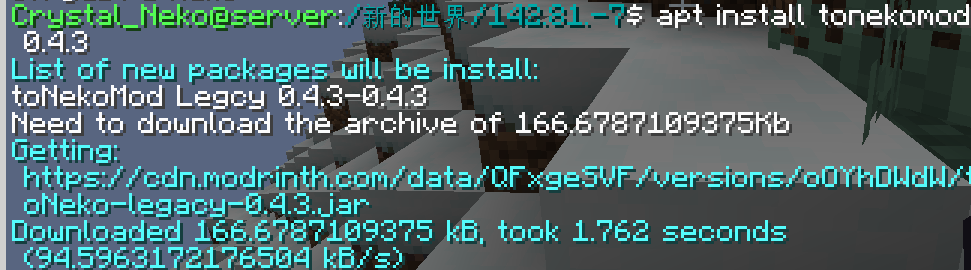
#### bash
Call the system to execute bash commands (only supports Linux).
usage:
```
/bash
```
**WARNNING:THIS COMMAND IS DANGEROUS. IT MAYBE DAMAGE YOUR SYSTEM.**
#### neofetch
You know the command.
### Special files
#### .bashrc
This file executes the commands inside when the player logs in. The commands are separated by `;` and there is no `/` before the command.
The file is located in `home//.bashrc`. Players can modify this file without sudo permissions.