
Описание
# MCAI - Minecraft (Character) Artificial Intelligence
Have you ever played Minecraft alone? Well, let me tell you something - it gets very lonely, very quickly when you're all alone in a vast blocky world and the only human-ish thing in the game just makes 'hrm' and 'huh' noises. This mod aims to alleviate that by providing you access to your very own AIs for you to chat with.
## Setup
MCAI requires setup to work properly. This is because [c.ai](https://c.ai), like most websites, requires an authorization token before it gives you any data.
Thankfully, obtaining your authorization token is simple.
First, head to [c.ai](https://c.ai). Log in or create a new account.
Then, open Inspect Element, navigate to Application, find Local Storage -> https://beta.character.ai
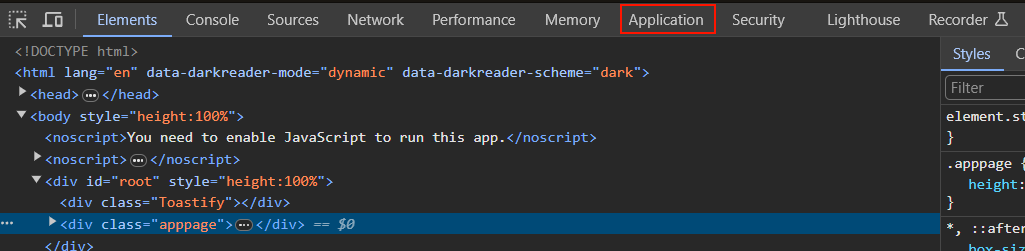

Once you're there, you will need to find a key called `char_token`. This should be a JSON file with two keys; `value` and `ttl`. You can ignore the `ttl` key; you only need the `value` key.
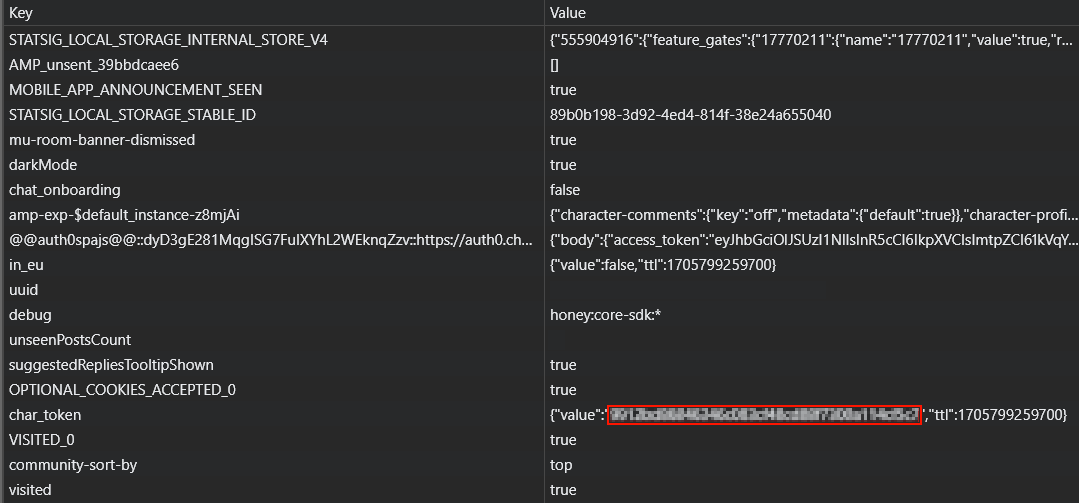
Copy the value of the `value` key, go to either the mod config (`mcai.toml`) and locate `[General]`, where you will find the `authorization` field in which you can paste the value of `value`. Then you're good to go! Alternatively, you can use the `/ai authorize ` command in-game to automatically update the configuration file.
To register an AI to chat with, you can manually edit the configuration file, or you can use the command `/ai register `. The `aliases` field is an optional space-separated list of alternative names to ping the AI with in chat, sort of like a nicknames system for the AI.
The `character id` field is used to get basic information about the character (like their name) and also as a way to know which character to send messages to. You can obtain the character ID of a character by going to [c.ai](https://c.ai), opening a chat with the character you want the ID from, and then copying the value of `char=` from the URL.

## Chatting with registered AIs
There are two methods to chat with registered AIs - pinging them in a message via @