
Описание
# 
Link your Minecraft server chat with your Discord
/!\ This mod needs configuration to work properly. Please take a look to the wiki: https://github.com/DenisD3D/Mc2Discord/wiki
## Features
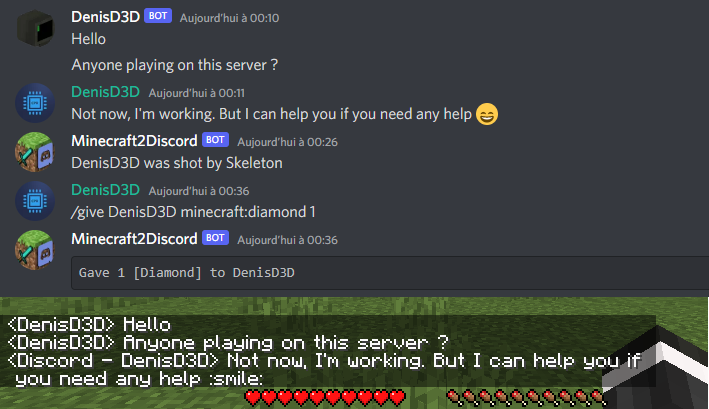
* Send Minecraft chat message to your Discord server
* Send message in your Discord server to the Minecraft chat
* Send game events message to Discord (player join, player leave, death, etc.)
* Display player's head as profile picture in Discord thanks to webhook mode
* Execute Minecraft commands on Discord
* Customize bot presence (eg: playing at xxx) and channel name / topic
* Provide an invitation link to your Discord server with the /discord command
* Forward the server console to discord (useful for admins)
* Hide player on Discord (useful for admins, integrate with [VanishMod](https://www.curseforge.com/minecraft/mc-mods/vanishmod))
* Account linking (forced or optional)
* Fully customizable, easy configuration (messages, behavior, etc.)
* Relay others mods announcements
* Works with [Emojiful](https://www.curseforge.com/minecraft/mc-mods/emojiful) to display emojis ingame
## Try without installing
Join the official demo server hosted by MtxServ
* Join the demo discord channel [#access-demo](https://discord.gg/rzzd76c)
* Start the sever with /start command (server is usually stopped)
* Connect to m2d-demo.denisd3d.fr with minecraft 1.20.2 Vanilla
## Installation
A quick configuration is mandatory for the mod to work. Steps are described on the wiki: https://github.com/DenisD3D/Mc2Discord/wiki
If you need any help or want new features, you can join the [Discord support server](https://discord.gg/rzzd76c)
You can also watch the video tutorial:
## Misc
### Links
* Discord (Support): https://discord.gg/rzzd76c
* CurseForge (Download): https://www.curseforge.com/minecraft/mc-mods/mc2discord/
* Modrinth (Download): https://modrinth.com/mod/mc2discord
* Github (Source): https://github.com/DenisD3D/Mc2Discord
* Wiki: https://github.com/DenisD3D/Mc2Discord/wiki
[Demo server hosted thanks to MtxServ](https://mtxserv.com/)