
Описание
Matcha Programmer Art remakes many textures from klei_wright's [Matcha Flavoured](https://modrinth.com/datapack/matcha-flavoured) in the style of Programmer Art.
[REQUIRES Matcha Vanilla Flavoured](https://modrinth.com/resourcepack/matcha-vanilla-flavoured)
[REQUIRES Polytone](https://modrinth.com/mod/polytone)
This resource pack is a work in progress! Matcha Flavoured has many textures, so I would really appreciate any help you can give. If you'd like to contribute, you can create [a pull request](https://github.com/antigers/matcha-programmer-art/pulls) or just write [an issue](https://github.com/antigers/matcha-programmer-art/issues) with attached files. Problem reports and suggestions are also appreciated.
# Recommended load order
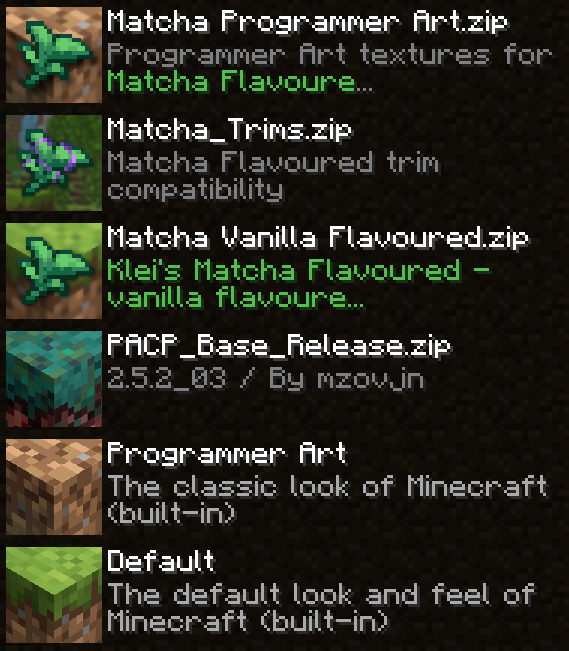
From top to bottom:
1. (This pack) Matcha Programmer Art
2. (Optional) [Matcha Trims](https://modrinth.com/datapack/matcha-trims) if you want armor trims compatibility
3. (Required) [Matcha Vanilla Flavoured](https://modrinth.com/resourcepack/matcha-vanilla-flavoured)
4. (Highly recommended) [Programmer Art Continuation Project (PACP)](https://modrinth.com/resourcepack/pacp) is the most compatible with this pack and the best in my opinion, but [Programmer Art Fix](https://modrinth.com/resourcepack/programmer-art-fix) is also a good option
5. (Built-in) Programmer Art
6. (Built-in) Default
# Water colors
Matcha Flavoured data pack overrides water colors in all biomes with a pale gray-ish color, which doesn't look too good with vanilla or programmer art textures.
This resource pack overrides water colors back to vanilla values, but it requires [Polytone](https://modrinth.com/mod/polytone) mod for the overrides to actually be applied. Unfortunately, resource packs cannot do that in vanilla.
If you want old water with vibrant blue color, add [Old Water Texture](https://modrinth.com/resourcepack/old-water-texture) on top of this pack (ignore incompatibility warning, it works fine). You would still need Polytone though, otherwise the color will be incorrect.
# Old HUD
If you want your HUD to look like this (no experience bar, the armor bar is in place of the hunger bar):

Then you should do the following:
1. Install [Melancholic Hunger & HUD](https://modrinth.com/mod/melancholic_hunger) mod
2. Put the following config into the config file config/melancholic_hunger.json5 (this will make the mod to only do visual HUD changes and not do anything related to game mechanincs):
```
{
clientOptions: {
hide_hunger_bar: true,
hide_experience_bar: true,
show_experience_in_inventory: false,
show_experience_on_screens: false,
show_experience_on_gain: false,
hide_locator_bar: false
},
serverOptions: {
disable_hunger: false,
hunger_effect: "VANILLA",
use_custom_food_stack_sizes: false,
sprinting: "VANILLA",
instant_eating: false
}
}
```
Also you can optionally install [Raised](https://modrinth.com/mod/raised) to move the whole HUD up by a few pixels