
Описание
# LazyBoost
LazyBoost is a Minecraft Fabric mod that boosts client rendering performance and provides many configurable visual and audio options for a smoother gameplay experience.
# This mod requred modmenu, if not, you may not open the configure menu
## Features
- **easier hand toggle**
Use that toggle to easier toggle render hand.
- **toggle gamma (brightness)**
Easy to get more brightness, easy to take pictures.
- **simple entity render**
If the entity is out of config entity render distance and also in vanilla entity distance, the mod will use a red box to render it.
- **Auto FPS Reduction**
Automatically lowers FPS limit to 12 when Minecraft window is unfocused or minimized, saving system resources.
- **ModMenu Integration**
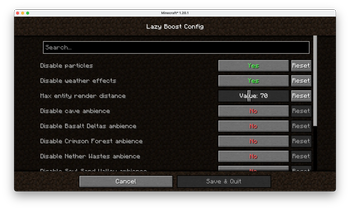
All options can be configured in-game via ModMenu or the config file.
## Installation
1. Download the latest release from [Modrinth](https://modrinth.com/mod/lazyboost-render).
2. Place the downloaded `.jar` file into your Minecraft `mods` folder.
3. Make sure you have installed Fabric Loader and Fabric API.
4. (Optional) Install ModMenu for in-game configuration.
## Configuration
- Press the LazyBoost key (configurable in Controls) to open the configuration GUI.
- You can also use ModMenu to access the config screen.
- All options are saved in the config file and take effect immediately.
## License
Licensed under the Apache License 2.0. See [LICENSE](https://www.apache.org/licenses/LICENSE-2.0) for details.