
Описание
> ### A mod that makes easy labelling *chests*, *shulker boxes*, *barrels* and other containers without the use of signs.
Check out my [Discord Server](https://discord.gg/34A6fRAgyM) to suggest features and add compatibility with other mods!
# How to use
This mod adds a **Label printer** which is an item that can set a label and an icon to a container.
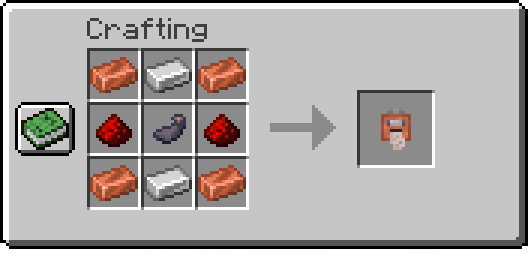
## Printing labels:
To use the **Label Printer**, _right-click_ while holding it, and it'll open a menu where you can set your icon and label. Finally, have **paper** in your inventory and _shift-right-click_ a chest or compatible container to set them.
## Copying labels from existing ones:
When holding the **Label Printer**, _shift-right-click_ to switch to *Copy mode*.
Then _shift-right-click_ on a container that has a label already set to copy its icon and text.
# Commands
## `/labelposition`
Sets the current player's HUD position.
Available positions are:
- `center-right` (default)
- `center-left`
- `left`
- `top`
- `top-left`
Examples:
- Set the current HUD position to `left`:
```minecraft
/labelposition left
```
## `/setlabel`
Requires *admin* permissions. Sets the label / icon of the selected container.
Examples:
- Setting the label of a block at coordinates:
```minecraft
/setlabel label I'm a dirt chest!
```
- Setting the icon of a block at coordinates:
```minecraft
/setlabel icon minecraft:dirt
```
## `/labelconfig`
Requires *admin* permissions. Adds/removes blocks that can be labeled from the config.
> NOTE: All blocks that have a Block Entity associated with them can be labeled.
> To check if a block can be added to the config and used correctly try *shift-right-clicking* on it with the
*Label Printer* item,
> and if it displays something like "You can't tag this block", that block can be added to the config
Examples:
- Add the Bell block to the config:
```minecraft
/labelconfig add-item minecraft:bell
```
- Add the Bell block to the config (while having the block in player's hand):
```minecraft
/labelconfig add-hand
```
- Remove the Bell block from the config:
```minecraft
/labelconfig remove-item minecraft:bell
```
- Remove the Bell block from the config (while having the block in player's hand):
```minecraft
/labelconfig remove-hand
```