
Описание
JourneyMap Tracker is a mod that creates and updates JourneyMap waypoints of tracked players given a DynMap URL.
**Not all web map software will work, but so far I haven't found one that doesn't work.**
The following are known to work:
- Squaremap
- Whatever EarthMC uses (couldn't find it)
### Setting the URL and other parameters
You can either type `/jmtracker url ` or set it using the config through ModMenu or running `/jmtracker config`.
There is an option in the config for modifying the polling delay but it doesn't seem to go below **one second**.
For the other parameters, you're going to have to press f12, navigate to **Network**, and right click -> open in new tab a file that repeatedly gets fetched. It's name should be something like ```players.json``` or ```tiles.json```.
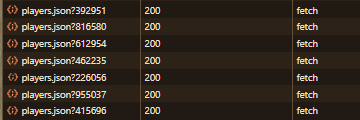
If the exact URL of the file isn't ```/tiles/players.json```, you're gonna have to set the url suffix to what the `/tiles/players.json` is instead.
For the world specific option, if an individual player's object doesn't contain a world object, you need to turn it off.
For the position sub category, it's the opposite: if the player object directly has x,y, and z values, leave it blank. If not, change it to the name of the object containing the values.
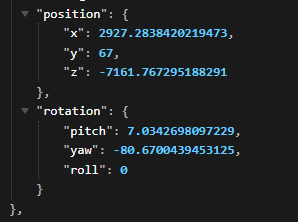
In this example, it would be set to `position` since the x y and z values are in a position object.
### Tracking / Untracking players
Tracking and untracking players is unfortunately not possible through the config.
To track and untrack players, you have to use the commands:
```
/jmtracker add/remove
```
Issues and/or feature requests can be posted on my issue tracker.