
Описание
## Preview
A small Minecraft mod that stops you from losing loot to a misclick mid-fight.
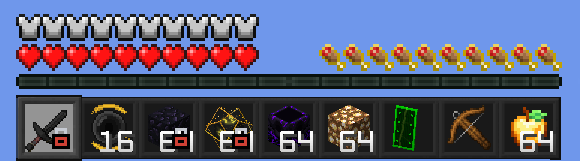
## What it does
Press **O** while on a hotbar slot to lock it in place. While a slot is locked:
- Pressing **Q** (or Ctrl+Q) does nothing while that slot is selected - you can't accidentally drop the item.
- Clicking, dragging, shift-clicking, or number-key-swapping that item out of its slot is blocked in any inventory screen.
- Everything else in your inventory stays freely usable - you can still loot chests and reorganise other slots.
- A small lock icon appears in the bottom-right corner of the locked hotbar slot so you can see it's active at a glance, even after you switch away to a different slot.
You can lock several slots at once, and locked slots are remembered between sessions. The lock stays on its slot as you switch hotbar slots around it. Press **O** again while back on the locked slot to unlock it, or switch to a different slot and press **O** to move the lock there instead. An action-bar message confirms every lock/unlock.
The key is rebindable in **Options -> Controls -> ItemLock** if O clashes with something else.
This is a client-side mod - it works in singleplayer and on any multiplayer server, no server-side install required.
## Requirements
**Fabric / Quilt**
- Minecraft 1.21 or 1.21.11 (pick the matching download)
- Fabric Loader >= 0.18.4 (or Quilt Loader, via its built-in Fabric compatibility layer)
- Fabric API (Quilted Fabric API on Quilt)
- Java 21
**NeoForge**
- Minecraft 1.21.11
- NeoForge >= 21.11.0-beta
- Java 21
**Forge**
- Minecraft 1.21.11
- Forge >= 1.21.11-61.0.0
- Java 21
## License
CC0-1.0 - Do whatever you'd like with it.