
Описание
# IRLights
**A standalone, in-game real-time lighting editor for Minecraft**
`It's made for Fabric 1.20.1-1.21.11. However, 1.20.1 build can be used on Forge and NeoForge
(1.21.1) with Sinytra Connector mod`
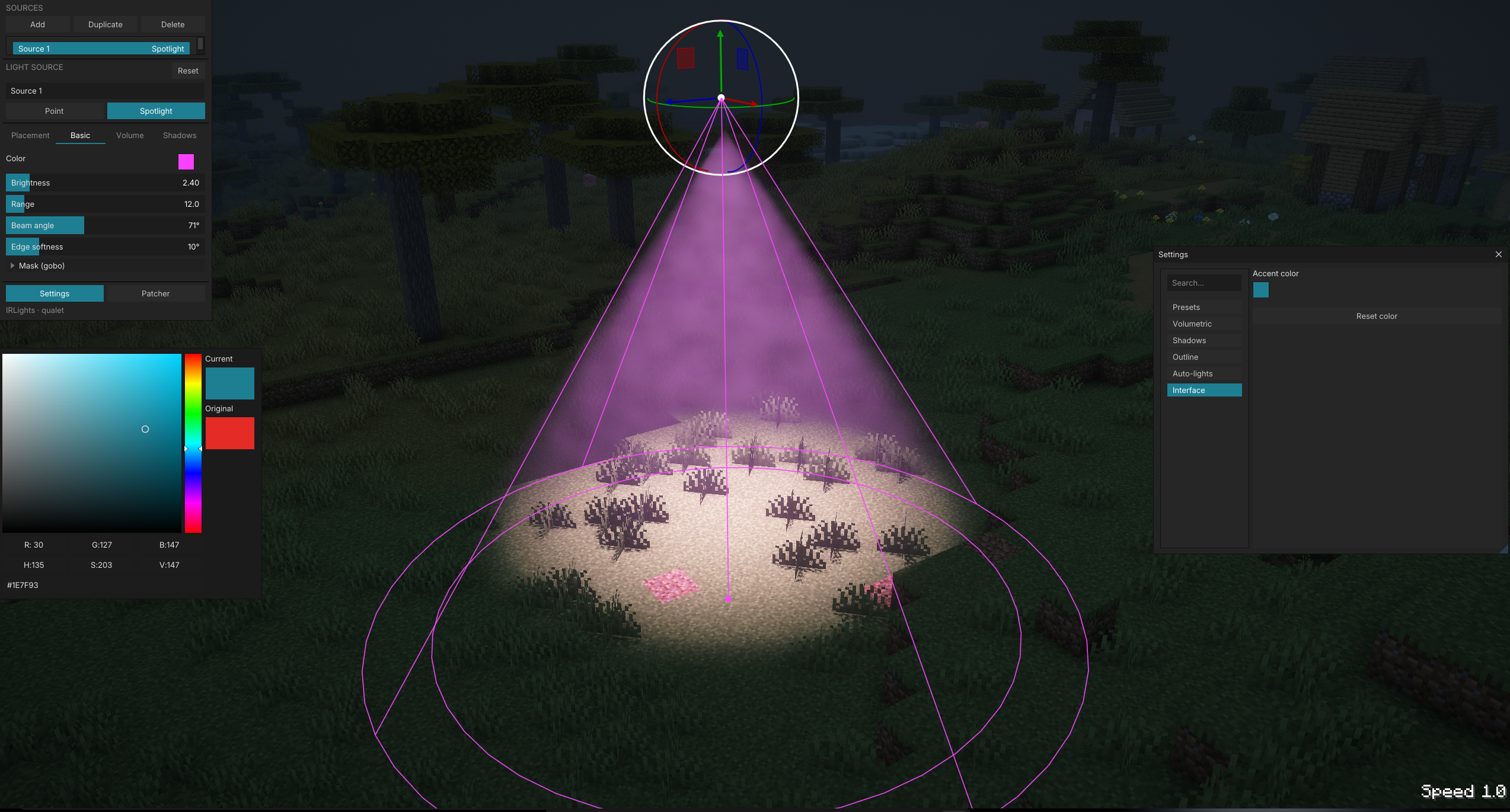
IRLights lets you place and sculpt dynamic point lights and spotlights directly in your world through a built-in ImGui editor. It comes with real-time shadows, volumetric light, and projected light patterns (gobo/cookie). Everything renders through the Iris shader pipeline, and the mod works entirely on its own: no BBS, nothing beyond Fabric and Iris.
## Features
- **In-game ImGui light editor**. Press a key and a floating panel opens over your world. Add, select, and edit lights with a 3D gizmo (drag to translate/rotate) or with precise numeric fields.
- **Point lights & spotlights** with full control over color, intensity, range/radius, cone angle (inner/outer), bulb size (shadow softness), and independent block/entity light masking.
- **Real-time shadows**. Both world blocks and entities cast shadows. Quality presets go from Low to Ultra, and a scene-aware cache only re-bakes what actually changed.
- **Volumetric lighting** with configurable beam strength, density, and anisotropy, for god-rays through fog, smoke, and dust.
- **Gobo / cookie projection**. Project a black-and-white PNG pattern out of a spotlight's cone, onto surfaces and through the volumetric beam, with rotation, scale, and invert controls.
- **Free-fly camera**. While the editor is open, fly freely around the scene to line up lights without being tied to your player's movement.
- **In-world guides**: interactive wireframe overlays showing each light's reach, cone, and falloff, with drag handles on the selected light.
- **Auto block-lights (experimental, opt-in)**. Turns emissive vanilla blocks like torches, lanterns, and glowstone into real point lights automatically, so existing builds light up without placing anything by hand.
- **Persistent scenes**. Lights are saved per world/server and reload automatically.
- **Replay Mod support**. The editor overlay works both in free-fly and in timeline mode, so you can light scenes for cinematic playback.
- **Localized UI** in English and Russian out of the box.
## Supported shader packs
IRLights ships a source patcher that injects its lighting code directly into popular Iris shader packs:
- Photon
- Complementary Reimagined
- BSL
- Bliss
- Solas
- IterationRP
- Rethinking Voxels
Pick a pack from the in-editor patcher panel, patch it once, and lights render with full shadow and volumetric support.
## Requirements
- [Fabric Loader](https://modrinth.com/mod/fabric-api)
- [Fabric API](https://modrinth.com/mod/fabric-api)
- [Iris Shaders](https://modrinth.com/mod/iris) plus a supported shader pack from the list above (you won't see any lighting without it)
No BBS, no other content mods. IRLights is fully standalone.
## Installing
1. Install Fabric Loader, Fabric API, and Iris.
2. Drop the IRLights jar into your `mods` folder.
3. Launch the game once so IRLights can extract its bundled shader patches.
4. Open the editor, pick your shader pack in the patcher panel, and patch it.
5. Enable that shader pack in Iris, open the editor again, and start placing lights.
## Credits
Created by qualet.
## License
Licensed under MIT.