
Описание
# IconButtons API
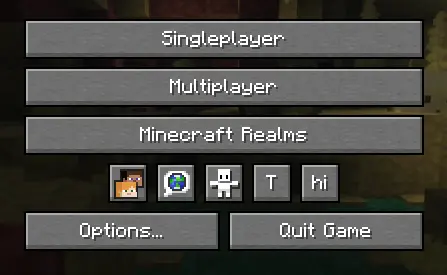
API for easily adding buttons to the Icon Buttons row in the title menu and pause menu
# Implementation
### 1. Configure `build.gradle`
```groovy
repositories {
maven {
url "https://api.modrinth.com/maven"
}
}
dependencies {
implementation "maven.modrinth:iconbuttonsapi:${project.iconbuttonsapi_version}+mc-${project.minecraft_version}"
}
```
### 2. Configure `gradle.properties`
Add the following lines to your `gradle.properties` file and replace the values with your target versions:
```properties
iconbuttonsapi_version=1.0.0
```
### 3. Configure `fabric.mod.json`
Don't forget to declare the dependency in your `fabric.mod.json` so Fabric Loader can verify it at runtime:
```json
"depends": {
...
"iconbuttonsapi": ">=1.0.0"
}
```
# Usage
The main entry point of the API is the `IconButtons` class. It provides methods to easily add any `AbstractWidget` (like buttons, sliders, etc.) to the Minecraft Title Screen or Pause Menu rows.
You can register buttons to stay visible permanently or control their visibility dynamically using a `BooleanSupplier`.
### Example
```java
public class ExampleModClient implements ClientModInitializer {
public static final String MOD_ID = "iconbuttonsapi";
public static final Logger LOGGER = LoggerFactory.getLogger(MOD_ID);
public static boolean willShow = true;
@Override
public void onInitializeClient() {
Button buttonHi = Button.builder(
Component.literal("hi"),
b -> {
LOGGER.info("Hi!");
}
).size(IconButtons.getButtonWidthAndHeight(), IconButtons.getButtonWidthAndHeight()).build();
Button buttonToggleShow = Button.builder(
Component.literal("T"),
b -> {
willShow = !willShow;
}
).size(IconButtons.getButtonWidthAndHeight(), IconButtons.getButtonWidthAndHeight()).build();
IconButtons.addTitleScreenButton(buttonHi, () -> willShow);
IconButtons.addPauseScreenButton(buttonHi, () -> willShow);
IconButtons.addTitleScreenButton(buttonToggleShow);
IconButtons.addPauseScreenButton(buttonToggleShow);
}
}
```
### Features
* **Automatic Positioning**: You don't need to specify coordinates (`X` and `Y`) for your widgets. The API calculates and applies positioning automatically, arranging your buttons into a neat row.
* **Size**: It is recommended to use `IconButtons.getButtonWidthAndHeight()` (returns `20`) for the correct size to ensure your icons fit perfectly alongside vanilla icons.