
Описание
This mod replaces the
- health bar
- hunger bar
- armor bar
- xp bar
with actual bars with numbers
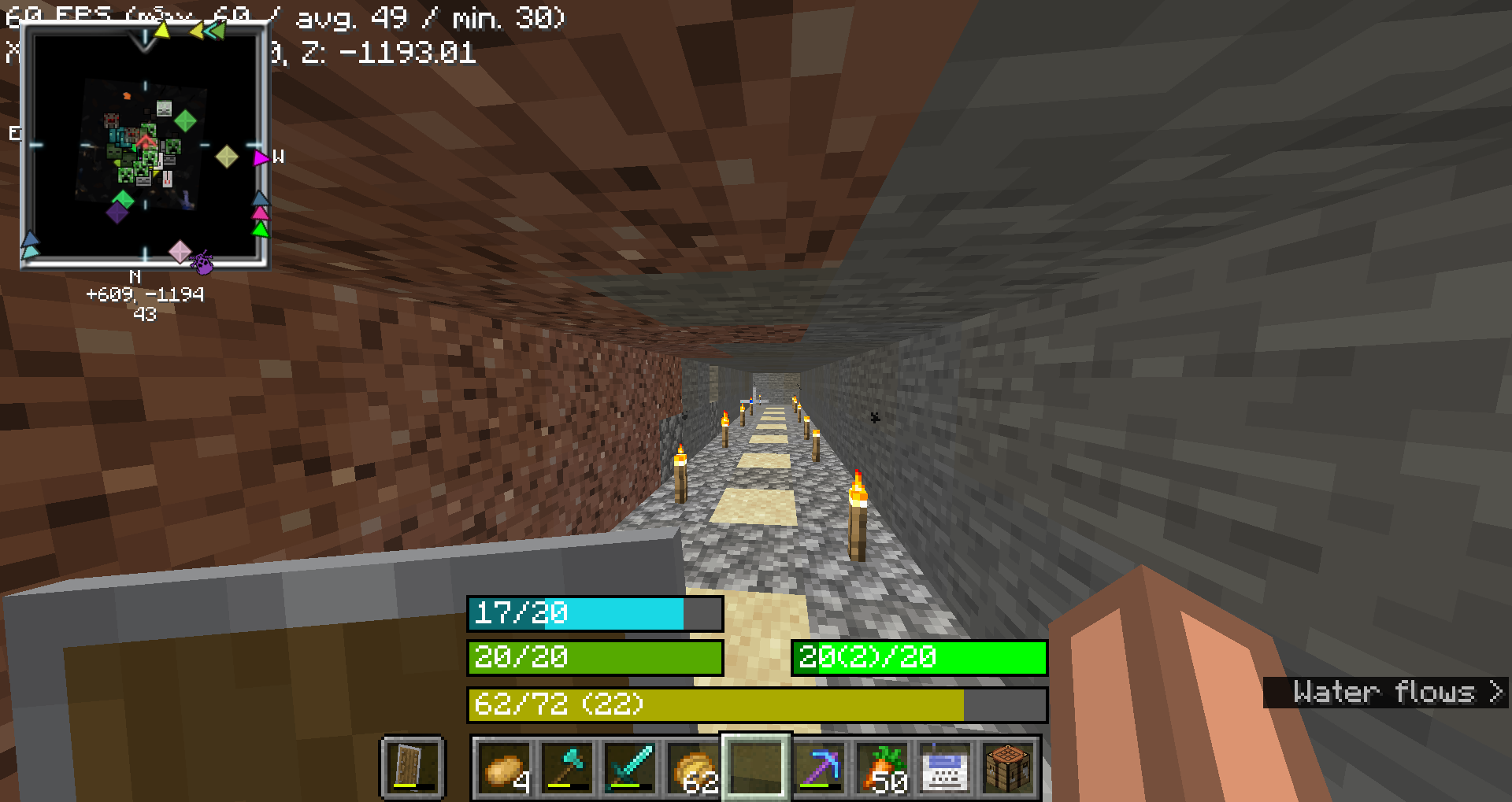
### Health Bar
- **Format**: Displays as `"current/maximum"`, where `current` is the player's current health (including absorption), and `maximum` is the total health capacity.
- Example: `20/20`
- **Color**:
- **Normal**: `#55AA00` (green)
- **With Absorption**: `#AAAA00` (yellow)
- **Poison Effect**: `#004400` (dark green)
- **Wither Effect**: `#000000` (black)
- **Frozen State**: `#00FFFF` (cyan)
- **Border Color**:
- **Blinking and Health Changed**: `#FFFFFF` (white)
- **Blinking without Health Change**: `#FF0000` (red)
- **Health Changed without Blinking**: `#FF80FF` (light purple)
- **No Change**: `#000000` (black)
### Food Bar
- **Format**: Displays as `"current(saturation)/maximum"`, where `current` is the player's current food level and `saturation` is the saturation level.
- Example: `15(5)/20`
- **Color**:
- **Hunger Effect**: `#AA55AA` (purple)
- **Saturation Effect**: `#00FF00` (green)
- **Full** (20 food levels): `#00FF00` (green)
- **High (18-19 food levels)**: `#33FF00` (bright green)
- **Moderate (7-17 food levels)**: `#66FF00` (lime green)
- **Low (1-6 food levels)**: `#FFFF00` (yellow)
- **Empty**: `#FF0000` (red)
- **Saturation Overlay**:
- **Color**: A darker shade of the food bar color, indicating the saturation level within the food bar.
- **Example**: If the food bar is `#00FF00` (green) and saturation is high, the overlay might be `#007F00` (darker green).
### Armor Bar
- **Format**: Displays as `"current/maximum"`, where `current` is the player's current armor level.
- Example: `10/20`
- **Color**:
- Transitions from `#AA` to `#FF` in red-green-blue channels as armor level increases, creating a gradient from grey to green:
- **Low Armor**: More red, less green
- **High Armor**: More green, less red
- **Example**: At low armor, you might see `#AA5555` (greyish-red) and at high armor, you might see `#55FF55` (green).
- **Toughness Overlay**:
- **Color**: A darker shade of the armor bar color, indicating the armor toughness level within the armor bar.
- **Example**: If the armor bar is `#55FF55` (green) and toughness is high, the overlay might be `#2A7F2A` (darker green).
### Experience Bar
- **Format**: Displays as `"current/required (level)"`, where `current` is the amount of experience gained towards the next level, `required` is the total experience needed for the next level, and `level` is the current experience level.
- Example: `150/300 (10)`
- **Color**:
- **Experience Bar**: `#AAAA00` (yellow)