
Описание
```
Logo by Artist: Skyana
Contact: Discord(skyana)
```
**HostBenchmark** is a Minecraft server benchmarking plugin built to answer one simple question:
> How good is this host for actually running Minecraft?
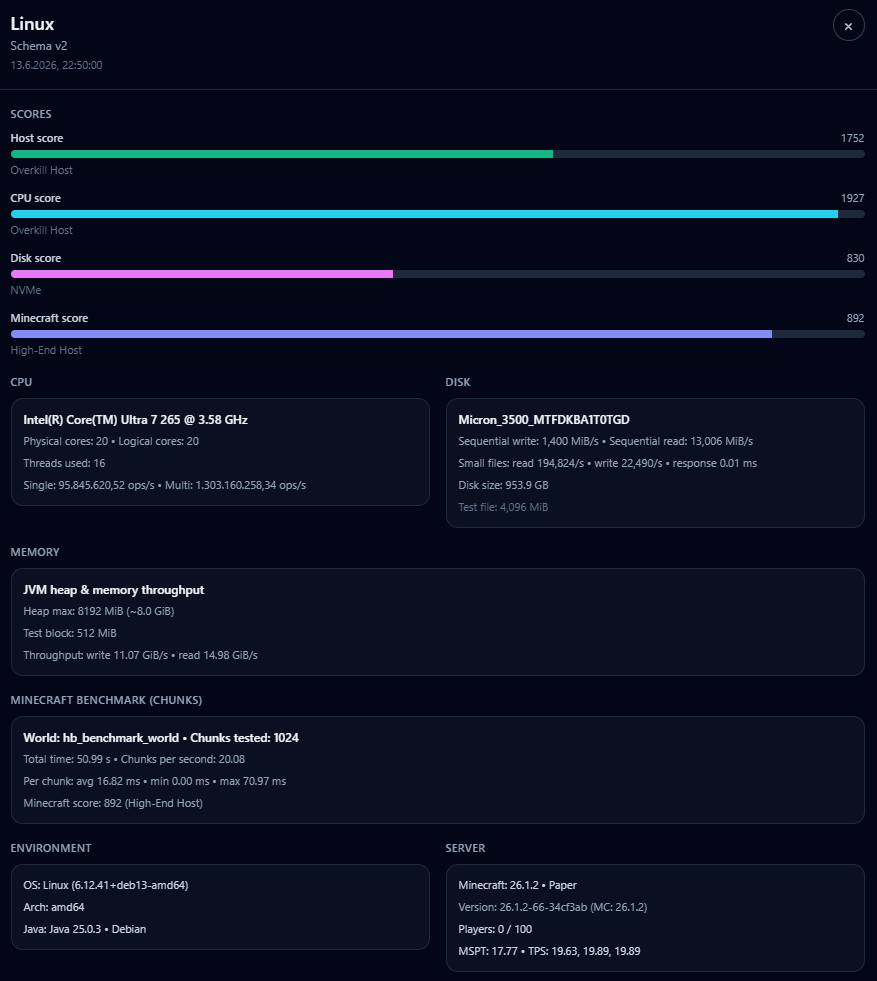
Instead of relying on marketing claims, CPU model names or generic VPS benchmarks, HostBenchmark runs a full benchmark directly inside your Minecraft server and creates a report you can compare locally or upload to **[HostBenchmark.net](https://hostbenchmark.net/)**.
**What HostBenchmark Measures**
HostBenchmark tests the parts of a host that matter most for Minecraft servers:
- **CPU performance**
- single-thread and multi-thread workload
- **Disk performance**
- write speed, read speed and small-file behavior
- **Java memory throughput**
- useful for understanding JVM-side performance
- **Real Minecraft workload**
- temporary world
- chunk generation/loading
- entities
- block updates
- main-thread pressure
The result is a clear set of scores:
- **Host Score**
- **CPU Score**
- **Disk Score**
- **Minecraft Score**
Each score also gets a simple tier label such as:
- `Entry Host`
- `Midrange Host`
- `High-End Host`
- `Overkill Host`
**Why Use It?**
Minecraft hosting performance is not just about having "many cores" or "NVMe storage".
A good Minecraft host needs:
- strong single-thread CPU performance
- stable disk performance
- good JVM behavior
- smooth main-thread performance under real server-like work
HostBenchmark combines these into one easy-to-read result, while still giving you the detailed numbers if you want to compare hosts more deeply.
**Simple Usage**
Install the plugin, start your server and run:
```txt
/hostbench start
```
or:
```txt
/hostbenchmark start
```
The plugin will run the full benchmark automatically.
When it finishes, a JSON report is saved here:
```txt
plugins/HostBenchmark/exports/
```
You can keep the report locally or upload it to:
**[HostBenchmark.net](https://hostbenchmark.net/)**
**Website & Leaderboard**
The companion website lets you upload your benchmark report and compare it with other hosts.
On the website you can:
- compare Host Scores
- compare CPU, Disk and Minecraft scores
- view detailed benchmark reports
- add your hosting provider and plan
- browse public results from other users
This makes it easier to compare VPS, dedicated servers and game hosting providers using real Minecraft-relevant data.
**Temporary Benchmark World**
HostBenchmark creates a temporary world for the Minecraft workload test.
The world is named:
```txt
hb_benchmark_world
```
It is unloaded and deleted after the benchmark finishes.
Do not use that name for your own worlds.
**Safety Notes**
For the cleanest and most comparable results:
- run the benchmark on an idle server
- avoid running it while players are online
- do not stop the server while the benchmark is running
- make sure enough disk space is available for the temporary test files
The benchmark is intentionally heavy because it is meant to reveal real host performance.
**Summary**
HostBenchmark helps you find out whether a host is actually good for Minecraft.
Use it to compare:
- a VPS against a game host
- a new dedicated server against your old one
- different hosting providers
- different plans from the same provider
You get a clear score, a detailed report and a public leaderboard for real-world comparison.
No guesswork. No marketing numbers. Just Minecraft-focused benchmark results.
**Benchmark Disclaimer**
HostBenchmark is designed to give useful, Minecraft-focused comparison results, but no benchmark is perfect.
Results can vary between runs depending on server load, background tasks, JVM state, disk cache, operating system behavior and other activity on the host. A result should be treated as a strong practical indicator, not as a 100% exact measurement of everything the server can or cannot do.