
Описание
# Helix Utility Client
Helix is a QOL Mod that aims to improve your experience by adding various features.
Helix is free and open source, forever.
[About Me](https://integr.is-a.dev/) | [Source](https://github.com/integr-dev/helix) | [Issues](https://github.com/integr-dev/helix/issues)
[](https://modrinth.com/mod/fabric-language-kotlin) [](https://modrinth.com/mod/fabric-api)
## Installation
Helix requires the Kotlin language adapter and the Fabric API to work correctly
### How to install, step by step
- Download the latest release of Helix, the matching Fabric API and Kotlin language adapter
- Put all 3 mods in your mods folder
- Make sure you have the correct java version installed (17)
- Make sure you have the fabric loader installed
- Launch the fabric loader
- Have fun!
## Accent colors
- ### Rgb

- ### Orange

- ### Red

- ### Green

- ### Yellow

- ### Pink

- ### Purple

- ### Blue

## Themes
- ### Dark

- ### Light

## In-Game features
- ### Crystal Optimizer
Optimized the placing and breaking of crystals clientside to improve crystal speed (removing broken crystals on the client...)
- ### Block Outline
Changes your block outline and adds optional entity outlines
- ### Armor Hud
Shows you your armor on the screen without having to open your inventory
- ### Autosprint
Presses the sprint key for you
- ### Better Arm
Changes the rendering of your In-Game hand
- ### Coordinates
Shows you your coordinates in the world
- ### Cosmetics
Render cosmetics clientside, for free
- ### Directions
Shows in what direction you are facing
- ### Fps Display
Shows your current Fps
- ### Fullbright
See in the dark
- ### Hotbar
Changes several status bars to literal bars
- ### Keystrokes
Shows what keys are being pressed
- ### Nametags
See your own nametag and add information to it
- ### No Armor
Hides your armor clientside
- ### No Render
Disables the rendering of certain things
- ### Ping Display
Shows your current ping
- ### Chat Format
Create gradients without leaving minecraft
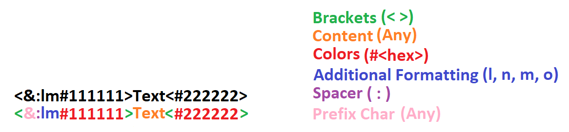
Also has the option so solve simple math, for example ```1+2*(27-5)/5```
## Commands
- ### /helix
Opens the main UI
- ### /gmc [player]
Puts you or the optionally specified player in creative mode (only works if you have permission on the server since we are just redirecting commands)
- ### /gms [player]
Puts you or the optionally specified player in survival mode (only works if you have permission on the server since we are just redirecting commands)
- ### /gma [player]
Puts you or the optionally specified player in adventure mode (only works if you have permission on the server since we are just redirecting commands)
- ### /gmsp [player]
Puts you or the optionally specified player in spectator mode (only works if you have permission on the server since we are just redirecting commands)
## Discord Presence
Shows some information about the server or world you are on to your friends on discord
## For Developers and Server Owners
The following example code can be used to block modules from being used on your server.
In the future, there may be more options for configuring the mod via the server.
### Json Structure for the payload
This is the structure to use in the payload of the message sent to the player. Invalid json and incorrect module ids will be ignored. You can find the module ids in the respective modules.
The ids can always be found in the header of the module and will always be in the following scheme: `moduleName`.
```json
{
"disabled": [
"armorHud",
"autoSprint"
]
}
```
### Sending the configuration json in your plugin
This code can be put for example in the `onJoin` listener. Once disabled, modules stay disabled until the player rejoins the server.
Then they need to be disabled again.
```java
.sendPluginMessage(, "helix:config",
.toByteArray()
);
```